
Join us on the Community Forums!
-
Community Guidelines
The Fitbit Community is a gathering place for real people who wish to exchange ideas, solutions, tips, techniques, and insight about the Fitbit products and services they love. By joining our Community, you agree to uphold these guidelines, so please take a moment to look them over. -
Learn the Basics
Check out our Frequently Asked Questions page for information on Community features, and tips to make the most of your time here. -
Join the Community!
Join an existing conversation, or start a new thread to ask your question. Creating your account is completely free, and takes about a minute.
Not finding your answer on the Community Forums?
- Community
- Platform
- Android App
- Active minutes??? (Blaze)
- Mark Topic as New
- Mark Topic as Read
- Float this Topic for Current User
- Bookmark
- Subscribe
- Mute
- Printer Friendly Page
- Community
- Platform
- Android App
- Active minutes??? (Blaze)
Active minutes??? (Blaze)
- Mark Topic as New
- Mark Topic as Read
- Float this Topic for Current User
- Bookmark
- Subscribe
- Mute
- Printer Friendly Page


 Fitbit Product Experts Alumni are retired members of the Fitbit Product Expert Program. Learn more
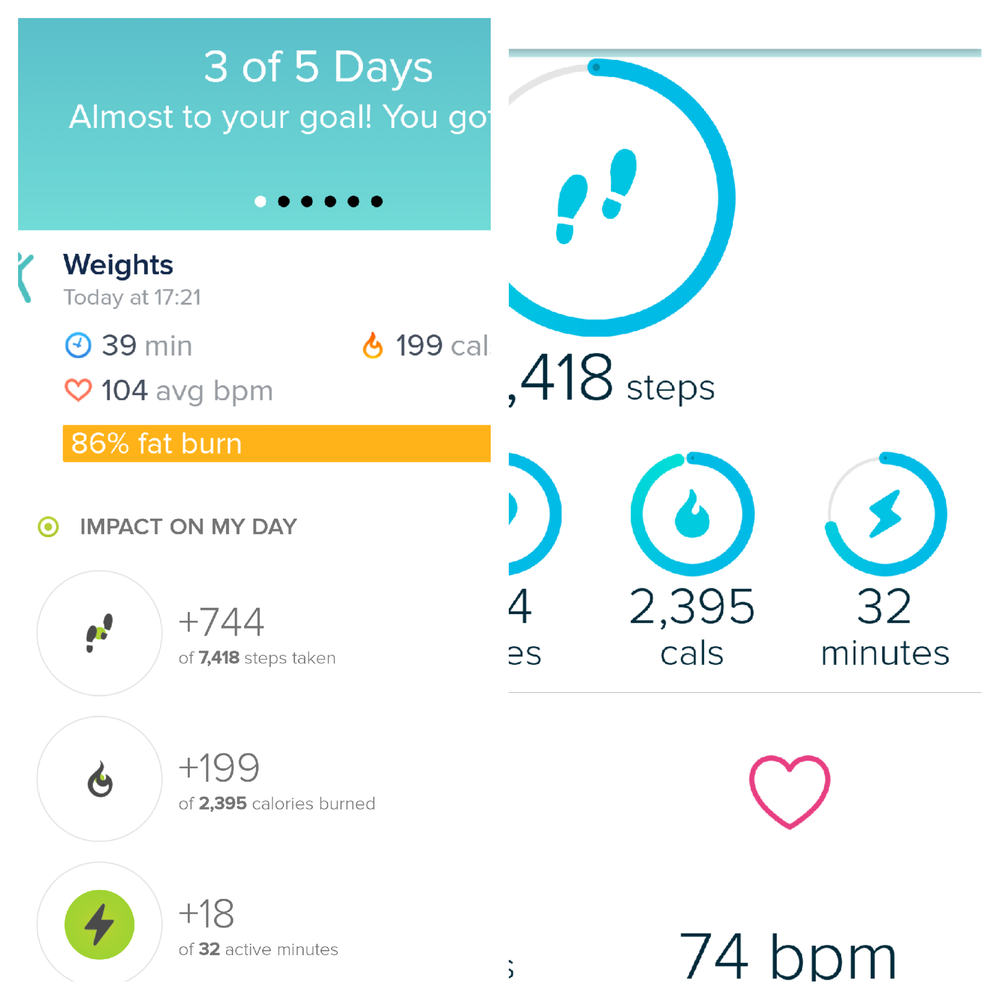
@walkymcwalkThe Active minutes that go into the tile start accumulating when you have a burst of 10+ consecutive active minutes. You will notice on the Exercise image there were only 18 minutes of continuous detected.
Active minutes starts at 3 times your BMR and you can analyze that on the PC by going to your Activity Log, Click on the large Stopwatch 
Here is a typical imaged for me, the red/orange line is Active Minutes and the green is Very Active Minutes which is 6+ times your BMR.

Ionic (OS 4.2.1, 27.72.1.15), Android App 3.45.1, Premium, Phone Sony Xperia XA2, Android 9.0
 Best Answer
Sent from Yahoo Mail on Android
Best Answer
Fitbit Product Experts Alumni are retired members of the Fitbit Product Expert Program. Learn more
@walkymcwalkI agree, and when Fitbit change their measurement criteria many have complained, especially when they stop at traffic lights/await traffic to cross roads, then there is the couple of minute lull and then build up again.
This extract below from this link is where Fitbit probably get their guidelines... The CDC, they quote them throughout the help profiles.
Aerobic activity or "cardio" gets you breathing harder and your heart beating faster. From pushing a lawn mower, to taking a dance class, to biking to the store – all types of activities count. As long as you're doing them at a moderate or vigorous intensity for at least 10 minutes at a time.
Intensity is how hard your body is working during
Ionic (OS 4.2.1, 27.72.1.15), Android App 3.45.1, Premium, Phone Sony Xperia XA2, Android 9.0
Best Answer