
Join us on the Community Forums!
-
Community Guidelines
The Fitbit Community is a gathering place for real people who wish to exchange ideas, solutions, tips, techniques, and insight about the Fitbit products and services they love. By joining our Community, you agree to uphold these guidelines, so please take a moment to look them over. -
Learn the Basics
Check out our Frequently Asked Questions page for information on Community features, and tips to make the most of your time here. -
Join the Community!
Join an existing conversation, or start a new thread to ask your question. Creating your account is completely free, and takes about a minute.
Not finding your answer on the Community Forums?
- Community
- Health & Wellness
- Get Moving
- Step Hack for Indoor Rowing Machine...!
- Mark Topic as New
- Mark Topic as Read
- Float this Topic for Current User
- Bookmark
- Subscribe
- Mute
- Printer Friendly Page
- Community
- Health & Wellness
- Get Moving
- Step Hack for Indoor Rowing Machine...!
Step Hack for Indoor Rowing Machine...!
- Mark Topic as New
- Mark Topic as Read
- Float this Topic for Current User
- Bookmark
- Subscribe
- Mute
- Printer Friendly Page
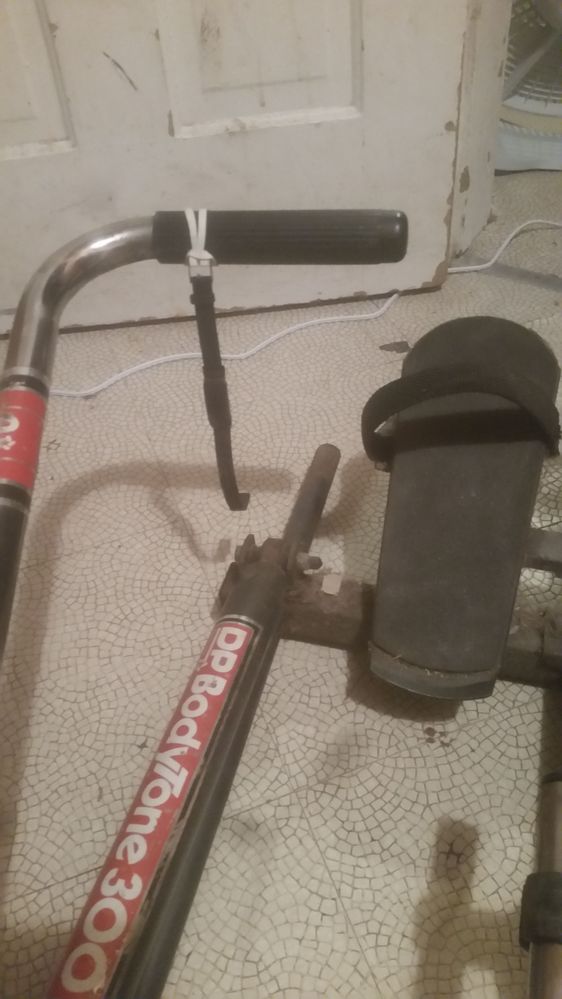


I tried that. It didn't work. Its swinging motion makes the difference. 😉
"Run in such a way as to attain the prize,
a crown that will last forever!"
 Best Answer
be interesting to see what kind of distance it thinks that is, and what kind of calorie burn.
Especially if you could compare to actual walk of same number of steps and distance.
What is your rowing turnover time, like for each cycle?
Help the next searcher of answers, mark a reply as Solved if it was, or a thumbs up if it was a good idea too.
Best Answer
I just did a trial run (both as "Workout").
On my wrist, it counted no steps.
On the [oar/scull?], it counted 5 strokes as 6 steps. (The extra step is probably when I held it to read it.)
Does "Workout" have a fixed distance, or is that re-figured when I change it to "Rowing Machine?"
"Run in such a way as to attain the prize,
a crown that will last forever!"
Best Answer
Also, I just downloaded a metronome app to my iPad, for pacing. 😉
"Run in such a way as to attain the prize,
a crown that will last forever!"
Best Answer
This idea needs some modification. In my first workout, it hit my leg a lot, adding false [strokes] to the count.
Maybe an oar handle extension (away from the body) might work...
"Run in such a way as to attain the prize,
a crown that will last forever!"
Best Answer
Why don't you place the watch on your knee? Not sure how you could attach it there (maybe put it under band or use small knee support). When rowing, your knee performs the bouncy motion that will be detected as step (up when bending, down when stretching). I'm not quite sure though, what the purpose of that conversion is. IMHO it doesn't make much sense but that's just my opinion 🙂
"I'm not quite sure though, what the purpose of that conversion is." --T.P
When I first got my Fitbit, I was looking for a way to track strokes on my old-school rowing machine. 😉
"Run in such a way as to attain the prize,
a crown that will last forever!"
Best Answer
@Argali I see. Basically, you just use a hack to find out how many strokes you did. I forgot how poor Fitbit sports tracking was. On Garmin, I have plenty of data fields related to strokes for indoor rowing. Basic functionality. If you use one of Fitbit smartwatches, maybe there is a thirdparty app that does what you want?
Best Answer
Seriously, dude. Is this conversation just an opportunity for you to brag on your Garmin. This site is community.FITBIT.com
Best Answer
Another post said that Elliptical would recognize Rowing, but it did not work for me. ☹️
"Run in such a way as to attain the prize,
a crown that will last forever!"
Best Answer
double post
"Run in such a way as to attain the prize,
a crown that will last forever!"
Best Answer
I use a rowing machine. With the newest update, my Inspire 3 has a Rowing machine app but if I look at the app screen it doesn't show any steps. Bit if I go back to home and look at the steps app I see I my step count raised by 1800 - 2000 steps. Go figure!
Before the update I used the Workout app. It did the same.
Best Answer Best Answer
So here's a poser for ya. I rode my exercise bike for 40 minutes today. I had my butt in the seat and my hands on the handlebars for the whole ride. My Firbit was running the Spinning app but I only moved my hand a couple of times just to check the notifications when I changed zones or hit my zone minute targets. The app never showed any steps but my step chart for today shows me taking 3412 steps during that period. I wonder how my Fitbit came up with that number. It couldn't have used any watch motion because my hand with the watch on it had a death grip on the handle bar and did not move a millimeter.
Best Answer