
Join us on the Community Forums!
-
Community Guidelines
The Fitbit Community is a gathering place for real people who wish to exchange ideas, solutions, tips, techniques, and insight about the Fitbit products and services they love. By joining our Community, you agree to uphold these guidelines, so please take a moment to look them over. -
Learn the Basics
Check out our Frequently Asked Questions page for information on Community features, and tips to make the most of your time here. -
Join the Community!
Join an existing conversation, or start a new thread to ask your question. Creating your account is completely free, and takes about a minute.
Not finding your answer on the Community Forums?
- Community
- Product Help Forums
- Ionic
- 24hr clock/military time
- Mark Topic as New
- Mark Topic as Read
- Float this Topic for Current User
- Bookmark
- Subscribe
- Mute
- Printer Friendly Page
- Community
- Product Help Forums
- Ionic
- 24hr clock/military time
24hr clock/military time
- Mark Topic as New
- Mark Topic as Read
- Float this Topic for Current User
- Bookmark
- Subscribe
- Mute
- Printer Friendly Page


SunsetRunner
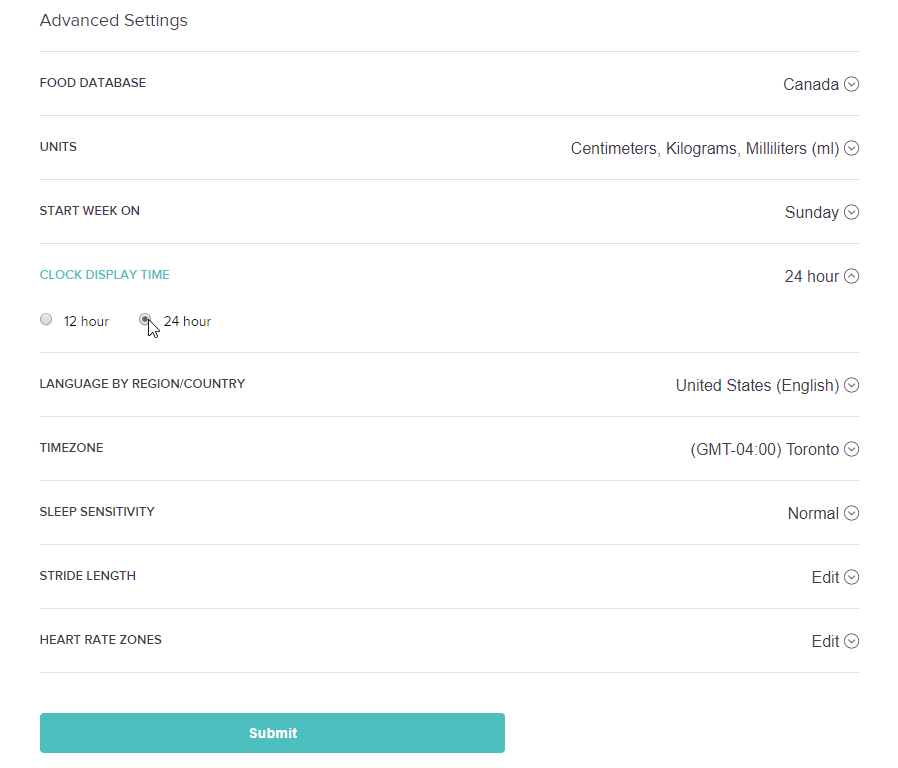
"CLOCK DISPLAY TIME" setting under Advanced Settings in your profile. https://www.fitbit.com/settings/profile
SunsetRunner
Wow I wasn't expecting an answer for this. Thanks!
I wish they would develop the web platform in sync with their phone platforms.
 Best Answer
That option has been there for as long as I’ve been around. It seems that some options are simply web only.
Mike | London, UK
Blaze, Surge, Charge 2, Charge, Flex 2 - iPad Air 2, Nokia Lumia 925 (Deceased), iPhone 6
Take a look at the Fitbit help site for further assistance and information.
SunsetRunner
@MikeF wrote:It seems that some options are simply web only.
Yeah and I hate that. There should be some sort of quality control getting all the features in sync with various platforms. Customers like and want consistency.
SunsetRunner
Indeed, the inconsistencies in the platform have a feeling of being rushed / not well thought out.
Having used a Pebble since the first iteration even the Ionic's layout is substandard and features such as music control and on watch replies (non existent) is miles behind, I realise the Ionic is more Fitness orientated, but they are competing, whether they like it or not, against Apple and Samsung.
Considering they bought Pebble I was hoping for slightly more I guess.
Barry
Best Answer

Uh ... I'll be nice ... [Interesting] as [poop] that you can't do this right from the watch or your paired phone. What a concept! Nothing on you personally, but seems like something fitbit should ... uh ... fix!