
Join us on the Community Forums!
-
Community Guidelines
The Fitbit Community is a gathering place for real people who wish to exchange ideas, solutions, tips, techniques, and insight about the Fitbit products and services they love. By joining our Community, you agree to uphold these guidelines, so please take a moment to look them over. -
Learn the Basics
Check out our Frequently Asked Questions page for information on Community features, and tips to make the most of your time here. -
Join the Community!
Join an existing conversation, or start a new thread to ask your question. Creating your account is completely free, and takes about a minute.
Not finding your answer on the Community Forums?
- Community
- Product Help Forums
- Other Versa Smartwatches
- Turn off pin passcode/lock on VERSA
- Mark Topic as New
- Mark Topic as Read
- Float this Topic for Current User
- Bookmark
- Subscribe
- Mute
- Printer Friendly Page
- Community
- Product Help Forums
- Other Versa Smartwatches
- Turn off pin passcode/lock on VERSA
Turn off pin passcode/lock on VERSA
ANSWERED- Mark Topic as New
- Mark Topic as Read
- Float this Topic for Current User
- Bookmark
- Subscribe
- Mute
- Printer Friendly Page

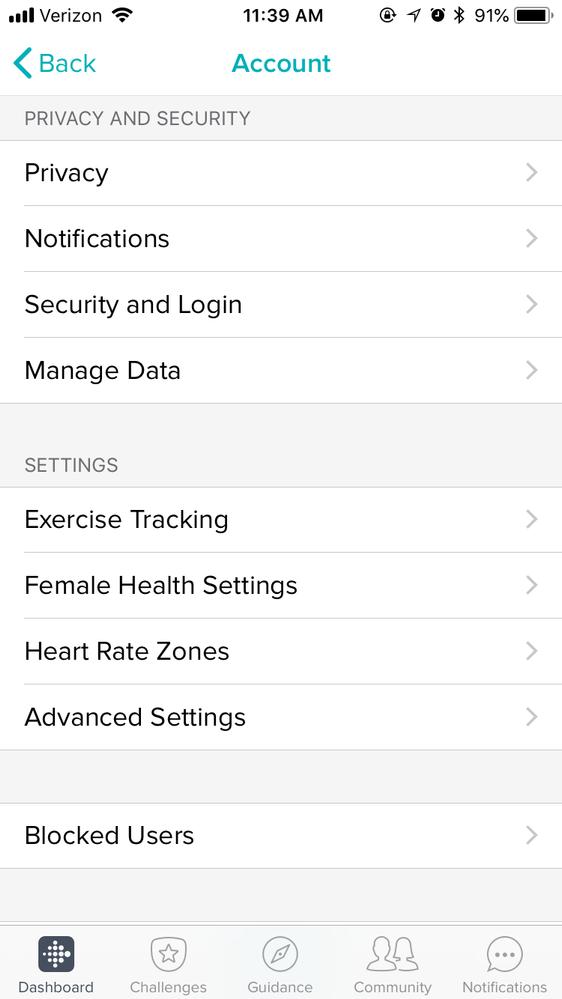
I loaded my credit cards onto my Versa wallet app and enabled the pin pass-code. I have since removed my cards from the wallet and would like to remove the pass-code prompt on my watch. Other posts state logging into my account on my phone app and locating "Device Lock", however I do not need this option.
Am I missing it completely or is this not an option within the Versa?
Answered! Go to the Best Answer.
 Best Answer
Accepted Solutions

SunsetRunner
That looks like the wrong section. Can you click on Versa somewhere after you've gone into the account/settings area? In the Windows app the Device Lock is in the same section as the Clocks, Apps, Media, Wallet etc.
If you find that section, scroll down toward the bottom and you should find Device Lock.
SunsetRunner
By tapping on "Device Lock" in the app, you should be able to disable it if it's still enabled. After you've disabled it, don't forget to sync.
https://help.fitbit.com/articles/en_US/Help_article/2250#how
SunsetRunner
That looks like the wrong section. Can you click on Versa somewhere after you've gone into the account/settings area? In the Windows app the Device Lock is in the same section as the Clocks, Apps, Media, Wallet etc.
If you find that section, scroll down toward the bottom and you should find Device Lock.