
Join us on the Community Forums!
-
Community Guidelines
The Fitbit Community is a gathering place for real people who wish to exchange ideas, solutions, tips, techniques, and insight about the Fitbit products and services they love. By joining our Community, you agree to uphold these guidelines, so please take a moment to look them over. -
Learn the Basics
Check out our Frequently Asked Questions page for information on Community features, and tips to make the most of your time here. -
Join the Community!
Join an existing conversation, or start a new thread to ask your question. Creating your account is completely free, and takes about a minute.
Not finding your answer on the Community Forums?
- Community
- Developers
- SDK Development
- Change number with images
- Mark Topic as New
- Mark Topic as Read
- Float this Topic for Current User
- Bookmark
- Subscribe
- Mute
- Printer Friendly Page
- Community
- Developers
- SDK Development
- Change number with images
Change number with images
ANSWERED- Mark Topic as New
- Mark Topic as Read
- Float this Topic for Current User
- Bookmark
- Subscribe
- Mute
- Printer Friendly Page

Hello, I would like to try to change the numbers of the time with images that represent the numbers created by me how can I do it? Is there a function that does this?
Thanks
Answered! Go to the Best Answer.
 Best Answer
Accepted Solutions

 Fitbit Developers oversee the SDK and API forums. We're here to answer questions about Fitbit developer tools, assist with projects, and make sure your voice is heard by the development team.
 Fitbit Developers oversee the SDK and API forums. We're here to answer questions about Fitbit developer tools, assist with projects, and make sure your voice is heard by the development team.

Would you possible know of an example of a clock face app using images for numbers that is aimed at Versa 3 and Sense models, and using latest SDK?
Best Answer
 Fitbit Product Experts Alumni are retired members of the Fitbit Product Expert Program. Learn more
Hi @FredrikPahlman - the previous post [to yours] in this topic gives the example.
Author | ch, passion for improvement.
But since the example is from 2018, I thought there would have to be changes done to make it work with new devices like the Sense and SDK 6? Sorry, very much a beginner at trying to build anything with code. I noticed that the resource file index.gui should be index.view instead, but I guess I need to change more than the file type.
Best Answer
06-17-2022
12:22
- last edited on
09-06-2024
09:49
by
MarreFitbit

Fitbit Product Experts Alumni are retired members of the Fitbit Product Expert Program. Learn more
06-17-2022
12:22
- last edited on
09-06-2024
09:49
by
MarreFitbit
@FredrikPahlman- the basic principle is the same, regardless of watch type.
However, as you noticed, the SDK 4 has a different file name convention to SDK 6, because the watches have a different geometry and different additional features.
See https://dev.fitbit.com/build/guides/migration/
SDK 5 and 6 are similar for the migration purposes which is about all you need apply to the sample.
Author | ch, passion for improvement.
Wonderful! Thank you for the resource on migration to SDK6, now I´ll try to apply it 🙂
That did the trick, thank you!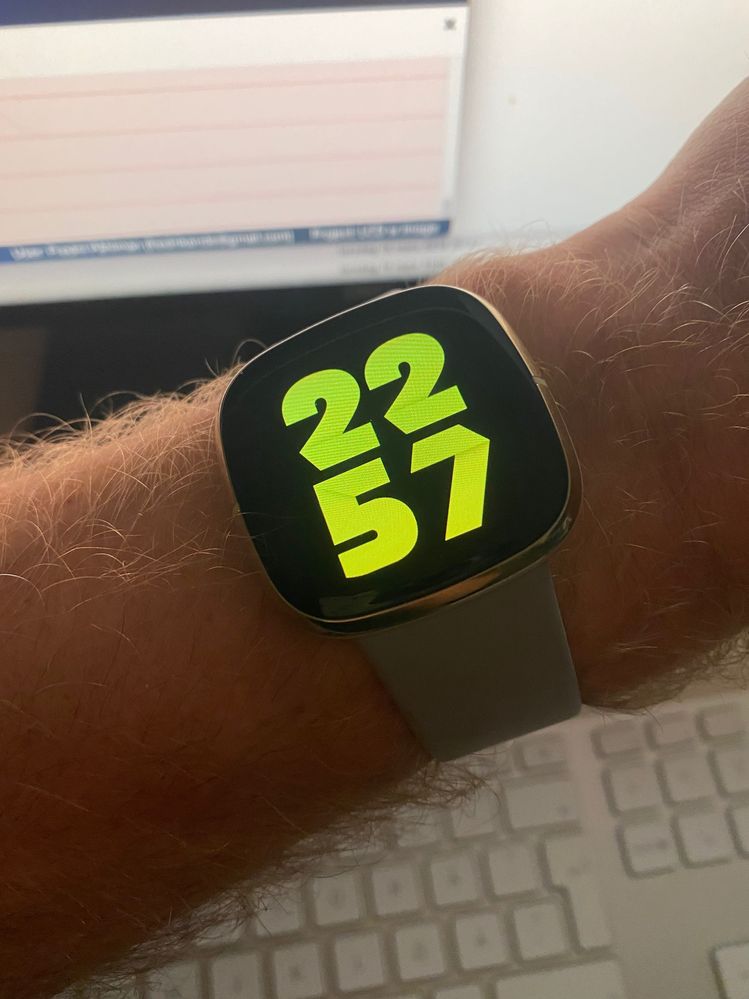
06-17-2022
20:41
- last edited on
09-06-2024
09:49
by
MarreFitbit
Fitbit Product Experts Alumni are retired members of the Fitbit Product Expert Program. Learn more
06-17-2022
20:41
- last edited on
09-06-2024
09:49
by
MarreFitbit
@FredrikPahlman - nice.
For some reason it reminds me of Riso Assist
Which if you tap on a quadrant will beep out the number for people with sight issues.
You could add that functionality to yours.
Author | ch, passion for improvement.
Best Answer