
Join us on the Community Forums!
-
Community Guidelines
The Fitbit Community is a gathering place for real people who wish to exchange ideas, solutions, tips, techniques, and insight about the Fitbit products and services they love. By joining our Community, you agree to uphold these guidelines, so please take a moment to look them over. -
Learn the Basics
Check out our Frequently Asked Questions page for information on Community features, and tips to make the most of your time here. -
Join the Community!
Join an existing conversation, or start a new thread to ask your question. Creating your account is completely free, and takes about a minute.
Not finding your answer on the Community Forums?
- Community
- Developers
- SDK Development
- Group Storage - Cluster Storage
- Mark Topic as New
- Mark Topic as Read
- Float this Topic for Current User
- Bookmark
- Subscribe
- Mute
- Printer Friendly Page
- Community
- Developers
- SDK Development
- Group Storage - Cluster Storage
Group Storage - Cluster Storage
ANSWERED- Mark Topic as New
- Mark Topic as Read
- Float this Topic for Current User
- Bookmark
- Subscribe
- Mute
- Printer Friendly Page

 Fitbit Product Experts Alumni are retired members of the Fitbit Product Expert Program. Learn more
Has anyone managed to get Cluster Storage working for sharing data between 2 apps/clocks?
Can they share an example and confirm that the sharing is done at the watch level.
It should be noted that normally each clock/app has it's own private watch storage which possibly suggests that there must be some public watch storage which can be used for sharing.
Author | ch, passion for improvement.
Answered! Go to the Best Answer.
 Best Answer
Accepted Solutions

Maybe:
import * as appClusterStorage from 'app-cluster-storage'

const cluster = appClusterStorage.get('gondwana')
console.log(cluster)  // should be [object Object]
cluster.setItem('testKey', 'testValue')
const testVar = cluster.getItem('testKey')
console.log(testVar)
I have no way of testing this, since I don't have any relevant watches and I suspect it isn't implemented in the sim.
Gondwana Software

Do you mean Cluster Storage? If so, the data would be shared among multiple apps/clock faces via smartphone. I'm sorry I don't have its working example though.
Best Answer
Fitbit Product Experts Alumni are retired members of the Fitbit Product Expert Program. Learn more
Thanks @r.b - I do mean App Cluster storage.- when I tested it a while back there was no success.
In the package.json permission was requested and the following included
"requestedPermissions": [
"access_app_cluster_storage"
],
"appClusterID": "public",
"developerID": "<your developerID>"
but it doesn't seems to help - the instruction won't build as it has a syntax error
app-cluster-storage.get(clusterID: "public")
And no means is given to set the storage.
There seems also to be a confusion as to whether this is a companion feature, some say it is a watch storage and others a phone storage.
You probably need some import too like
import { appClusterStorage } from "app-cluster-storage";
But even then appClusterStorage is undefined.
Anybody have any ideas to try?
Author | ch, passion for improvement.
Best Answer
Two quick thoughts that probably won't help:
- Get it working in companion first, because we know it's implemented there. Once the syntax is correct in that context, try it in device.
- kpay uses cluster storage (in companion, I assume); you could dredge though kpay debug source for clues.
Re app-cluster-storage.get(clusterID: "public"), I know where you got that from. In JS, hyphens are subtraction so that's a documentation error.
Gondwana Software
Best Answer
Maybe:
import * as appClusterStorage from 'app-cluster-storage'

const cluster = appClusterStorage.get('gondwana')
console.log(cluster)  // should be [object Object]
cluster.setItem('testKey', 'testValue')
const testVar = cluster.getItem('testKey')
console.log(testVar)
I have no way of testing this, since I don't have any relevant watches and I suspect it isn't implemented in the sim.
Gondwana Software
Fitbit Product Experts Alumni are retired members of the Fitbit Product Expert Program. Learn more
Bingo! It works within an App.
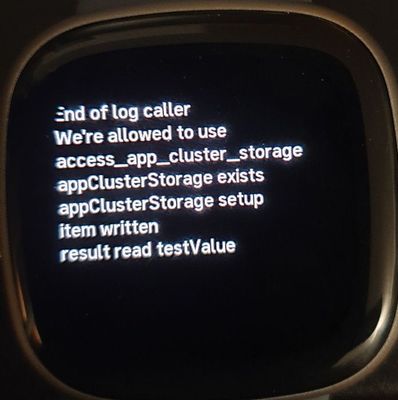
This confirms it is on watch storage and no need for the companion and phone storage.
Curiously it causes the simulator to crash the watch, instead of not working.
Thank you, you are a Star!
Author | ch, passion for improvement.
Fitbit Product Experts Alumni are retired members of the Fitbit Product Expert Program. Learn more
@Gondwana- do you think appClusterStorage has something like appClusterStorage.addEventListener("change", () => {}); ?
It raises an error in the Simulator, may be only because cluster storage is not properly implemented or the syntax is wrong.
Hopefully there is some way of seeing if a change has been made to the storage?
Author | ch, passion for improvement.
Best Answer
I don't think Device SDK in sim implements cluster storage. Try a real watch. I can't because I don't have any left.
Gondwana Software
Best Answer
Fitbit Product Experts Alumni are retired members of the Fitbit Product Expert Program. Learn more
You could try setting .onchange directly. Total guess...
Gondwana Software
Best Answer
Fitbit Product Experts Alumni are retired members of the Fitbit Product Expert Program. Learn more
appClusterStorage.onchange = function() {
console.log(` detected a change.`);}
Doesn't get triggered when a change is made in the same app.
Author | ch, passion for improvement.
Best Answer
It's possible that it doesn't implement the LiveStorage interface.
But have you verified that your appClusterStorage var is of the right type? Eg, does it respond correctly to .setItem(), etc?
Gondwana Software
Best Answer
Fitbit Product Experts Alumni are retired members of the Fitbit Product Expert Program. Learn more
Yes it's working fine, but it means testing values to see if they change, so looking for a way to trap the change to improve it.
Author | ch, passion for improvement.
Best Answer
SunsetRunner
If you can't attach an eventListener, why not wrap the update in a function checking the getItem against newValue after having set?
Best Answer
@SunsetRunnergot me thinking about this...
Since only one app can be running at any one time, an app should only need to check for changes made by other apps when it starts. App B can't change storage while App A is running. Internally, App A can communicate its own storage changes using other means. So it may not be necessary for cluster storage to have change events on the device.
I probably didn't explain this well, and I could be wrong.
Gondwana Software
Best Answer