
Join us on the Community Forums!
-
Community Guidelines
The Fitbit Community is a gathering place for real people who wish to exchange ideas, solutions, tips, techniques, and insight about the Fitbit products and services they love. By joining our Community, you agree to uphold these guidelines, so please take a moment to look them over. -
Learn the Basics
Check out our Frequently Asked Questions page for information on Community features, and tips to make the most of your time here. -
Join the Community!
Join an existing conversation, or start a new thread to ask your question. Creating your account is completely free, and takes about a minute.
Not finding your answer on the Community Forums?
- Community
- Developers
- SDK Development
- Updating screenshots.
- Mark Topic as New
- Mark Topic as Read
- Float this Topic for Current User
- Bookmark
- Subscribe
- Mute
- Printer Friendly Page
- Community
- Developers
- SDK Development
- Updating screenshots.
Updating screenshots.
ANSWERED- Mark Topic as New
- Mark Topic as Read
- Float this Topic for Current User
- Bookmark
- Subscribe
- Mute
- Printer Friendly Page

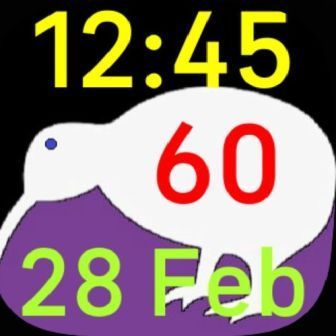
Well I made a clock face then during the process of getting it published I put up a screenshot. There's a small fault with it and I've tried to substitute updated screenshots but it's just not working and the new screenshots are not showing. How to I get the reviewers attention to get this sorted or is there some easy way in Gallery App Manager that I'm just missing ?
If you look at the link below to my App you'll see the difference between this screenshot I've posted here and what's on the App link.
https://gallery.fitbit.com/details/486275cc-27c0-4124-a2c9-bd6a38f0992c
Answered! Go to the Best Answer.
 Best Answer
Accepted Solutions

You might need to email appgallerysupport (see GAM FAQ link).
Gondwana Software
And it's up on the Fitbit 'store' but the screen shots I originally supplied need to be changed and I have uploaded new ones, (and removed the old ones), to the Gallery App Manager but they're not showing up on the app. How can I get this to change ?
Best Answer
Hi @DrcspyNz your second post was moved from the Fitbit Dashboard forum area to be with your original post in the SDK Development forum. The Dashboard forum is for people having issues with their Fitbit dashboard, not for developers. You might have to be patient getting answers as there are only so many people around to help with this sort of issue.
There should be a message on the GAM page saying that the replacement screenshots are awaiting review. You need to wait for the review.
Gondwana Software
