
Join us on the Community Forums!
-
Community Guidelines
The Fitbit Community is a gathering place for real people who wish to exchange ideas, solutions, tips, techniques, and insight about the Fitbit products and services they love. By joining our Community, you agree to uphold these guidelines, so please take a moment to look them over. -
Learn the Basics
Check out our Frequently Asked Questions page for information on Community features, and tips to make the most of your time here. -
Join the Community!
Join an existing conversation, or start a new thread to ask your question. Creating your account is completely free, and takes about a minute.
Not finding your answer on the Community Forums?
- Mark Topic as New
- Mark Topic as Read
- Float this Topic for Current User
- Bookmark
- Subscribe
- Mute
- Printer Friendly Page
Unable to receive Notifications on Charge 2.
ANSWERED- Mark Topic as New
- Mark Topic as Read
- Float this Topic for Current User
- Bookmark
- Subscribe
- Mute
- Printer Friendly Page
08-14-2018
15:57
- last edited on
08-15-2018
07:23
by
MarcoGFitbit


08-14-2018
15:57
- last edited on
08-15-2018
07:23
by
MarcoGFitbit
My Fitbit Charge 2 is syncing with my IPhone 7 and use to receive messages, etc. but now it is not. How do I fix this? Thank you in advance for any help.
Moderator Edit: Clarified Subject.
Answered! Go to the Best Answer.
 Best Answer
Accepted Solutions


 Community Moderator Alumni are previous members of the Moderation Team, which ensures conversations are friendly, factual, and on-topic. Moderators are here to answer questions, escalate bugs, and make sure your voice is heard by the larger Fitbit team. Learn more
Hello @snowak426, thanks for joining us, it's a pleasure for me to welcome you to the Fitbit Community. It's always great to see you @SteveH, thanks for all your help. 
I appreciate you have brought this to my attention. As @SteveH mentioned, it's possible the Do Not Disturb mode has been activated by mistake on your Charge 2, press down the button on the side for 2 seconds while on the clock face, a vibration and a message will let you know if Notifications have been turned off or on
If everything seems to working fine, I would like to suggest you to reset Notifications from the Fitbit app following these steps:
- Go to the Bluetooth settings on your phone and tap on tracker. Then tap on Forget this Device.
- Force-close the Fitbit app by double tapping the home button on your phone and swiping up the app.
- Open the app again and tap on Account > Your Tracker > Notifications. You will receive the following Pop-up:
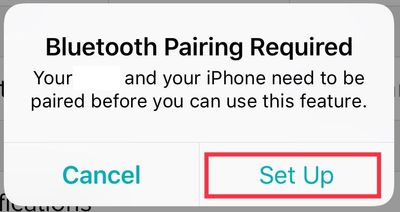
- Then, once you tap on Set Up, the app will begin setting up your tracker with the Bluetooth on your phone, which will prompt the next pop-up:
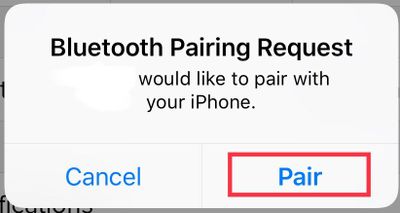
- Tap Pair
- Once you get back to the tracker options, tap on Notifications an enable the ones you'd like to receive.
Additionally, please go to your phone Settings > Notifications > Fitbit and Settings > Notifications > Messages and check that the following is enabled:
- Allow Notifications
- Show on Lock Screen
- Show in History
I hope this can be helpful, give it a try and keep me posted in case you need anything else.


 Fitbit Product Experts Alumni are retired members of the Fitbit Product Expert Program. Learn more
A common cause of this with the Charge 2 is where it is accidentally put into "do not disturb" mode. This is turned on / off by pressing and holding the button on the fitbit. Could this be what's happening here?
Community Moderator Alumni are previous members of the Moderation Team, which ensures conversations are friendly, factual, and on-topic. Moderators are here to answer questions, escalate bugs, and make sure your voice is heard by the larger Fitbit team. Learn more
Hello @snowak426, thanks for joining us, it's a pleasure for me to welcome you to the Fitbit Community. It's always great to see you @SteveH, thanks for all your help.
I appreciate you have brought this to my attention. As @SteveH mentioned, it's possible the Do Not Disturb mode has been activated by mistake on your Charge 2, press down the button on the side for 2 seconds while on the clock face, a vibration and a message will let you know if Notifications have been turned off or on
If everything seems to working fine, I would like to suggest you to reset Notifications from the Fitbit app following these steps:
- Go to the Bluetooth settings on your phone and tap on tracker. Then tap on Forget this Device.
- Force-close the Fitbit app by double tapping the home button on your phone and swiping up the app.
- Open the app again and tap on Account > Your Tracker > Notifications. You will receive the following Pop-up:
- Then, once you tap on Set Up, the app will begin setting up your tracker with the Bluetooth on your phone, which will prompt the next pop-up:
- Tap Pair
- Once you get back to the tracker options, tap on Notifications an enable the ones you'd like to receive.
Additionally, please go to your phone Settings > Notifications > Fitbit and Settings > Notifications > Messages and check that the following is enabled:
- Allow Notifications
- Show on Lock Screen
- Show in History
I hope this can be helpful, give it a try and keep me posted in case you need anything else.
Thank you for the information. I did all the steps and it did not work immediately but the next morning it started working.
Thank you!
Best Answer
Community Moderator Alumni are previous members of the Moderation Team, which ensures conversations are friendly, factual, and on-topic. Moderators are here to answer questions, escalate bugs, and make sure your voice is heard by the larger Fitbit team. Learn more
Hello @snowak426, I hope you're doing well, thanks for taking the time to reply and let me know your issue has now been resolved, I'm very glad! 
In case you have some spare time, I would like to invite you to visit our Discussions board where you will find great tips and encouragement from other members and if there's anything else I can do for you, please keep me posted!
Best Answer