
Join us on the Community Forums!
-
Community Guidelines
The Fitbit Community is a gathering place for real people who wish to exchange ideas, solutions, tips, techniques, and insight about the Fitbit products and services they love. By joining our Community, you agree to uphold these guidelines, so please take a moment to look them over. -
Learn the Basics
Check out our Frequently Asked Questions page for information on Community features, and tips to make the most of your time here. -
Join the Community!
Join an existing conversation, or start a new thread to ask your question. Creating your account is completely free, and takes about a minute.
Not finding your answer on the Community Forums?
- Community
- Product Help Forums
- Blaze
- Re: How to update FitBit app?
- Mark Topic as New
- Mark Topic as Read
- Float this Topic for Current User
- Bookmark
- Subscribe
- Mute
- Printer Friendly Page
- Community
- Product Help Forums
- Blaze
- Re: How to update FitBit app?
How do I update the Fitbit app?
- Mark Topic as New
- Mark Topic as Read
- Float this Topic for Current User
- Bookmark
- Subscribe
- Mute
- Printer Friendly Page
05-17-2017
06:23
- last edited on
05-07-2018
04:18
by
AlejandraFitbit


05-17-2017
06:23
- last edited on
05-07-2018
04:18
by
AlejandraFitbit
How does one update the Fitbit app?
Moderator edit: subject for clarity
 Best Answer


 Community Moderator Alumni are previous members of the Moderation Team, which ensures conversations are friendly, factual, and on-topic. Moderators are here to answer questions, escalate bugs, and make sure your voice is heard by the larger Fitbit team. Learn more
A warm welcome to the Community @BillAbitz and @Rich_Laue thanks for stopping by.
To update your Fitbit app for Android, you just need to do the following:
- Tap the Play Store app.
- Tap or click the menu icon in the top left corner.
- Tap My apps & games. If the Fitbit app has an update, you’ll see it in the Updates list.
- Tap Update.
See you around. 

Sent from my iPhone
Best Answer
Community Moderator Alumni are previous members of the Moderation Team, which ensures conversations are friendly, factual, and on-topic. Moderators are here to answer questions, escalate bugs, and make sure your voice is heard by the larger Fitbit team. Learn more
Hey @Sheilagillies great to welcome you and @Rich_Laue to see you around.
If you want to change your timezone or update it, I recommend taking a look at the How do I change the time on my Fitbit device? article. But first, verify that your Blaze is setup to your account.
Let me know how it goes. 

I don't see the menu in the upper left. Here is a screenshot. I'm trying to update because once again notifications aren't working. Where is the menu am I not seeing it?
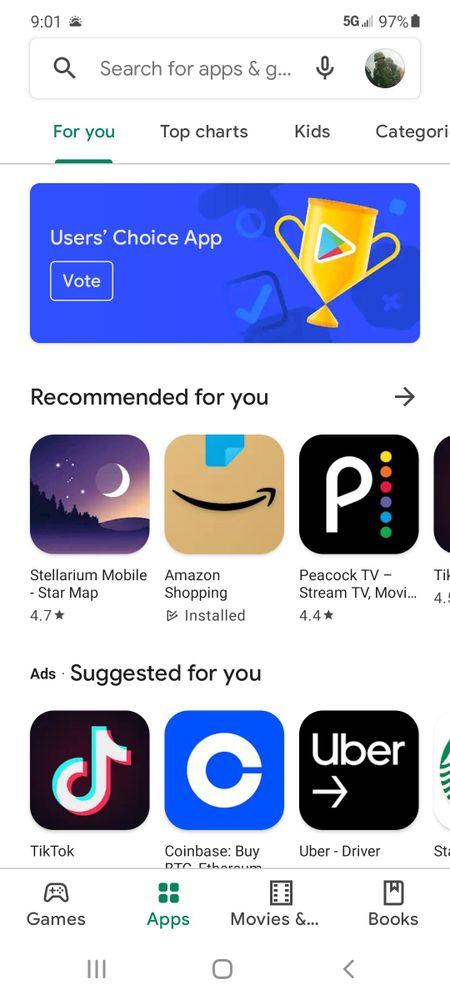
The best way to update the fitbit app is through your phones app store.
Or go to fitbit.com/setup and you will be directed to the correct location for your phone.
I'll be happy to move your post to the app support, out of the tracker hardware support, but I'm not sure which OS the phone runs.
Best Answer
@Guitarplayer the issue here is that we are in the hardware support board, asking about software support for the fitbit app on an unknown phone model.
To update the fitbit app, one would go to the same place they went to to install the app.
@DannyFB I'm not sure what yoire asking, or what the problem is.
