
Join us on the Community Forums!
-
Community Guidelines
The Fitbit Community is a gathering place for real people who wish to exchange ideas, solutions, tips, techniques, and insight about the Fitbit products and services they love. By joining our Community, you agree to uphold these guidelines, so please take a moment to look them over. -
Learn the Basics
Check out our Frequently Asked Questions page for information on Community features, and tips to make the most of your time here. -
Join the Community!
Join an existing conversation, or start a new thread to ask your question. Creating your account is completely free, and takes about a minute.
Not finding your answer on the Community Forums?
- Community
- Product Help Forums
- Blaze
- Re: Time wrong
- Mark Topic as New
- Mark Topic as Read
- Float this Topic for Current User
- Bookmark
- Subscribe
- Mute
- Printer Friendly Page
- Community
- Product Help Forums
- Blaze
- Re: Time wrong
Time wrong
ANSWERED- Mark Topic as New
- Mark Topic as Read
- Float this Topic for Current User
- Bookmark
- Subscribe
- Mute
- Printer Friendly Page

My Blaze is exactly 5 hours off. When I try to sync my blaze with my phone it just spins and never finishes the sync. I have turned Bluetooth off and on, pushed the left and lower right button and turned my phone on and off.
Any Ideas?
Answered! Go to the Best Answer.
Accepted Solutions

Where you able to recconect your Blazer to your account, removing it from the app only tells Fitbit you do not want to use it. It will not change anything on the phone.
It sounds as if you did not have a time problem but a sync.
The things to try
Make sure that any device that is nearby and has been known to sync your tracker is turned off.
Remove app
Shutdown phone
Shutdown blaze
Tell phones BT to forget blaze
Install the fitbit app
Login
If it still won't connect or sync contact.fitbit.com.

I am having the same problem and have tried all of the same things and still showing an hour behind and is trying to sync but just keeps spinning and not syncing. This just started tonight.
 Best Answer
Best Answer
Best Answer
Sent from my iPad
Best Answer
I have got all these problems too. Hope there is a way to get it sorted!
Best Answer
I managed to fix it by going into my phones settings>bluetooth and forgetting the device. Then clicking to add it again. It has started to sync again but I kept gettign a pop up saying pairing failed. If you click cancle on that everything seems to have gone back to normal.
Best Answer
Did you shut the Blaze off? If you did I reccomend that you do NOT do that. I never have and I have no issues with mine.
Best Answer
Sent from my iPhone
Best Answer
Have shut down and restarted both IPhone and Fitbit as well as turning Bluetooth on and off - Nothing changes and of course doesn't sync. HELP
Best Answer
Where you able to recconect your Blazer to your account, removing it from the app only tells Fitbit you do not want to use it. It will not change anything on the phone.
It sounds as if you did not have a time problem but a sync.
The things to try
Make sure that any device that is nearby and has been known to sync your tracker is turned off.
Remove app
Shutdown phone
Shutdown blaze
Tell phones BT to forget blaze
Install the fitbit app
Login
If it still won't connect or sync contact.fitbit.com.
Thank you for your help. Even though I tried all those things before, I did not do them in that order. It worked finally. 🙂 🙂 🙂
Thanks again.
Best Answer

Thank you, I did as you suggested. The wrong time is really a function of not syncing. I forgot the device on my blue tooth settings ... then added it back. Took a few minutes & you need a full battery with watch near your phone . It worked! Clock is finally right again. Problem started when I downloaded the latest apple version, if you are over 10.1 you may have reinstall your phone.
Best Answer
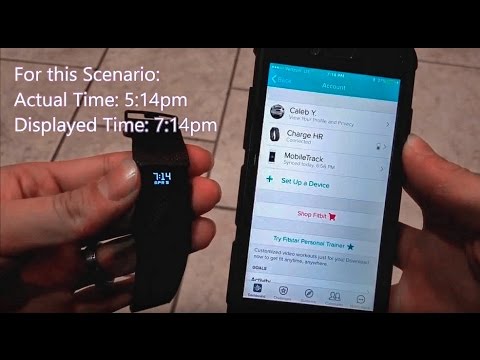
There is no way I'm going to be able to talk my 75 year old mother through this over the phone from several hundred miles away...She doesn't even know how to screen shot on her phone....Bluetooth is on. The correct time zone is selected. Tried both auto and manually select the time zone. There is no Bluetooth icon on the phone (neither green nor grey). Turned off Bluetooth classic and shutdown the watch and restarted without effect. The second half of this video (start at 2:26) video recommends picking a time zone that's the same number of hours off as the watch is from the phone. Will this work?
 Best Answer
The part that starts at 2:26 doesn't sound right at all @ToddBrennan.
As for the Bluetooth icom on the phone, this should be found under the phone settings!/Bluetooth. There will not be a Bluetooth icon on the Fitbit app.
If through the app the tome zone has been set to auto, or manually set, them I would force a sync by dragging down the dashboard. Alternatively tap on the picture of your mom's tracker, on the next page tap the picture of the tracker to force a sync. This page will also show the time of the last successfull sync.
Best Answer