
Join us on the Community Forums!
-
Community Guidelines
The Fitbit Community is a gathering place for real people who wish to exchange ideas, solutions, tips, techniques, and insight about the Fitbit products and services they love. By joining our Community, you agree to uphold these guidelines, so please take a moment to look them over. -
Learn the Basics
Check out our Frequently Asked Questions page for information on Community features, and tips to make the most of your time here. -
Join the Community!
Join an existing conversation, or start a new thread to ask your question. Creating your account is completely free, and takes about a minute.
Not finding your answer on the Community Forums?
- Community
- Product Help Forums
- Charge 5
- EDA sensors don't work on Charge 5
- Mark Topic as New
- Mark Topic as Read
- Float this Topic for Current User
- Bookmark
- Subscribe
- Mute
- Printer Friendly Page
- Community
- Product Help Forums
- Charge 5
- EDA sensors don't work on Charge 5
EDA sensors don't work on Charge 5
ANSWERED- Mark Topic as New
- Mark Topic as Read
- Float this Topic for Current User
- Bookmark
- Subscribe
- Mute
- Printer Friendly Page
10-06-2021 20:12 - last edited on 10-07-2021 07:31 by LiliyaFitbit
- Mark as New
- Bookmark
- Subscribe
- Permalink
- Report this post

10-06-2021 20:12 - last edited on 10-07-2021 07:31 by LiliyaFitbit
- Mark as New
- Bookmark
- Subscribe
- Permalink
- Report this post
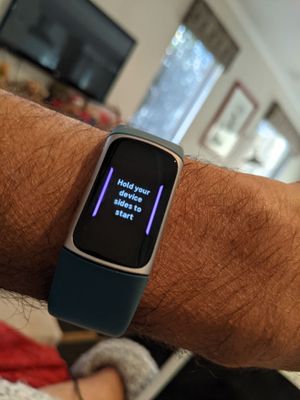
Most of the time I get this message and the picture of where to place fingers . I've updated the Fitbit, and tried it off and on my wrist. It rarely works but most of the time the above scenario occurs. Very frustrating. Any suggestions?
Moderator edit: subject for clarity
Answered! Go to the Best Answer.
07-08-2022 07:18
- Mark as New
- Bookmark
- Subscribe
- Permalink
- Report this post

 Community Moderator Alumni are previous members of the Moderation Team, which ensures conversations are friendly, factual, and on-topic. Moderators are here to answer questions, escalate bugs, and make sure your voice is heard by the larger Fitbit team. Learn more
07-08-2022
08:41
- last edited on
07-16-2022
11:06
by
DavideFitbit

- Mark as New
- Bookmark
- Subscribe
- Permalink
- Report this post

07-08-2022
08:41
- last edited on
07-16-2022
11:06
by
DavideFitbit
- Mark as New
- Bookmark
- Subscribe
- Permalink
- Report this post
I am having the same problem when I start it then tells me to put my
fingers and does not do anything or it gives me a error paused--
Moderator edit: removed personal info
07-08-2022 08:52
- Mark as New
- Bookmark
- Subscribe
- Permalink
- Report this post

07-08-2022 08:52
- Mark as New
- Bookmark
- Subscribe
- Permalink
- Report this post
Wet fingers then try it works for me onkt this way
07-16-2022
11:05
- last edited on
12-26-2024
07:34
by
MarreFitbit
- Mark as New
- Bookmark
- Subscribe
- Permalink
- Report this post
Community Moderator Alumni are previous members of the Moderation Team, which ensures conversations are friendly, factual, and on-topic. Moderators are here to answer questions, escalate bugs, and make sure your voice is heard by the larger Fitbit team. Learn more
07-16-2022
11:05
- last edited on
12-26-2024
07:34
by
MarreFitbit
- Mark as New
- Bookmark
- Subscribe
- Permalink
- Report this post
Hi, thank you for sharing this information about the issue with the EDA feature on your Charge 5, @Sdumond.
If you haven't done so already, please make sure that you've tried all the steps mentioned here earlier to properly record EDA. In addition, you can also try completing a three pulse restart using the charging cable:
- Connect your device to the charging cable. For instructions, see How do I charge my Fitbit device?
- Press the button located on the flat end of the charger 3 times (end of the USB cable), pausing for 1 second between presses. Then wait 10 seconds or until the Fitbit logo appears.
Let me know if you continue to experience the same problem afterwards. Even though some users have been able to resolve by moistening your fingers, the feature should work properly without having to do this step first.
I'll be around.
 Best Answer
07-18-2022 11:28
- Mark as New
- Bookmark
- Subscribe
- Permalink
- Report this post
07-18-2022 11:28
- Mark as New
- Bookmark
- Subscribe
- Permalink
- Report this post
works properly, thx.
Best Answer07-30-2022 12:42
- Mark as New
- Bookmark
- Subscribe
- Permalink
- Report this post
Community Moderator Alumni are previous members of the Moderation Team, which ensures conversations are friendly, factual, and on-topic. Moderators are here to answer questions, escalate bugs, and make sure your voice is heard by the larger Fitbit team. Learn more
08-05-2022 09:29
- Mark as New
- Bookmark
- Subscribe
- Permalink
- Report this post

08-05-2022 09:29
- Mark as New
- Bookmark
- Subscribe
- Permalink
- Report this post
Worked after licking fingers. Tnks
09-01-2022 06:36
- Mark as New
- Bookmark
- Subscribe
- Permalink
- Report this post
Community Moderator Alumni are previous members of the Moderation Team, which ensures conversations are friendly, factual, and on-topic. Moderators are here to answer questions, escalate bugs, and make sure your voice is heard by the larger Fitbit team. Learn more
10-08-2022 23:36
- Mark as New
- Bookmark
- Subscribe
- Permalink
- Report this post

10-08-2022 23:36
- Mark as New
- Bookmark
- Subscribe
- Permalink
- Report this post
I am having the same problem. Disappointed, as this is one of the main reasons i bought this model.
Best Answer10-09-2022 03:40
- Mark as New
- Bookmark
- Subscribe
- Permalink
- Report this post
10-09-2022 03:40
- Mark as New
- Bookmark
- Subscribe
- Permalink
- Report this post
Moisten fingers slightly
Best Answer10-10-2022 02:27
- Mark as New
- Bookmark
- Subscribe
- Permalink
- Report this post
10-10-2022 02:27
- Mark as New
- Bookmark
- Subscribe
- Permalink
- Report this post
Omg. It worked!!
Best Answer10-10-2022 05:09
- Mark as New
- Bookmark
- Subscribe
- Permalink
- Report this post
10-10-2022 05:09
- Mark as New
- Bookmark
- Subscribe
- Permalink
- Report this post
you.😀
Best Answer10-19-2022 08:39
- Mark as New
- Bookmark
- Subscribe
- Permalink
- Report this post

10-19-2022 08:39
- Mark as New
- Bookmark
- Subscribe
- Permalink
- Report this post
Yay!!!!
Best Answer10-19-2022 21:17
- Mark as New
- Bookmark
- Subscribe
- Permalink
- Report this post
10-19-2022 21:17
- Mark as New
- Bookmark
- Subscribe
- Permalink
- Report this post
Best Answer
10-22-2022
10:25
- last edited on
11-06-2024
03:31
by
MarreFitbit
- Mark as New
- Bookmark
- Subscribe
- Permalink
- Report this post
Community Moderator Alumni are previous members of the Moderation Team, which ensures conversations are friendly, factual, and on-topic. Moderators are here to answer questions, escalate bugs, and make sure your voice is heard by the larger Fitbit team. Learn more
10-22-2022
10:25
- last edited on
11-06-2024
03:31
by
MarreFitbit
- Mark as New
- Bookmark
- Subscribe
- Permalink
- Report this post
Hi, it's good to see you visiting the Community for the first time, @Cecilialmc.
Let me know if you continue to experience any issue to track your EDA session. You can find more extra recommendations here.
It's good to know the workaround suggested by other users has been helpful.
See you around.
Best Answer10-22-2022 16:59
- Mark as New
- Bookmark
- Subscribe
- Permalink
- Report this post
10-22-2022 16:59
- Mark as New
- Bookmark
- Subscribe
- Permalink
- Report this post
Mine does not work again it started after I did steps
Best Answer
11-14-2022
08:24
- last edited on
11-15-2022
15:35
by
DavideFitbit
- Mark as New
- Bookmark
- Subscribe
- Permalink
- Report this post
11-14-2022
08:24
- last edited on
11-15-2022
15:35
by
DavideFitbit
- Mark as New
- Bookmark
- Subscribe
- Permalink
- Report this post
I have only had my Charge 5 for less than 3 days and I could never get my EDA scan to work even though every else seems to be functioning correctly. I found this forum and before trying anything else I tried to dampen my fingers slightly and pat them dry. The scan started right away however stalled with 30 seconds left to go so I quickly licked my fingers slightly, squeezed on my shirt to dry and the scan finished successfully. Seems like the dry skin affects the EDA scan. This forum solved my problem. Thanks to all.....
Best Answer
11-15-2022
15:34
- last edited on
11-06-2024
03:31
by
MarreFitbit
- Mark as New
- Bookmark
- Subscribe
- Permalink
- Report this post
Community Moderator Alumni are previous members of the Moderation Team, which ensures conversations are friendly, factual, and on-topic. Moderators are here to answer questions, escalate bugs, and make sure your voice is heard by the larger Fitbit team. Learn more
11-15-2022
15:34
- last edited on
11-06-2024
03:31
by
MarreFitbit
- Mark as New
- Bookmark
- Subscribe
- Permalink
- Report this post
@Sdumond Thanks for confirming that you've been having this inconvenience again.
Could you please confirm if you already tried all the steps mentioned here earlier? In addition, please try restarting your device using the charging cable and check if you continue to have the same problem.
I'll be around.
Best Answer11-19-2022 15:45
- Mark as New
- Bookmark
- Subscribe
- Permalink
- Report this post
11-19-2022 15:45
- Mark as New
- Bookmark
- Subscribe
- Permalink
- Report this post
worked for me. If I slightly dampen my thumb and index finger but don't dry
them completely the EDA 3 minute session works every time for me. My hands
are very dry and that may be the reason the EDA never worked for me until I
dampened my thumb and index finger. This was a suggestion by someone who
posted on the Fitbit community blog. Thanks to everyone for the helpful
suggestions.
Regards,
Ray
Best Answer11-22-2022 11:34
- Mark as New
- Bookmark
- Subscribe
- Permalink
- Report this post
Community Moderator Alumni are previous members of the Moderation Team, which ensures conversations are friendly, factual, and on-topic. Moderators are here to answer questions, escalate bugs, and make sure your voice is heard by the larger Fitbit team. Learn more
11-22-2022 11:34
- Mark as New
- Bookmark
- Subscribe
- Permalink
- Report this post
@RayWalker49 Thanks for sharing your experience with this to help other users in the Community!
See you aroind.
Best Answer