
Join us on the Community Forums!
-
Community Guidelines
The Fitbit Community is a gathering place for real people who wish to exchange ideas, solutions, tips, techniques, and insight about the Fitbit products and services they love. By joining our Community, you agree to uphold these guidelines, so please take a moment to look them over. -
Learn the Basics
Check out our Frequently Asked Questions page for information on Community features, and tips to make the most of your time here. -
Join the Community!
Join an existing conversation, or start a new thread to ask your question. Creating your account is completely free, and takes about a minute.
Not finding your answer on the Community Forums?
- Community
- Product Help Forums
- Charge 6
- Re: New update sucks!
- Mark Topic as New
- Mark Topic as Read
- Float this Topic for Current User
- Bookmark
- Subscribe
- Mute
- Printer Friendly Page
- Community
- Product Help Forums
- Charge 6
- Re: New update sucks!
New Charge 6 sleep format
- Mark Topic as New
- Mark Topic as Read
- Float this Topic for Current User
- Bookmark
- Subscribe
- Mute
- Printer Friendly Page
04-24-2024
10:33
- last edited on
06-10-2024
06:24
by
LizzyFitbit


04-24-2024
10:33
- last edited on
06-10-2024
06:24
by
LizzyFitbit
What the heck is this new update? It took away so much sleep data information. Is it just me that hates this format?
Moderator Edit: Clarified subject

Hello @CindyFair & @JennBSLP
All your sleep data should be available in the updated Sleep section. There is a known bug for the Benchmark section that the Fitbit team is working on fixing.
What information are you looking for? We will help you navigate to it.
Rieko | N California USA MBG PE
to see the times when that that occurred during the night. Now I am just
told that the score is a 14 out 25 with no details or information
Hi @CindyFair
To see your restoration graph, tap on Sleeping heart rate under More about your sleep. This will open to a page with Your sleeping heart rate graph. Currently, the graph is in 2 shades of purple: medium purple for heart rate above and dark purple (almost black) for heart rate below. It will also have the bar graph showing percentage above & below, like the previous version.
From what I recently learned, the colors of this graph and the estimated oxygen variation may soon change to make it easier to see.
If there's any other information you're looking for, please let us know. I realize there's always learning curve when there are significant changes to the Fitbit app. We're here to help you.
Rieko | N California USA MBG PE
is still there. I thought I had looked everywhere. It doesn't seem as
intuitive as it used to be though
Hi @CindyFair
You're so welcome. Because we were so used to seeing our sleep data a certain way, the redesign doesn't seem as intuitive as before.
We recently learned that the sleep data redesign was for Accessibility, especially for users with visual impairments. The updated sleep section is now compatible with screen readers so users who have vision issues can see their data. The sleep graph was redesigned for color blind users. That's why it was divided into the various sleep stages as opposed to the bar graphs. Apparently, color blind users weren't able to tell the which bar graph was which sleep stage.
If there's any other help you would like, let us know.
Rieko | N California USA MBG PE
 Best Answer
The sleep graphs you described in this reply:
"Hi @CindyFair
To see your restoration graph, tap on Sleeping heart rate under More about your sleep. This will open to a page with Your sleeping heart rate graph. Currently, the graph is in 2 shades of purple: medium purple for heart rate above and dark purple (almost black) for heart rate below. It will also have the bar graph showing percentage above & below, like the previous version."
OMG it is AWEFUL!! The graphs, when I hit today, all run together. I can't click on each graph to get more info like we use to. I thought something was broken. I hate the all white background with nothing to separate the graph data. I can't say enough about how horrible it is. It seems like a BETA app that has a thousand bugs. If the Fitbit company doesn't fix this, or at the very least put it back to the way it was I sure as hell not going to continue to pay $10/month for premium.
Hello @Travlnwoman
If you are looking to see when each stage started & ended, touch and hold on that section of the sleep graph. The text above the graph will change to display the sleep stage with start & end times.
If there's other specific sleep data you're looking for, let us know. We will help you navigate to it.
Rieko | N California USA MBG PE
Best Answer
I've got it figured out but it is a hot mess with one graph running into another. Hopefully you can see my screen shot here:
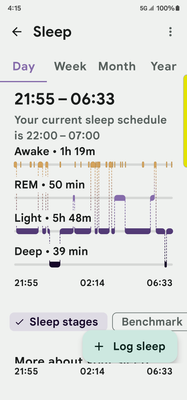
Best Answer
I do have premium by the way.
Best Answer
Hello @Travlnwoman
Thank you for providing the screenshot.
What you're seeing is how the sleep stages are now presented. My sleep graph looks similar to yours.
The graph was redesigned to separate out the different sleep stages so that they are stacked instead of bar graphs in the previous version.
Rieko | N California USA MBG PE
Best Answer
they need o separate them so they don't run together and make the background a different color foe each of them.
Best Answer
May I suggest users are given the ability to set their own colours, perhaps by being given a choice. Many people have a degree of colour blindness and their perceptions of colours are totally different than anyone else. They are the only person who would know what colours stand out for them and what colours blend to be one colour only.
Cheers
Best Answer