
Join us on the Community Forums!
-
Community Guidelines
The Fitbit Community is a gathering place for real people who wish to exchange ideas, solutions, tips, techniques, and insight about the Fitbit products and services they love. By joining our Community, you agree to uphold these guidelines, so please take a moment to look them over. -
Learn the Basics
Check out our Frequently Asked Questions page for information on Community features, and tips to make the most of your time here. -
Join the Community!
Join an existing conversation, or start a new thread to ask your question. Creating your account is completely free, and takes about a minute.
Not finding your answer on the Community Forums?
- Community
- Features
- Fitbit App Gallery
- Game golf blank settings page
- Mark Topic as New
- Mark Topic as Read
- Float this Topic for Current User
- Bookmark
- Subscribe
- Mute
- Printer Friendly Page
- Community
- Features
- Fitbit App Gallery
- Game golf blank settings page
Game golf blank settings page
- Mark Topic as New
- Mark Topic as Read
- Float this Topic for Current User
- Bookmark
- Subscribe
- Mute
- Printer Friendly Page

Anybody else have this problem. I open game golf through apps on ionic and tap on settings. It goes to a blank page. Only way to get a settings page is to log out then log back in. However then you lose saved courses.




 Community Moderators ensure that conversations are friendly, factual, and on-topic. We're here to answer questions, escalate bugs, and make sure your voice is heard by the larger Fitbit team. Learn more
Hello guys @kevinz821 @Zorrac66, it's nice to see you around the forums! 
I'd recommend logging out of the Fitbit app and on log back in, it also has the settings available in Game Golf to log in to the account. As soon as you log back in to Fitbit, sync and setup your local course and select "send to tracker" and it should go through immediately. When you add the courses stay on the settings screen open the app and keep track on your watch as it builds your courses. Note that you have to log out/in of Fitbit for the settings to show up.
If you keep having issues with the Game Golf app, try uninstalling and reinstalling the Fitbit app. Then, from the Fitbit app, reinstall the Game Golf app and try transfering the golf courses.
If you are still having difficulties with this after following those suggestions, I'd like you to send me screen shots of the error message or blank screen you're getting so I can go from there.
Catch you later guys!
Was my post helpful? Give it a thumbs up to show your appreciation! Of course, if this was the answer you were looking for, don't forget to make it the Best Answer! Als...
 Best Answer
Community Moderators ensure that conversations are friendly, factual, and on-topic. We're here to answer questions, escalate bugs, and make sure your voice is heard by the larger Fitbit team. Learn more
Best Answer
Community Moderators ensure that conversations are friendly, factual, and on-topic. We're here to answer questions, escalate bugs, and make sure your voice is heard by the larger Fitbit team. Learn more
Thanks for the update @kevinz821! In order to add a photo to your reply, please:
* When you're in the reply page, click on the Photos icon.
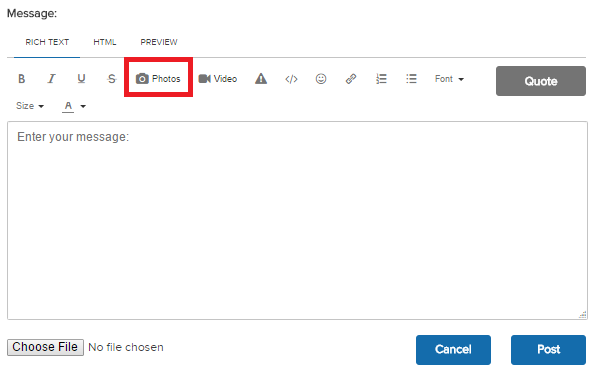
* Then, click on the Choose File in the middle of the grey window that will pop up
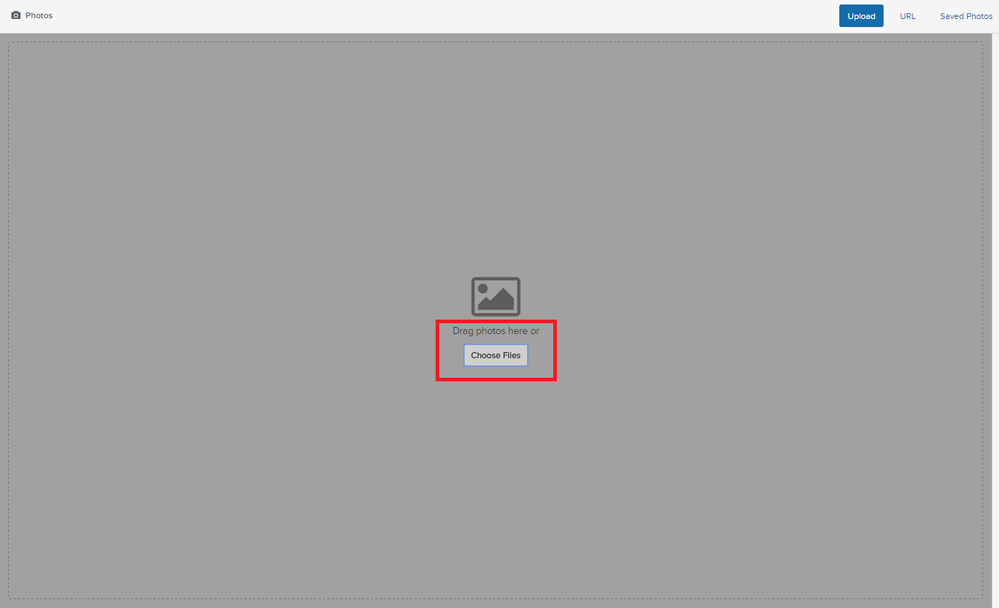
* Search for the photo on your computer and click on Open.
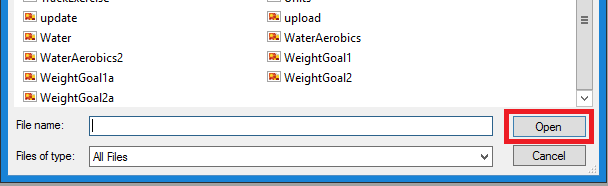
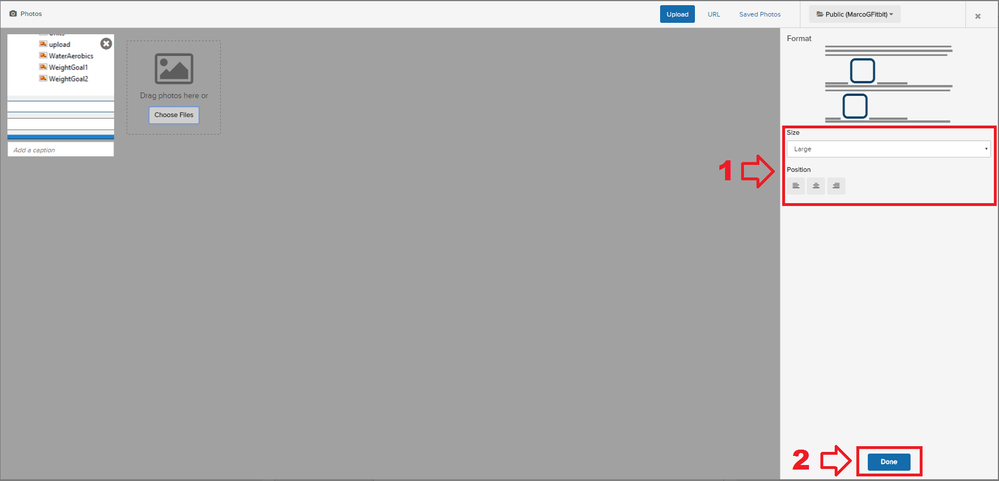
* Once the image shows up in the grey windows, select the size and the position (1) and click on Done (2)
Catch you later!
Was my post helpful? Give it a thumbs up to show your appreciation! Of course, if this was the answer you were looking for, don't forget to make it the Best Answer! Als...
Best Answer
I also could not get the app to work I would get to the point to send to tracker then the screen would go all blank and never would recover to access courses. I was doing all this at home thinking I was testing the app out. Once I arrived to a course, I did the uninstall and reinstall, sign in, then selected that course (where I was) and sent to tracker. This now worked, and I used for the entire round very pleased. That was Monday, today I played a different course. Went to the app and opened settings..... blank white screen. nada, nothing, no work again!!!! Uninstalled/reinstalled, signed back in, selected the course and sent to tracker. Worked again. Question is, will this be what to expect? Each time I use this app I have to spend all this time uninstalling, reinstalling etc???? Why can't I expect the app to just work from course to course???

Same blank page as everyone else, I had to uninstall game golf from fitbit then uninstall fitbit from my phone.
Once I'd re-installed fitbit app, logged in, reinstalled game golf I was able to login, I then tried to add a couple of courses but it says I've already got three loaded on and need to remove them to install others, but I haven't got any on there! Also on my ionic when I load the app it says to login via fitbit which I cannot do.
Best Answer
Same issue and Fitbit keeps sending me the same things to do (what you just tried to do) and it's still not working. It let's me login and go to settings right after I re-download it in the app. But once I sync my watch the settings go back to the blank page. Very frustrating. HELP!! I've golfed twice since I got it and ha e not been able to use it yet.
Best Answer