
Join us on the Community Forums!
-
Community Guidelines
The Fitbit Community is a gathering place for real people who wish to exchange ideas, solutions, tips, techniques, and insight about the Fitbit products and services they love. By joining our Community, you agree to uphold these guidelines, so please take a moment to look them over. -
Learn the Basics
Check out our Frequently Asked Questions page for information on Community features, and tips to make the most of your time here. -
Join the Community!
Join an existing conversation, or start a new thread to ask your question. Creating your account is completely free, and takes about a minute.
Not finding your answer on the Community Forums?
- Community
- Features
- Fitbit App Gallery
- "Clear Beam" Watch Face Customization Problem?
- Mark Topic as New
- Mark Topic as Read
- Float this Topic for Current User
- Bookmark
- Subscribe
- Mute
- Printer Friendly Page
- Community
- Features
- Fitbit App Gallery
- "Clear Beam" Watch Face Customization Problem?
"Clear Beam" Watch Face Customization Problem?
ANSWERED- Mark Topic as New
- Mark Topic as Read
- Float this Topic for Current User
- Bookmark
- Subscribe
- Mute
- Printer Friendly Page
12-05-2017
17:58
- last edited on
08-19-2018
12:40
by
SantiR


12-05-2017
17:58
- last edited on
08-19-2018
12:40
by
SantiR
The face titled Clear Beam is one that I like, but it looks like the "hex code" customization is not working. Is anyone else having this problem? I am using real 6 character Hex code following the # but none show any change. Any ideas?
Moderator Edit: Added Labels
Answered! Go to the Best Answer.
 Best Answer
- Labels:
-
App Gallery - Clock
Accepted Solutions

SunsetRunner
Hi!
A new version is published in the app gallery. The Problem with the customization is, that the companion is not working sometimes. According to a chat on a discord-server, there are many developers having this issue with their apps and watchfaces.
Sometimes, it helps to restart the fitbit-app on the mobile device and to sync with the ionic before entering the seetings of the watchface.
I'm not sure if there is a bug in the watchface or somewhere else, but I will go on trying to solve the issue.
However, there was a bug in the watchface, which made the ionic lose the settings after restarting the watchface. This is fixed now, so, please update to the new version (1.2).
Sorry for the inconvenience.
All the best and a merry christmas to everybody!


I have the same problem too. This is by far my favorite watch face for any fitness watch I have used thus far. I hope this is updated, even though I like the current grey and red theme.
Best Answer
SunsetRunner
It seems that the communication between app and device is not working properly. I'll take a look at it next week.
SunsetRunner
Hi!
A new version is published in the app gallery. The Problem with the customization is, that the companion is not working sometimes. According to a chat on a discord-server, there are many developers having this issue with their apps and watchfaces.
Sometimes, it helps to restart the fitbit-app on the mobile device and to sync with the ionic before entering the seetings of the watchface.
I'm not sure if there is a bug in the watchface or somewhere else, but I will go on trying to solve the issue.
However, there was a bug in the watchface, which made the ionic lose the settings after restarting the watchface. This is fixed now, so, please update to the new version (1.2).
Sorry for the inconvenience.
All the best and a merry christmas to everybody!
Ah, that explains problems with So So So many faces where a master reset makes it work for me, but not otherwise. Thanks for the post.
I agree, thanks for looking into it!
SunsetRunner
I'm glad that you like it! 
Another hint: Sometimes it helps (at least for me) to turn off bluetooth while the fitbit app is running and to turn it on again.
Best Answer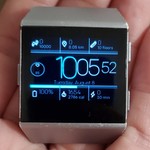
Where is the tutorial for changing the colors? I don't know the hex codes to put in and the change screen said there was a tutorial somewhere...
Best Answer
SunsetRunner
This is a misunderstanding. Just search the web for "hex color codes" and you will find a lot of pages with examples and explanations. There is no tutorial in the watchface or watchface-description.

Dear Sam. Thanks for the great clockface. It is the one I like the most. Actually I often try another one, but after 20 minutes I'm back to yours. Very well done
I have some suggestion though if I may.
1. Text for battery is too small for my eyes. Would it be an option to make it bigger and/or move the battery icon below and horizontally?
2. The bottom right part is empty. Is there an option to put weather temperature down there?
3. Minor: the Color schemes changes unvolontarely as an example when you have a shower. Might it be an option to let the user change it only through the app?
Many thanks anyway
Roberto
Best Answer
SunsetRunner
Hi Spada,
sorry for my late answer, I did not recieve a notification.
1. I can try to improve the battery-display with the next update.
2. Sorry, I will not include weather information since the companion is quite buggy and not always working as intended.
3. Well, this is also a decision due to to the problems with the companion. Thus, I want to keep it this way.
All the best,
Sam
Best Answer
This was also a favorite watch face for me to, I just wish the fonts on the small numbers were slightly bolder.
Best Answer
it kicked in about an hour later... so its all good. just a bit frustrating but the clock face is the best so will put up with it!!!
Best Answer

 Community Moderators ensure that conversations are friendly, factual, and on-topic. We're here to answer questions, escalate bugs, and make sure your voice is heard by the larger Fitbit team. Learn more
Awesome @KLoukes! I'm glad to hear you're back on track with the clock face.
Hey @SunsetRunner, keep us updated if something on the app changes or gets implemented! 
Have a great week you all!
Was my post helpful? Give it a thumbs up to show your appreciation! Of course, if this was the answer you were looking for, don't forget to make it the Best Answer! Als...
Best Answer