
Join us on the Community Forums!
-
Community Guidelines
The Fitbit Community is a gathering place for real people who wish to exchange ideas, solutions, tips, techniques, and insight about the Fitbit products and services they love. By joining our Community, you agree to uphold these guidelines, so please take a moment to look them over. -
Learn the Basics
Check out our Frequently Asked Questions page for information on Community features, and tips to make the most of your time here. -
Join the Community!
Join an existing conversation, or start a new thread to ask your question. Creating your account is completely free, and takes about a minute.
Not finding your answer on the Community Forums?
- Community
- Product Help Forums
- Ionic
- Ionic 24 hour clock
- Mark Topic as New
- Mark Topic as Read
- Float this Topic for Current User
- Bookmark
- Subscribe
- Mute
- Printer Friendly Page
- Community
- Product Help Forums
- Ionic
- Ionic 24 hour clock
Ionic 24 hour clock
ANSWERED- Mark Topic as New
- Mark Topic as Read
- Float this Topic for Current User
- Bookmark
- Subscribe
- Mute
- Printer Friendly Page

How do I change my Ionic to display a 24 hour clock? My phone and the Fitbit app are both set to 24 hour clocks,but I can’t figure out how to change the Ionic display.
Answered! Go to the Best Answer.
 Best Answer
Accepted Solutions

SunsetRunner
On the fitbit.com website of course. 😃
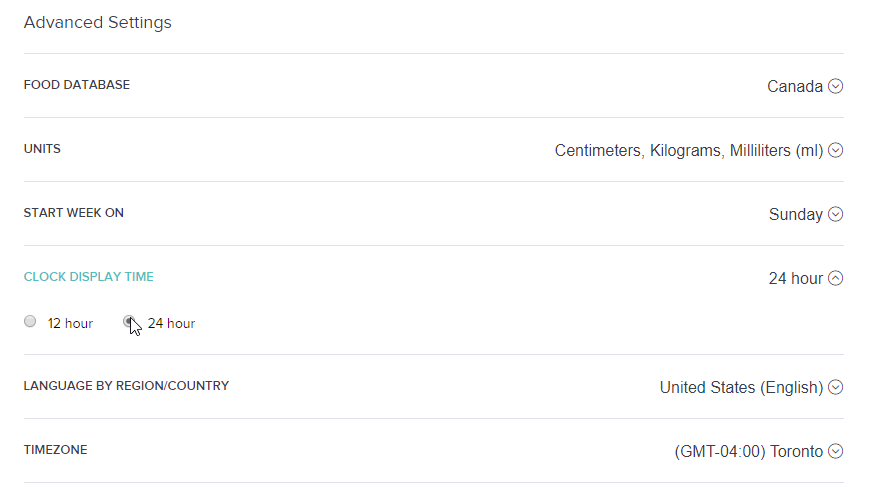
On https://www.fitbit.com/settings/profile look for the "CLOCK DISPLAY TIME" setting under Advanced Settings.
SunsetRunner
On the fitbit.com website of course. 😃
On https://www.fitbit.com/settings/profile look for the "CLOCK DISPLAY TIME" setting under Advanced Settings.
I saw this before, but couldn't get it to work because I was doing it on the dashboard in my Fitbit app on my phone. Apparently, you can only do it on the website! Thank you!

Hi,
So i've followed the instructions
profile: clicked the 24 and then synced my fitbit
but it still wont change to the 24.
the clock i'm using is Korone.
Please help - this is driving me nuts!
SunsetRunner
SunsetRunner
@BitRich I’ve just tried another watch face and again, the format remains 12hr despite having 24hrs toggled in personal settings. I think it’s down to watch face designers, who may or may not conform to Fitbit settings. Some watch faces have options to enable 24 or 12 hr displays, so I’m guessing it’s their coding that is overriding user settings.
Best Answer
 Fitbit Product Experts Alumni are retired members of the Fitbit Product Expert Program. Learn more
@BitRichand @SunsetRunner,
I think it's up to each watch face designer to parse user settings and locale settings and present the data appropriately. I ran into a different though similar problem, I tried the ClearBeam clock face, which I liked a lot...
However, the app developer uses European standards for formatting numbers (reverse the use of ',' and '.' vs. the US), which is to say:
10,000 steps -> 10.000 steps
5.00 miles -> 5,00 miles
And there's no way to set it to US convention. I just couldn't get used to reading the numbers this way.
Sadly, there's also no mechanism that (I'm aware of) to give the app developer this feedback.
Frank | Washington, USA
Fitbit One, Ionic, Charge 2, Alta HR, Blaze, Surge, Flex, Flex 2, Zip, Ultra, Flyer, Aria, Aria 2 - Windows 10, Windows Phone
Take a look at the Fitbit help site for further assistance and information.
Hi
so thanks for your help... but it finally switched back to 24 hrs. I tried it several times and after a few hours and a dozen syncs it finally cooperated.
cheers
rd

I've been wanting to make this change to 24 hour clock being a retired military guy. This solution worked perfectly and went into effect with the next synch on my Ionic. Many thanks!

SunsetRunner
PureEvil, have you checked Clear Beam lately. I am using Clear Beam downloaded about a week ago and it uses the normal U.S. conventions. For example, 7,567 Steps, 3.65 Miles, etc. Even though the picture of it in the App Clock Faces shows the European convention, when you download it for U.S. use, it installs with U.S. conventions.
BTW, I like it very much and have looked extensively at all the Faces I could find and found none I liked better.
Best Answer
Fitbit Product Experts Alumni are retired members of the Fitbit Product Expert Program. Learn more
@SunsetRunner,
Oh, thanks! Good to know; I stand corrected. 
Maybe it was updated or maybe I remembered a different clock face.
Right now, I'm stuck on "My Dog Timmy". It's like having a Tamagotchi on your wrist. Right now Timmy is mad at me because I didn't get the steps to give him enough treats yesterday.
Frank | Washington, USA
Fitbit One, Ionic, Charge 2, Alta HR, Blaze, Surge, Flex, Flex 2, Zip, Ultra, Flyer, Aria, Aria 2 - Windows 10, Windows Phone
Take a look at the Fitbit help site for further assistance and information.
Best Answer
@SunsetRunnerwrote:On the fitbit.com website of course. 😃
On https://www.fitbit.com/settings/profile look for the "CLOCK DISPLAY TIME" setting under Advanced Settings.
Thank you! I think it is a poor design on the part of Fitbit not to include this setting in the app, since you can set virtually every other setting from the online profile there. Nonetheless, your answer should be the accepted solution in this thread since it's the real answer. Thank you!

I also have the settings on the Fitbit dashboard site to 24h clock. The watch face is also showing the time format in 24h correctly, but if set the charging cable and check the charging screen's clock, it is set to 12h format. Can't get it fixed!
Best Answer