
Join us on the Community Forums!
-
Community Guidelines
The Fitbit Community is a gathering place for real people who wish to exchange ideas, solutions, tips, techniques, and insight about the Fitbit products and services they love. By joining our Community, you agree to uphold these guidelines, so please take a moment to look them over. -
Learn the Basics
Check out our Frequently Asked Questions page for information on Community features, and tips to make the most of your time here. -
Join the Community!
Join an existing conversation, or start a new thread to ask your question. Creating your account is completely free, and takes about a minute.
Not finding your answer on the Community Forums?
- Community
- Product Help Forums
- Ionic
- Re: Map App blank
- Mark Topic as New
- Mark Topic as Read
- Float this Topic for Current User
- Bookmark
- Subscribe
- Mute
- Printer Friendly Page
- Community
- Product Help Forums
- Ionic
- Re: Map App blank
Map App blank
ANSWERED- Mark Topic as New
- Mark Topic as Read
- Float this Topic for Current User
- Bookmark
- Subscribe
- Mute
- Printer Friendly Page

So I have downloaded the Map App from Google unto my Fitbit a while ago. However, whenever I try to open the app on my ionic it never shows me a map. I can see the zoom in/ out and location finder signs and can even click on them but I don't see anything.
I hope someone can help me out. I'm going on a holiday in a short while and the map app might be quite useful.
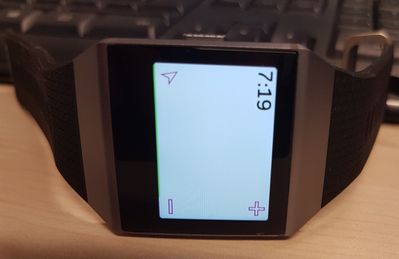
Answered! Go to the Best Answer.
Accepted Solutions

there are 2 map apps the one you are using dosent work the other is slow but it works.

Which mobile device/operating system are you using? This will assist those trying to help troubleshoot.
Without knowing your setup, have you tried the obvious things like restarting your phones Bluetooth? Also try restarting the Ionic by pressing and holding the left button and bottom right button together for around 10secs. Ensure your phone has location services switched on and has an active data connection.

 Best Answer
@N8teGee I'm using Samsung Galaxy S7.
I have already tried restarting my phones Bluetooth a couple of times; same with my Ionic. It doesn't help.
I have turned on my phone's location as well as my data connection but my map is still blank.
Is there anything else I can try to ensure the map app is running properly?
Best Answer
SunsetRunner
That app almost never works. I have got it to work I think once. Now, every time I open it, I only see the map of the surroundings of my work (where it worked) but nothing else.
I tried to use it again, connected to wifi, on my home, to no avail. And there is no way to contact the developer for assistance (that I know).
Best Answer
SunsetRunner
I’ve just downloaded this to see what might be the problem and have the following observations:
1. There were several settings that needed sorting first, namely, which mapping service, the refresh interval, image quality and whether to use the Ionic’s GPS, to name a few
2. Noting that, the app is obviously very reliant upon data, so you’ll need to be connected to your phone and have internet connection.
3. You need to ensure the app has the appropriate permissions granted (internet and location)
4. Map data by Bluetooth is slow 🙂
However, that said, I did get it to work and it showed my location. I was able to zoom in and see a good map. But moving the map around meant a screen refresh, and that is slow.
I can see little benefit of using this over my phone.
Best Answer
Sent on my Boost Mobile Samsung Galaxy S7.
Best Answer
SunsetRunner
Possibly wasn’t installed properly. Try removing the app and then reinstalling it. You should definitely be able to see the settings 🙂
Best Answer
Sent on my Boost Mobile Samsung Galaxy S7.
Best Answer
Hey,
I'm having the same problem with my ionic watch and google pixel phone. I installed the map app a month ago, the settings page got blank (white) almost immediately and the map on the watch is white but you can see some cursors. First I tried to just reinstall, I did this many times at several occations. Nothing changed.
Today I found out that if you uninstall the map app, make sure it's gone from the watch and then shut down and restart the watch, you will get the initial settings page back as you reinstall the map app. HOWEVER, the settings page goes blank if you
- directly open the map app in your watch
- press "use watch GPS"
- press "Hybrid GPS" in the mapping service settings
- and probably if you try to set any other setting (it seems fine to just open and close the menus but as soon as you pick any setting it will blank out.
IT IS DRIVING ME CRAZY!
Best Answer