
Join us on the Community Forums!
-
Community Guidelines
The Fitbit Community is a gathering place for real people who wish to exchange ideas, solutions, tips, techniques, and insight about the Fitbit products and services they love. By joining our Community, you agree to uphold these guidelines, so please take a moment to look them over. -
Learn the Basics
Check out our Frequently Asked Questions page for information on Community features, and tips to make the most of your time here. -
Join the Community!
Join an existing conversation, or start a new thread to ask your question. Creating your account is completely free, and takes about a minute.
Not finding your answer on the Community Forums?
- Community
- Health & Wellness
- Manage Weight
- Re: Weight
- Mark Topic as New
- Mark Topic as Read
- Float this Topic for Current User
- Bookmark
- Subscribe
- Mute
- Printer Friendly Page
- Community
- Health & Wellness
- Manage Weight
- Re: Weight
Weight
ANSWERED- Mark Topic as New
- Mark Topic as Read
- Float this Topic for Current User
- Bookmark
- Subscribe
- Mute
- Printer Friendly Page

Accepted Solutions

 Fitbit Product Experts Alumni are retired members of the Fitbit Product Expert Program. Learn more
Hey @Salemgirl if you are good to go, consider marking Dominique's last reply as the solution. This will help others with the same question locate the answer.. thank you!
Elena | Pennsylvania
 Fitbit Product Experts Alumni are retired members of the Fitbit Product Expert Program. Learn more
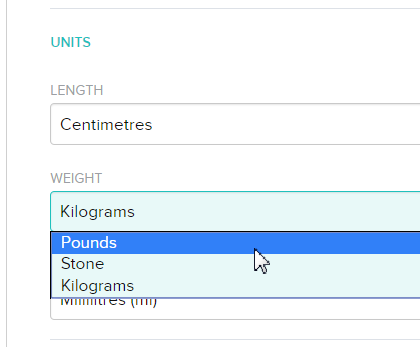
Sure. Just edit your profile and change the unit:
Dominique | Finland
Ionic, Aria, Flyer, TrendWeight | Windows 7, OS X 10.13.5 | Motorola Moto G6 (Android 9), iPad Air (iOS 12.4.4)
Take a look at the Fitbit help site for further assistance and information.
 Best Answer
Fitbit Product Experts Alumni are retired members of the Fitbit Product Expert Program. Learn more
Best Answer
Fitbit Product Experts Alumni are retired members of the Fitbit Product Expert Program. Learn more
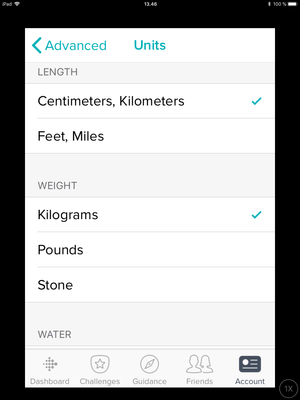
Since I see you’re using an iPad, you can also do it in the Fitbit app (if you have installed it on your iPad). Just select Account > Advanced Settings > Units and you should see this:
Dominique | Finland
Ionic, Aria, Flyer, TrendWeight | Windows 7, OS X 10.13.5 | Motorola Moto G6 (Android 9), iPad Air (iOS 12.4.4)
Take a look at the Fitbit help site for further assistance and information.
Fitbit Product Experts Alumni are retired members of the Fitbit Product Expert Program. Learn more
Hey @Salemgirl if you are good to go, consider marking Dominique's last reply as the solution. This will help others with the same question locate the answer.. thank you!
Elena | Pennsylvania
