
Join us on the Community Forums!
-
Community Guidelines
The Fitbit Community is a gathering place for real people who wish to exchange ideas, solutions, tips, techniques, and insight about the Fitbit products and services they love. By joining our Community, you agree to uphold these guidelines, so please take a moment to look them over. -
Learn the Basics
Check out our Frequently Asked Questions page for information on Community features, and tips to make the most of your time here. -
Join the Community!
Join an existing conversation, or start a new thread to ask your question. Creating your account is completely free, and takes about a minute.
Not finding your answer on the Community Forums?
- Community
- Product Help Forums
- One
- Re: Edit default settings "sleep start/sleep end"
- Mark Topic as New
- Mark Topic as Read
- Float this Topic for Current User
- Bookmark
- Subscribe
- Mute
- Printer Friendly Page
- Community
- Product Help Forums
- One
- Re: Edit default settings "sleep start/sleep end"
Edit default settings "sleep start/sleep end"
- Mark Topic as New
- Mark Topic as Read
- Float this Topic for Current User
- Bookmark
- Subscribe
- Mute
- Printer Friendly Page
- « Previous
-
- 1
- 2
- Next »

The built-in default settings for sleep start and sleep end are 11:00pm and 7:00am, how do I permanently change those to a different time (ex. 10:00 and 6:00) so that when I open the sleep tab to record my sleep it will say 10 to 6 instead of 11 to 7?
 Best Answer

 Community Moderator Alumni are previous members of the Moderation Team, which ensures conversations are friendly, factual, and on-topic. Moderators are here to answer questions, escalate bugs, and make sure your voice is heard by the larger Fitbit team. Learn more
@Macie Thanks for your reply! Please post your screen shot using this option:

Are you able to log in on the Fitbit app? Do you see a "log in" option?
Keep me posted!
Best Answer
Community Moderator Alumni are previous members of the Moderation Team, which ensures conversations are friendly, factual, and on-topic. Moderators are here to answer questions, escalate bugs, and make sure your voice is heard by the larger Fitbit team. Learn more
@Macie Thanks for your reply. When you first open the Fitbit app for Windows 10, this is what it shows:
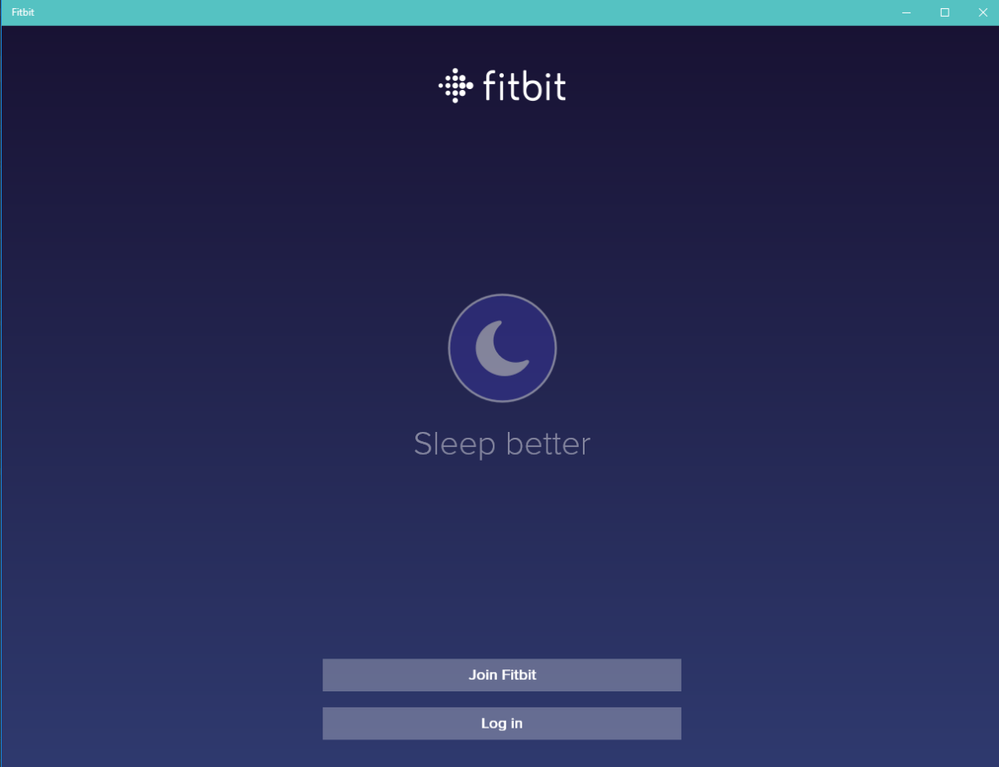
Right there, you have the option to "Log in"!
If you don't see this, please share a screen shot of what you are seeing.
Keep me posted!
Best Answer
05-02-2017
11:01
- last edited on
12-24-2025
09:06
by
MarreFitbit

Community Moderator Alumni are previous members of the Moderation Team, which ensures conversations are friendly, factual, and on-topic. Moderators are here to answer questions, escalate bugs, and make sure your voice is heard by the larger Fitbit team. Learn more
05-02-2017
11:01
- last edited on
12-24-2025
09:06
by
MarreFitbit
@Macie Are you having trouble logging in with your mobile device or with your computer?
Keep me posted!
Best Answer
05-03-2017
07:53
- last edited on
12-24-2025
09:06
by
MarreFitbit
Community Moderator Alumni are previous members of the Moderation Team, which ensures conversations are friendly, factual, and on-topic. Moderators are here to answer questions, escalate bugs, and make sure your voice is heard by the larger Fitbit team. Learn more
05-03-2017
07:53
- last edited on
12-24-2025
09:06
by
MarreFitbit
@Macie Thanks for your reply. Please go to Fitbit.com and log in there! Also, if you need to sync, please download Fitbit Connect. This is a software that will allow you to sync your Fitbit using an USB dongle.
Try that out and let me know how it goes! 
Best Answer
05-03-2017
07:57
- last edited on
05-03-2017
08:24
by
SantiR

05-03-2017
07:57
- last edited on
05-03-2017
08:24
by
SantiR
I have been doing that for five and a half years. It takes me straight to the Dashboard which is fine. But…..that does not solve the problem with the sleep portion of the app.
Moderator Edit: Personal Info Removed
Best Answer
05-03-2017
08:14
- last edited on
12-24-2025
09:06
by
MarreFitbit
Community Moderator Alumni are previous members of the Moderation Team, which ensures conversations are friendly, factual, and on-topic. Moderators are here to answer questions, escalate bugs, and make sure your voice is heard by the larger Fitbit team. Learn more
05-03-2017
08:14
- last edited on
12-24-2025
09:06
by
MarreFitbit
@Macie I'm glad to hear that you are able to log in. Yes, the sleep page changed a bit, as stated on this official post about it.
If you want to set up a sleep schedule to set up your bedtime and your wake up times; you can do this on the Fitbit app for iOS on your phone:
- Log in to the Fitbit app.
- Tap "Account".
- Under "Goals", tap "Sleep".
- Set up your sleep schedule.
- Sync your tracker.
Hope this helps. See you around!
05-03-2017
08:32
- last edited on
05-03-2017
08:56
by
SantiR
05-03-2017
08:32
- last edited on
05-03-2017
08:56
by
SantiR
Right back where I started originally!!! There is no “Account” to tap. When I click on Fitbit, it takes me directly to the dashboard and the new sleep “program” is a huge problem. Just don’t worry about it. I just won’t use it anymore because I give up!
Moderator Edit: Personal Info Removed
Best Answer
Community Moderator Alumni are previous members of the Moderation Team, which ensures conversations are friendly, factual, and on-topic. Moderators are here to answer questions, escalate bugs, and make sure your voice is heard by the larger Fitbit team. Learn more
@Macie That's unfortunate. However, I do want you to be able to use the sleep portion on the Fitbit app. So, check this screen shot below. You will see the dashboard when you open up the Fitbit app on an iOS device. In the top right corner you will see the account icon, I mark it with a red rectangle:
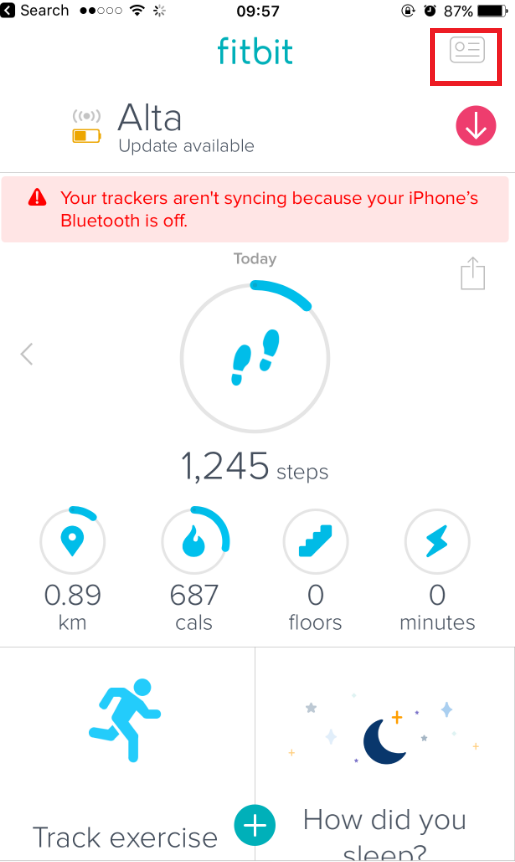
Hope this helps. Keep me posted!
05-04-2017
11:49
- last edited on
12-24-2025
09:06
by
MarreFitbit
Community Moderator Alumni are previous members of the Moderation Team, which ensures conversations are friendly, factual, and on-topic. Moderators are here to answer questions, escalate bugs, and make sure your voice is heard by the larger Fitbit team. Learn more
05-04-2017
11:49
- last edited on
12-24-2025
09:06
by
MarreFitbit
@Macie Thanks for your reply! I'm sorry Macie, but your post is not showing any screen shot or picture! Could you please try to upload it once again? That way I can help you further!
Keep me posted!
Best Answer
- « Previous
-
- 1
- 2
- Next »