
Join us on the Community Forums!
-
Community Guidelines
The Fitbit Community is a gathering place for real people who wish to exchange ideas, solutions, tips, techniques, and insight about the Fitbit products and services they love. By joining our Community, you agree to uphold these guidelines, so please take a moment to look them over. -
Learn the Basics
Check out our Frequently Asked Questions page for information on Community features, and tips to make the most of your time here. -
Join the Community!
Join an existing conversation, or start a new thread to ask your question. Creating your account is completely free, and takes about a minute.
Not finding your answer on the Community Forums?
- Community
- Product Help Forums
- Other Versa Smartwatches
- STUCK ON DATA RESET SCREEN
- Mark Topic as New
- Mark Topic as Read
- Float this Topic for Current User
- Bookmark
- Subscribe
- Mute
- Printer Friendly Page
- Community
- Product Help Forums
- Other Versa Smartwatches
- STUCK ON DATA RESET SCREEN
STUCK ON DATA RESET SCREEN
ANSWERED- Mark Topic as New
- Mark Topic as Read
- Float this Topic for Current User
- Bookmark
- Subscribe
- Mute
- Printer Friendly Page

I tried doing a total reset on my versa and then got the screen you see in the pictures help no matter what I have tried I cannot get any further 😞
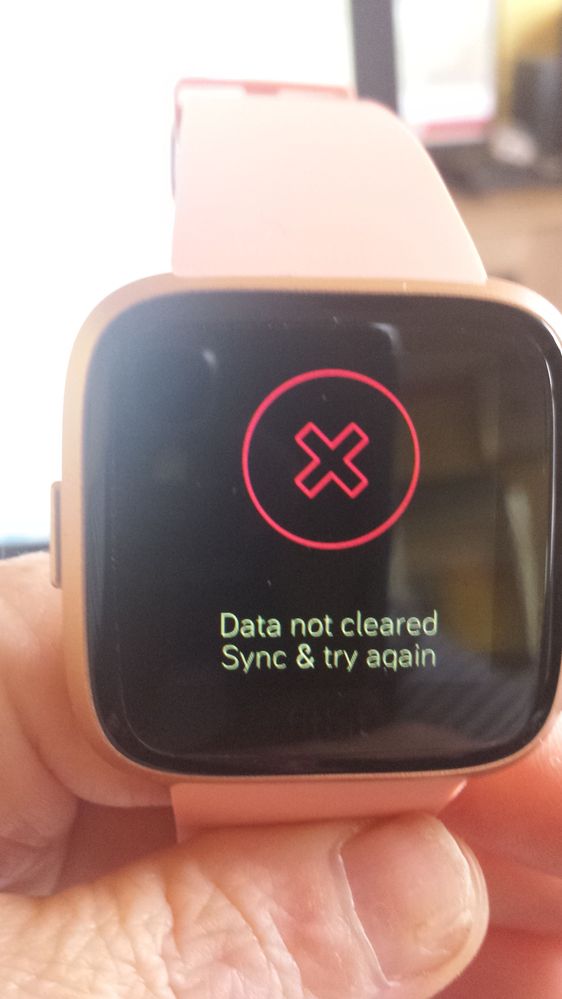
Answered! Go to the Best Answer.
 Best Answer
Accepted Solutions

You need to go into the fitbit app and remove the Versa from your account, you then need to go into your phones Bluetooth settings and unpair it from there. Once you have done that, go back into the fitbit app and set the device up again.

You need to go into the fitbit app and remove the Versa from your account, you then need to go into your phones Bluetooth settings and unpair it from there. Once you have done that, go back into the fitbit app and set the device up again.
thanks hun 🙂 actually got onto tech support as was about to chuck it out of window lol and yep same way as you said BUT yours was easier to follow lol thank you for replying
But have to say Nineveh was very good on chat app for fitbit so hats off to him
Best Answer
Excellent, glad you got it all sorted 

I was able to do everything you said but now I’m back to the same problem with the screen frozen on the Fitbit logo and not tracking anything and I can’t click anything 😩😩
Best Answer
Have you tried restarting your phone and the fitbit? To restart the fitbit, press and hold the left button and bottom right button together for 15 secs (until you see the fitbit logo)
