
Join us on the Community Forums!
-
Community Guidelines
The Fitbit Community is a gathering place for real people who wish to exchange ideas, solutions, tips, techniques, and insight about the Fitbit products and services they love. By joining our Community, you agree to uphold these guidelines, so please take a moment to look them over. -
Learn the Basics
Check out our Frequently Asked Questions page for information on Community features, and tips to make the most of your time here. -
Join the Community!
Join an existing conversation, or start a new thread to ask your question. Creating your account is completely free, and takes about a minute.
Not finding your answer on the Community Forums?
- Community
- Product Help Forums
- Other Versa Smartwatches
- Text messages
- Mark Topic as New
- Mark Topic as Read
- Float this Topic for Current User
- Bookmark
- Subscribe
- Mute
- Printer Friendly Page
- Community
- Product Help Forums
- Other Versa Smartwatches
- Text messages
Text messages
- Mark Topic as New
- Mark Topic as Read
- Float this Topic for Current User
- Bookmark
- Subscribe
- Mute
- Printer Friendly Page

I am not receiving text messages on my new Versa. Two friends also have Verss, they are receiving texts. I have tried EVERYTHING; reset, tech support...EVERYTHING! I have concluded it has to do with cell carrier. One of my friends has Verizon the other ATT. I have T-Mobile. Anyone else using T-Mobile having same issue???? I am so frustrated!!! About to dump FitBit go with iwatch!!! 😡
 Best Answer
Which phone do you have? Are you receiving texts on your phone? If yes, it's not an issue with your cell carrier.
Are you receiving other notifications on your Versa from your phone (calls, emails etc.)?
On the Fitbit app, are the notifications for Text Messages turned ON?
Hi. I have an iPhone 7plus. I can get all other notifications; emails, calls, notifications from apps. But I cannot get texts. My phone is updated, the Fitbit ap is updated. I’m at a loss.
Best Answer
Hi @Linda.O
Is your iPhone 7 on iOS 11?
Under the notification settings on your Fitbit app, further in Mesaages, there should be a "Show in History" option. Is that also turned ON?
Best Answer
Sorry. It should be under the notification settings of your Phone, not the app.
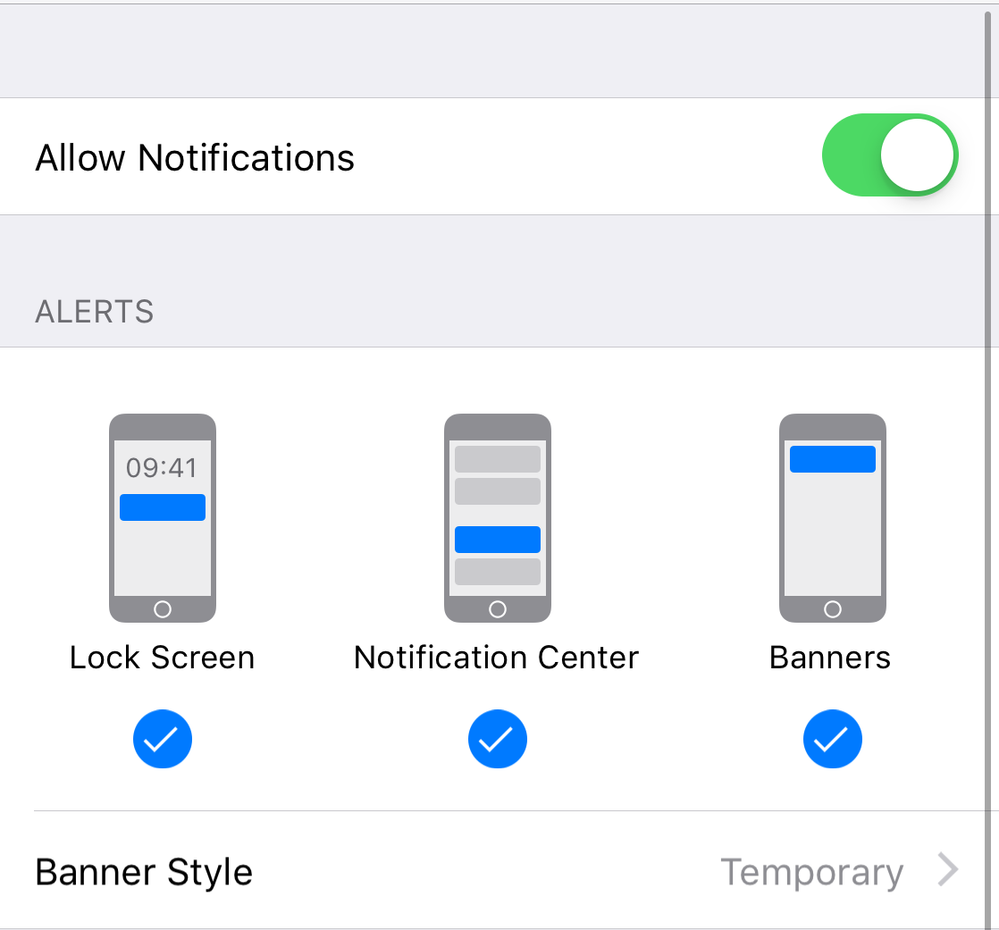
Try this if it helps:
Phone Settings > Notifications > Messages and make sure the following is enabled:
Best Answer
Yeah, that changed with iOS 12.
See the screenshot in my previous reply and compare your settings. It should be like in that screenshot. See if it works.
Best Answer