
Join us on the Community Forums!
-
Community Guidelines
The Fitbit Community is a gathering place for real people who wish to exchange ideas, solutions, tips, techniques, and insight about the Fitbit products and services they love. By joining our Community, you agree to uphold these guidelines, so please take a moment to look them over. -
Learn the Basics
Check out our Frequently Asked Questions page for information on Community features, and tips to make the most of your time here. -
Join the Community!
Join an existing conversation, or start a new thread to ask your question. Creating your account is completely free, and takes about a minute.
Not finding your answer on the Community Forums?
- Community
- Product Help Forums
- Other Versa Smartwatches
- Versa is getting stuck on Firmware update
- Mark Topic as New
- Mark Topic as Read
- Float this Topic for Current User
- Bookmark
- Subscribe
- Mute
- Printer Friendly Page
- Community
- Product Help Forums
- Other Versa Smartwatches
- Versa is getting stuck on Firmware update
Versa is getting stuck on Firmware update
ANSWERED- Mark Topic as New
- Mark Topic as Read
- Float this Topic for Current User
- Bookmark
- Subscribe
- Mute
- Printer Friendly Page
08-16-2018
07:49
- last edited on
08-17-2018
11:57
by
HeydyF


08-16-2018
07:49
- last edited on
08-17-2018
11:57
by
HeydyF
My first versa died during a dip in the sea. The replacement they sent me isn't installing the firmware. I tried factory resetting, restarting the versa, using wifi in different places, installing via a different phone, uninstalled and reinstalled the app basically anything I can do. I don't want to have get another .
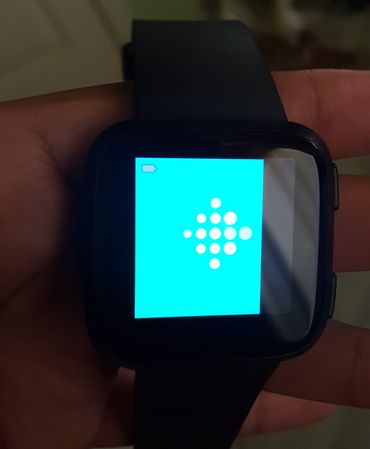
Moderator edit: Subject for clarity
Answered! Go to the Best Answer.
Accepted Solutions
I got my 2nd replacement versa in the mail and it updated seamlessly. So I'm pleased to have a functioning versa again.
 Best Answer
08-17-2018
11:55
- last edited on
01-31-2026
12:56
by
MarreFitbit


 Community Moderator Alumni are previous members of the Moderation Team, which ensures conversations are friendly, factual, and on-topic. Moderators are here to answer questions, escalate bugs, and make sure your voice is heard by the larger Fitbit team. Learn more
08-17-2018
11:55
- last edited on
01-31-2026
12:56
by
MarreFitbit
Hey @glenso, let me give you a warm welcome to the Community! I appreciate you have tried some troubleshooting to complete the set up process of your Versa. Beside that, I'd like you to confirm with me if you already tried every troubleshooting in this help article: Why can't I update my Fitbit device? If you haven't, please give them a try and keep me updated!
Have a nice day!
Best Answer
One thing you might do is to make sure you are connected to wi-fi and make certain there are not anydev ices with open bloothtooth nearby. Too many signals in the area can “confuse”trackers in that they don’t know which signals to connect to. I Realize this may be a long shot, but it’s worth a try. I know there have been times I have had to move other Bluetooth devices out of range to do an update.
Best Answer
@John917I've done that as well. I've been trying to update with WiFi provided from my phone. I know that my phone data service is more stable than my wifi and ensure the only items with Bluetooth on is my versa and the other phone I've been using to try update the versa. When the versa reaches step 3, the supposed actual installation, I notice that it looses connectivity to my phones Wifi. After that it fails and I have use the left and bottom right button to restart the versa because even though my fitbit app says installation failed my versa remains with stuck like in the image above.
08-18-2018
07:27
- last edited on
01-31-2026
12:56
by
MarreFitbit
Community Moderator Alumni are previous members of the Moderation Team, which ensures conversations are friendly, factual, and on-topic. Moderators are here to answer questions, escalate bugs, and make sure your voice is heard by the larger Fitbit team. Learn more
08-18-2018
07:27
- last edited on
01-31-2026
12:56
by
MarreFitbit
Hey @glenso, thanks for the update! And for trying the tips that @John917 also posted above. Now let me ask you this, could you please try to start all over from the beginning one more time? Try to remove your Versa from your account, then set it up as a new device and finally update it. And please let me know if this time works.
I'll be around!
Best Answer
@HeydyFI've done that a few times as well but with no success. My versa always ends up stuck like in the image above. I went ahead and put in for a replacement. Disappointed that I had to and I'm hoping things work this time around.
I got my 2nd replacement versa in the mail and it updated seamlessly. So I'm pleased to have a functioning versa again.
Best Answer
I have tried updating my Versa for the past 2 days. It will get almost done after 3 hours and then get stuck. I have tried all of the tips posted.
Best Answer
Were you able to get it to work? I have been trying to update since the update came out and I'm about to give up...either get a replacement or just go with a different brand...
Best Answer
If it's within the 1 year warranty then just have them send you a new one, that's what I did.
Best Answer
Hi there. I am in exactly the same boat as the others. Tried at least 15 times to update and did everything others suggested including deleting my device and adding it again. No luck. Can I get a refund within 12 months? This is already a replacement device so not at all happy.
Best Answer
I've restarted everything 3 times tonight and still stuck trying to update . Really had enough now . I've had it 4 months and it's been nothing but hassle !!
Best Answer
same here!!! Contacted them about it so have to wait and see what they say . Nothing but hassle since I got it! !
Best Answer
I have the same problem. We have rebooted the phone, rebooted the stupid Fitbit several times now. I guess Fitbit will be going into the trash as I am so done with this.
