
Join us on the Community Forums!
-
Community Guidelines
The Fitbit Community is a gathering place for real people who wish to exchange ideas, solutions, tips, techniques, and insight about the Fitbit products and services they love. By joining our Community, you agree to uphold these guidelines, so please take a moment to look them over. -
Learn the Basics
Check out our Frequently Asked Questions page for information on Community features, and tips to make the most of your time here. -
Join the Community!
Join an existing conversation, or start a new thread to ask your question. Creating your account is completely free, and takes about a minute.
Not finding your answer on the Community Forums?
- Community
- Product Help Forums
- Other Versa Smartwatches
- Re: Note 5 w/Versa syncing
- Mark Topic as New
- Mark Topic as Read
- Float this Topic for Current User
- Bookmark
- Subscribe
- Mute
- Printer Friendly Page
- Community
- Product Help Forums
- Other Versa Smartwatches
- Re: Note 5 w/Versa syncing
Versa not syncing with Note 5.
- Mark Topic as New
- Mark Topic as Read
- Float this Topic for Current User
- Bookmark
- Subscribe
- Mute
- Printer Friendly Page
11-20-2018
23:23
- last edited on
11-21-2018
07:26
by
MarcoGFitbit


11-20-2018
23:23
- last edited on
11-21-2018
07:26
by
MarcoGFitbit
I just purchased the Versa today and spent several hours trying to sync/bluetooth with Note 5. I've read the threads, tried uninstalling, updating,etc...nothing works! I'm ready for a refund if I can't get it to work soon. Any help would be appreciated!
Moderator Edit: Clarified Subject.
 Best Answer
@FSA18 is the versa linked to your Fitbit account and simply doesn't sync or you couldn't set it up? Try forgetting versa from your phone's Bluetooth settings, rebooting phone and versa, and force syncing in the Fitbit mobile app.

Marrrmaduke | Canada
Charge HR, Blaze, Charge 2, Charge 3, Inspire HR, Versa Lite, Versa SE, Aria


 Community Moderator Alumni are previous members of the Moderation Team, which ensures conversations are friendly, factual, and on-topic. Moderators are here to answer questions, escalate bugs, and make sure your voice is heard by the larger Fitbit team. Learn more
Hello @FSA18, thanks for joining the Fitbit Community, it's great to have you on board. It's great to see you too @Marrrmaduke, thanks for all your help. 
@FSA18, I appreciate your participation in the Forums and for sharing your experience with us. If you have already tried the recommendations provided by @Marrrmaduke and your Versa is still not syncing, please reply to us with the exact list of troubleshooting steps you've tried so far. This will be very helpful for us to determine what we should do next.
Thanks for your patience and understanding, we'll be waiting to hear from you.

Hi,
I have now got it to set up and it's showing that the when I try to connect the bluetooth. My phone is recognizing a Versa and a Versa Classic for some reason? When I try to connect to my phone to the Versa or Versa classic by adding a device, it shows the watch searching but it says no devices found?
Best Answer
@FSA18 Versa Classic is used to control music. It's not used for notifications or sync. Quick question, how did you set the versa up if you cannot pair? When you go to your phones Bluetooth settings does Versa show under paired devices?
Marrrmaduke | Canada
Charge HR, Blaze, Charge 2, Charge 3, Inspire HR, Versa Lite, Versa SE, Aria
Best Answer
Yes, it shows in the paired in my devices but my versa doesn't find my phone when I scan?
Best Answer
@FSA18 I believe it's already paired. It's not gonna show with other unpaired devices. Can you take a screenshot and post here?
Marrrmaduke | Canada
Charge HR, Blaze, Charge 2, Charge 3, Inspire HR, Versa Lite, Versa SE, Aria
Best Answer
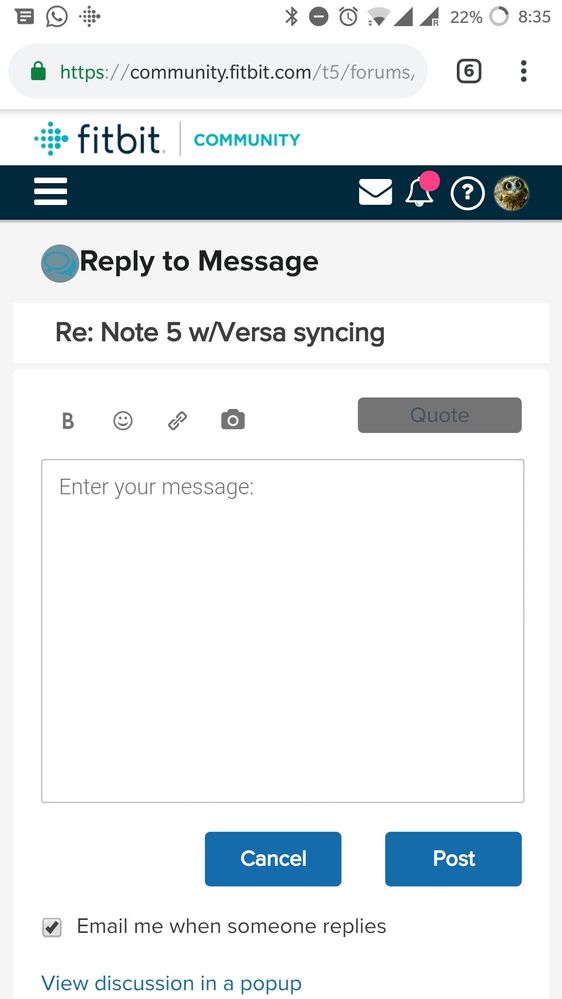
@FSA18 Start typing a new post (reply) and you should see a little camera icon on the left side of Quote button. Tap it and attach your picture.
Marrrmaduke | Canada
Charge HR, Blaze, Charge 2, Charge 3, Inspire HR, Versa Lite, Versa SE, Aria
Best Answer
I tried but it just puts up a box with image source, description, then I can't paste the pic?
Best Answer
Community Moderator Alumni are previous members of the Moderation Team, which ensures conversations are friendly, factual, and on-topic. Moderators are here to answer questions, escalate bugs, and make sure your voice is heard by the larger Fitbit team. Learn more
Hello @FSA18, I hope you're doing well, thanks for taking the time to reply. It's nice to see you around @Marrrmaduke, thanks for all your help.
@FSA18, please note that your Versa will not sync or pair through the Bluetooth settings on your phone, which is why when you tap on it while on the Bluetooth settings on your phone, nothing happens. As mentioned earlier, please reply to us with the exact list of troubleshooting steps you've tried so far. This will be very helpful for us to determine what we should do next.
Now, if you're having trouble attaching a picture, please reply to us using a computer and follow these steps to add a picture.
Thanks for your patience and understanding, we'll be waiting for your next reply.
