
Join us on the Community Forums!
-
Community Guidelines
The Fitbit Community is a gathering place for real people who wish to exchange ideas, solutions, tips, techniques, and insight about the Fitbit products and services they love. By joining our Community, you agree to uphold these guidelines, so please take a moment to look them over. -
Learn the Basics
Check out our Frequently Asked Questions page for information on Community features, and tips to make the most of your time here. -
Join the Community!
Join an existing conversation, or start a new thread to ask your question. Creating your account is completely free, and takes about a minute.
Not finding your answer on the Community Forums?
- Community
- Developers
- SDK Development
- Re: App errors on setting change
- Mark Topic as New
- Mark Topic as Read
- Float this Topic for Current User
- Bookmark
- Subscribe
- Mute
- Printer Friendly Page
- Community
- Developers
- SDK Development
- Re: App errors on setting change
App errors on setting change
ANSWERED- Mark Topic as New
- Mark Topic as Read
- Float this Topic for Current User
- Bookmark
- Subscribe
- Mute
- Printer Friendly Page

Hi All,
I have followed the settings guide as shown on https://dev.fitbit.com/guides/settings/ and every time I change a colour in the companion app I get the following error in the console:
TypeError: undefined is not an object (evaluating 'evt.data.key')
onchange at companion/index.js:10
A screenshot of my companion index.js is below:
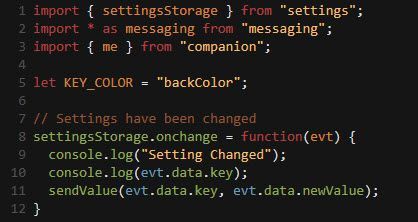
as you can see, I added some console logs to see check the code was being called. Prior to me adding lines 9 and 10, the same error occurred on line 11.
Any ideas?
Answered! Go to the Best Answer.
 Best Answer
Accepted Solutions
ok, so after much playing around the following seems to work:
console.log(evt.key + " - " + evt.newValue);

although now I am getting all kinds of other errors. I will persevere ...
Best Answer

 Fitbit Developers oversee the SDK and API forums. We're here to answer questions about Fitbit developer tools, assist with projects, and make sure your voice is heard by the development team.
Hi Jon
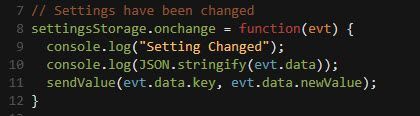
Console says :

 Best Answer
Not sure if this makes a difference but I have configured this as an app (not a clock face)
Best Answer
Fitbit Developers oversee the SDK and API forums. We're here to answer questions about Fitbit developer tools, assist with projects, and make sure your voice is heard by the development team.
Apps and clocks are the same, but you can only have 1 clock and clocks can't use buttons.
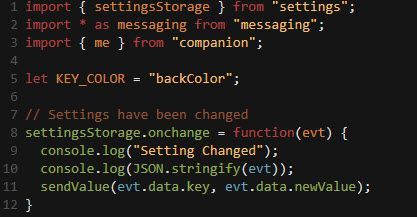
What happens if you log the contents of evt?
console.log(JSON.stringify(evt))
Best Answer
Similar error but empty braces this time:

 Best Answer
Fitbit Developers oversee the SDK and API forums. We're here to answer questions about Fitbit developer tools, assist with projects, and make sure your voice is heard by the development team.
Best Answer
Fitbit Developers oversee the SDK and API forums. We're here to answer questions about Fitbit developer tools, assist with projects, and make sure your voice is heard by the development team.
Very strange, can I see your settings.jsx?
Best Answer
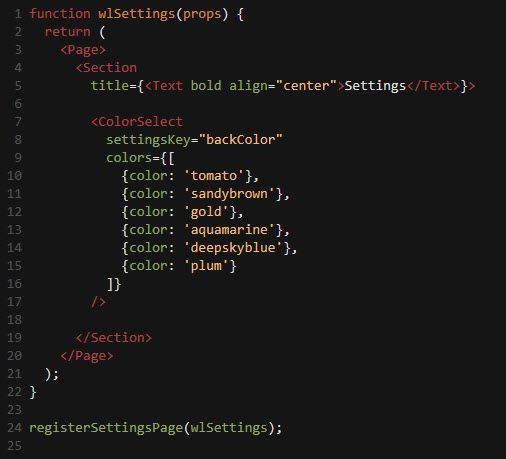
Here you are
Best Answer
ok, so after much playing around the following seems to work:
console.log(evt.key + " - " + evt.newValue);
although now I am getting all kinds of other errors. I will persevere ...
Best Answer