
Join us on the Community Forums!
-
Community Guidelines
The Fitbit Community is a gathering place for real people who wish to exchange ideas, solutions, tips, techniques, and insight about the Fitbit products and services they love. By joining our Community, you agree to uphold these guidelines, so please take a moment to look them over. -
Learn the Basics
Check out our Frequently Asked Questions page for information on Community features, and tips to make the most of your time here. -
Join the Community!
Join an existing conversation, or start a new thread to ask your question. Creating your account is completely free, and takes about a minute.
Not finding your answer on the Community Forums?
- Community
- Developers
- SDK Development
- Clock face battery
- Mark Topic as New
- Mark Topic as Read
- Float this Topic for Current User
- Bookmark
- Subscribe
- Mute
- Printer Friendly Page
- Community
- Developers
- SDK Development
- Clock face battery
Clock face battery
- Mark Topic as New
- Mark Topic as Read
- Float this Topic for Current User
- Bookmark
- Subscribe
- Mute
- Printer Friendly Page

I have built a face for my Versa 3 with a basic battery (meter from.. import { battery } from "power";). I am playing around and wanting something a bit fancier. Can some one point me to an example of using images to associate with the battery meter %, and displaying it. Something fairly basic please, I'm a baby developer 🙂 Thanks
 Best Answer
 Fitbit Product Experts Alumni are retired members of the Fitbit Product Expert Program. Learn more
Hi @Punzai - if you place the PNG images in the projects resources folder simply add an image SVG entry with href="image name".
You can have multiple defined in the same place and choose which one you want with opacity = 1;
Author | ch, passion for improvement.
Best Answer
hey guy_
im a complete newbie at this, would you be able to post a demo scipt to show how this works?
Best Answer
Fitbit Product Experts Alumni are retired members of the Fitbit Product Expert Program. Learn more
Hi @mickslsnikt - see the link in the previous post for displaying the image.
In Fitbit Studio best to start a new project example with clock and modify that.
Author | ch, passion for improvement.
Best Answer
<svg class="background">
<image id="myBatteryLevels" x="15%" y="92%" width="70%" height="5%"/>
</svg>
Index.js
import * as document from "document";
import { preferences } from "user-settings";
import * as util from "../common/utils";
import { battery } from "power";
const myBatteryLevels = document.getElementById("myBatteryLevels");
//battery levels
if (battery.chargeLevel > 90) {
myBatteryLevels.href = "BatFull.png";
} else if (battery.chargeLevel > 80) {
myBatteryLevels.href = "Bat80.png";
} else if (battery.chargeLevel > 60) {
myBatteryLevels.href = "Bat60.png";
} else if (battery.chargeLevel > 40) {
myBatteryLevels.href = "Bat40.png";
} else if (battery.chargeLevel > 20) {
myBatteryLevels.href = "Bat20.png";
} else if (battery.chargeLevel > 10) {
myBatteryLevels.href = "BatLow.png";
} else {
myBatteryLevels.href = "BatEmpty.png";}
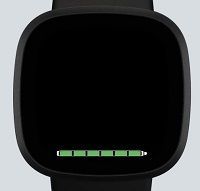
Nice one, thanks for this! I find it easier to learn when I can see how things work!
Best Answer