
Join us on the Community Forums!
-
Community Guidelines
The Fitbit Community is a gathering place for real people who wish to exchange ideas, solutions, tips, techniques, and insight about the Fitbit products and services they love. By joining our Community, you agree to uphold these guidelines, so please take a moment to look them over. -
Learn the Basics
Check out our Frequently Asked Questions page for information on Community features, and tips to make the most of your time here. -
Join the Community!
Join an existing conversation, or start a new thread to ask your question. Creating your account is completely free, and takes about a minute.
Not finding your answer on the Community Forums?
- Community
- Developers
- SDK Development
- Graphic bugs when rotating images
- Mark Topic as New
- Mark Topic as Read
- Float this Topic for Current User
- Bookmark
- Subscribe
- Mute
- Printer Friendly Page
- Community
- Developers
- SDK Development
- Graphic bugs when rotating images
Graphic bugs when rotating images
ANSWERED- Mark Topic as New
- Mark Topic as Read
- Float this Topic for Current User
- Bookmark
- Subscribe
- Mute
- Printer Friendly Page

When you have a transparent PNG inside a <g>-Section with a rotation (like a hand on the clock), then sometimes there are artefacts on the bottom of the source. These artefacts are not everytime, so I could not produce a screenshot for that issue.
To me it seems, that the rotation has an overrun of the last pixel line in the image and calculates some void data into the rotated result.
Does anyone else noticed this issue?
Answered! Go to the Best Answer.
Accepted Solutions


 Fitbit Developers oversee the SDK and API forums. We're here to answer questions about Fitbit developer tools, assist with projects, and make sure your voice is heard by the development team.
Thanks for reporting this, I've passed it on to the firmware team for review. In the meantime, I would suggest recreating the clock hands using simple shapes in SVG, then rotate those.
I hope that helps.
 Fitbit Developers oversee the SDK and API forums. We're here to answer questions about Fitbit developer tools, assist with projects, and make sure your voice is heard by the development team.
Thanks for reporting this, I've passed it on to the firmware team for review. In the meantime, I would suggest recreating the clock hands using simple shapes in SVG, then rotate those.
I hope that helps.
The bug happens also for simple shapes like rect.
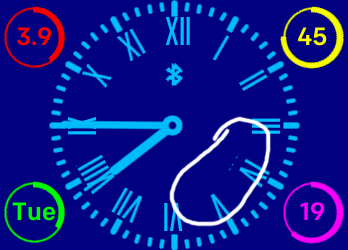
After clarification with the developer of the shown watchface within this bug, it's not a rotated image, it's a rotated text - the 'IV'.
So it seems there is no easy solution yet.
But I appreciate that this bug is recognized and tracked.

I am have been having issue. At first I thought the images were not good, but I can find no issues with them. I've tried adjusting how the rotation works, but cannot seem to fix it. My clock face is rather simple and I don't see a coding issue (I don't see an issue, but that doesn't mean I'm not doing something wrong)
I did notice that when it does occur (it's intermittent) and when I tap the screen, the artifacts go away and the image is perfect again.
I would be happy to work with someone to figure out the problem.
Does the hand reach all the way to the edge of your image? If so, what happens if you leave a pixel or two between the 'tip' of the hand and the edge of the image? If there is an issue with the edge of the image, but the edge is only transparent pixels, this could 'fix' the issue maybe?
 Best Answer
After almost a half a year and Fitbit still did not provided a working solution for this problem. We are able to use PNG files, but we can not rotate them because of these glitches. Instead we must use ugly solution like drawing with SVG. I hope Fitbit will put priority to this problem.
Best Answer
Get Outlook for Android
Best Answer
Does anyone know if this issue is addressed in SDK 2.0?
I'll resort to SVG as recommended however non-artifact PNG rotation would allow far greater flexibility in design & improved workflow.
Best Answer
I got around to updating the images, but it didn't work. I changed the images, the scale, moved items around differently to try to work around it to no avail.
Best Answer
Now it is one year later and there is still no fix for this graphic bug?
Rotating images is a main part in watchface development and often pngs can not be replaced by svgs.
This is still happening with simple SVG Text as well... 😞
This still happes on my Versa 3.
So I setup a simple clockface project and almost succeeded reproducing this bug.
(Not always happen ,but reloading few times and it will certainly happen.)
index.view (minute_hand.png is 336x168 8bit grey scale png image, (I can not upload the actual image file. why?))
<svg viewport-fill="black" class="default">
  <g transform="translate(50%,50%)">
    <g id="minute_hand">
      <image x="-50%" y="-50%" width="100%" height="50%" href="minute_hand.png" />
    </g>
  </g>
</svg>
style.css
.default {
  fill: white;
}
index.js
import clock from "clock";
import document from "document";

const minute_hand = document.getElementById("minute_hand");

clock.granularity = "seconds";
clock.ontick = (evt) => {
  minute_hand.groupTransform.rotate.angle = (6 * evt.date.getSeconds());
}
Then, deploy it to my Versa 3 and I confirmed the artifacts occures.
(I saved some screenshots as evidence. but can not upload it here...)
The artifacts seem to occur along with the bottom edge of the image.
So, possible workaround is
- Hide the bottom edge of the image below another image
(It could be used for images for clock hands)
- Stretch the bottom half of the image and push the bottom edge off the screen.
(240px from center or rotation is probably enough)
In any case, we are waiting for Fitbit to fix the bug.
This bug still happens after upgrading to OS 5.2 (36.128.5.38 on my Versa 3)
Here are some screenshots with the artifacts. (with OS 5.2)

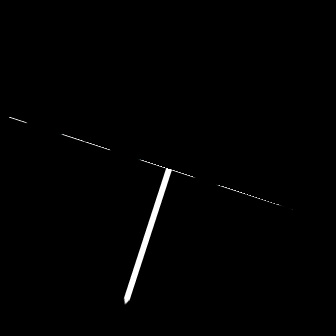
This is the rotating image ("minute_hand.png", 336x168 8bit grey scale png image).

I hope the bug may be fixed in next release.
This issue has existed for YEARS now. Come on Fitbit.
SDK 6 is out and here are some basic things Fitbit has failed to put in the roadmap:
We can't import SVG properly https://community.fitbit.com/t5/SDK-Development/Integrate-icon-libraries-SVG-format/m-p/2757156#M495...
We don't have a proper graphics API https://community.fitbit.com/t5/SDK-Development/How-to-draw-programatically/m-p/2170209#M98
And we can't use PNGs that have been translated because of a 3 year old bug in the SDK.
Developers will take Fitbit as seriously as Fitbit takes itself. Pretty laughable right now. Stop wasting time on new features nobody asked for and fix the **ahem** bugs so we can actually make interesting and impressive things.

Hey Jon, it's been over 4 years now. Any word on getting this fixed? This seems like a pretty big flaw for developers rotating text and .png images.
