
Join us on the Community Forums!
-
Community Guidelines
The Fitbit Community is a gathering place for real people who wish to exchange ideas, solutions, tips, techniques, and insight about the Fitbit products and services they love. By joining our Community, you agree to uphold these guidelines, so please take a moment to look them over. -
Learn the Basics
Check out our Frequently Asked Questions page for information on Community features, and tips to make the most of your time here. -
Join the Community!
Join an existing conversation, or start a new thread to ask your question. Creating your account is completely free, and takes about a minute.
Not finding your answer on the Community Forums?
- Community
- Developers
- SDK Development
- Re: Image clipping using mask works on simulator b...
- Mark Topic as New
- Mark Topic as Read
- Float this Topic for Current User
- Bookmark
- Subscribe
- Mute
- Printer Friendly Page
- Community
- Developers
- SDK Development
- Re: Image clipping using mask works on simulator b...
Image clipping using mask works on simulator but not on Versa
- Mark Topic as New
- Mark Topic as Read
- Float this Topic for Current User
- Bookmark
- Subscribe
- Mute
- Printer Friendly Page
05-17-2018 20:13 - edited 05-17-2018 20:16
- Mark as New
- Bookmark
- Subscribe
- Permalink
- Report this post

05-17-2018 20:13 - edited 05-17-2018 20:16
- Mark as New
- Bookmark
- Subscribe
- Permalink
- Report this post
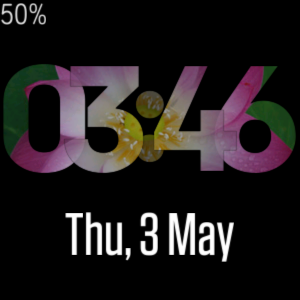
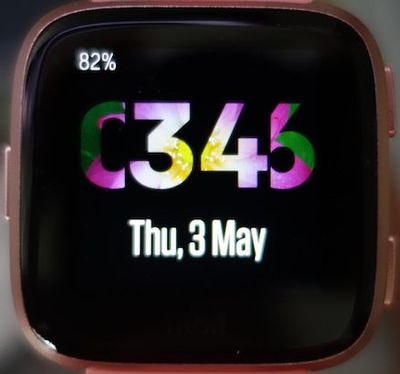
I am trying to clip an image with text. It displays correctly on the simulator but not on the device. Any tip on how I can solve this problem? Thanks.
  <defs>
  <mask id="mask">
     <text class="colon"> : </text>
     <text id="hour1" />
     <text id="hour2" />
     <text id="minute2" />
     <text id="minute1" />
  </mask>
  </defs>
  <svg mask="#mask" width="100%" height="100%">
  <image href="Lotus.jpg" load="sync" />
  </svg>
On the simulator
On Fitbit Versa
05-18-2018 13:07
- Mark as New
- Bookmark
- Subscribe
- Permalink
- Report this post


 Fitbit Developers oversee the SDK and API forums. We're here to answer questions about Fitbit developer tools, assist with projects, and make sure your voice is heard by the development team.
05-18-2018 13:07
- Mark as New
- Bookmark
- Subscribe
- Permalink
- Report this post
I wonder if you could make a template symbol containing the text elements, then apply the mask to that symbol?
https://dev.fitbit.com/build/guides/user-interface/svg/#template-symbols
 Best Answer
05-22-2018 06:43 - edited 05-22-2018 06:43
- Mark as New
- Bookmark
- Subscribe
- Permalink
- Report this post
05-22-2018 06:43 - edited 05-22-2018 06:43
- Mark as New
- Bookmark
- Subscribe
- Permalink
- Report this post
Thanks. I don't really know svg and basically pick it up from the Fitbit SVG guide. I have tried a few things and the result is the same. Works on the simulator, but not on the device.
  <defs>
    <symbol id="mytime">
      <text class="colon"> : </text>
      <text id="hour1" />
      <text id="hour2" />
      <text id="minute2" />
      <text id="minute1" />
    </symbol>
    <mask id="mask">
      <use href="#mytime" fill="white" />
    </mask>
  </defs>
  <svg mask="#mask" >
      <image href="Lotus.jpg" load="sync" />
  </svg>
If I avoid overlapping the numbers, everything would be fine.
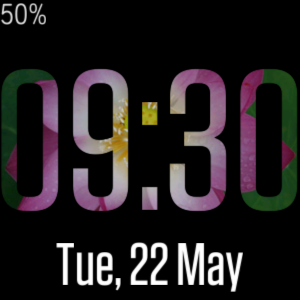
I can live with this.
Best Answer05-31-2018 06:02 - edited 05-31-2018 06:03
- Mark as New
- Bookmark
- Subscribe
- Permalink
- Report this post

05-31-2018 06:02 - edited 05-31-2018 06:03
- Mark as New
- Bookmark
- Subscribe
- Permalink
- Report this post
I have the exact same issue - working fine in simulator, but I get clipping on the Versa (same issue as original poster).
I hope that this can be fixed as it means I can't currently do what I want to do with my watch face 😞
<svg viewport-fill="#000000">
  <defs>
    <mask id="timeParts">
      <text id="hours" x="0" y="104"/>
      <text id="minutes" x="0" y="184"/>
      <text id="seconds" x="0" y="226"/>
    </mask>
  </defs>
  <svg>
    <svg mask="#timeParts" width="100%" height="100%">
      <gradientRect width="100%" height="100%" fill="cyan"
        gradient-type="bilinear"
        gradient-x1="10%" gradient-y1="10%"
        gradient-x2="80%" gradient-y2="80%"
        gradient-color2="yellow"
        gradient-color3="magenta"
        gradient-color4="green" />
    </svg>
  </svg>
</svg>
Best Answer06-01-2018 10:57
- Mark as New
- Bookmark
- Subscribe
- Permalink
- Report this post
Fitbit Developers oversee the SDK and API forums. We're here to answer questions about Fitbit developer tools, assist with projects, and make sure your voice is heard by the development team.
06-01-2018 10:57
- Mark as New
- Bookmark
- Subscribe
- Permalink
- Report this post
@Mark-D wrote:
I have the exact same issue - working fine in simulator, but I get clipping on the Versa (same issue as original poster).
Can you provide a project link and I'll take a look?
Best Answer06-01-2018 12:20 - edited 06-01-2018 12:45
- Mark as New
- Bookmark
- Subscribe
- Permalink
- Report this post
06-01-2018 12:20 - edited 06-01-2018 12:45
- Mark as New
- Bookmark
- Subscribe
- Permalink
- Report this post
Hi Jon. I only have single project in my account named 'Scratchpad'. How do I get a link to share?
Please note, this is just me trying out masks that I would need for my watch face and not the actual watch face itself. Part of the learning process 😉
This is the URL from my address bar : https://studio.fitbit.com/projects/MEVbr6/editor
Best Answer