
Join us on the Community Forums!
-
Community Guidelines
The Fitbit Community is a gathering place for real people who wish to exchange ideas, solutions, tips, techniques, and insight about the Fitbit products and services they love. By joining our Community, you agree to uphold these guidelines, so please take a moment to look them over. -
Learn the Basics
Check out our Frequently Asked Questions page for information on Community features, and tips to make the most of your time here. -
Join the Community!
Join an existing conversation, or start a new thread to ask your question. Creating your account is completely free, and takes about a minute.
Not finding your answer on the Community Forums?
- Community
- Developers
- SDK Development
- PKCE not working for OAuthButton?
- Mark Topic as New
- Mark Topic as Read
- Float this Topic for Current User
- Bookmark
- Subscribe
- Mute
- Printer Friendly Page
- Community
- Developers
- SDK Development
- PKCE not working for OAuthButton?
PKCE not working for OAuthButton?
ANSWERED- Mark Topic as New
- Mark Topic as Read
- Float this Topic for Current User
- Bookmark
- Subscribe
- Mute
- Printer Friendly Page

{\"redirectUrl\":\"https://app-settings.fitbitdevelopercontent.com/simple-redirect.html\",\"codeVerifier\":\"...\"} <Oauth
settingsKey="gcalCreds"
title="Google Calendar"
label="Google Calendar"
status="Connect"
authorizeUrl="https://accounts.google.com/o/oauth2/v2/auth"
requestTokenUrl="https://www.googleapis.com/oauth2/v4/token"
clientId="..."
clientSecret="..."
scope="https://www.googleapis.com/auth/calendar.readonly"
pkce=true
onAccessToken={async (accessToken) => {
console.log(accessToken);
}}
/>Answered! Go to the Best Answer.
Accepted Solutions
Looks like this works now! One of the Fitbit devs (Chapel in Discord) apparently fixed it recently.


 Fitbit Developers oversee the SDK and API forums. We're here to answer questions about Fitbit developer tools, assist with projects, and make sure your voice is heard by the development team.
It certainly looks correct.
Have you added this url to your Google oAuth settings?
https://app-settings.fitbitdevelopercontent.com/simple-redirect.html
Yup, that's in there:
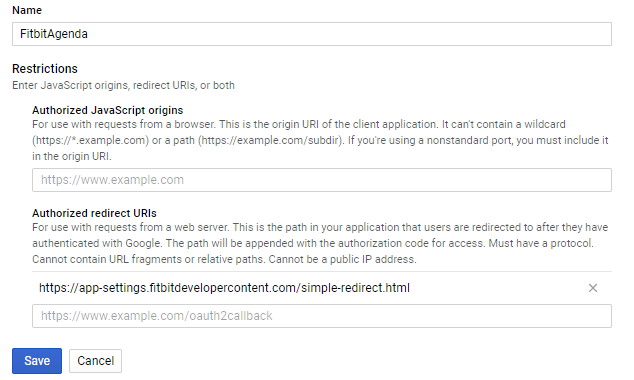
I'm testing on iOS, if that makes a difference.
 Best Answer
This evening I'm seeing different behavior. I updated to the latest developer firmware, but I assume that shouldn't make a difference with respect to the behavior of the Settings page on the device.
Now, my onAccessToken function is getting called. Maybe it was getting called before and I just didn't see it because it just showed up in the logging output as [object Object]. Or maybe it actually wasn't being called... I'm not sure. At any rate, I changed the logging to be more clear, and now I see that it is being called. However, this is what I'm getting back:
{"error":"invalid_request","error_description":"Invalid parameter value for redirect_uri: Missing scheme: undefined"}So now I'm not even getting the "codeVerifier" bit that I was before. My best guess about this error is that it looks like the OAuthButton may not be populating the redirect_uri parameter in the request body, as described here?
Best Answer

I am currently also trying to achieve this and still get the same CORS error.
Did you change anything or did it just work out of the box?
Best Answer