
Join us on the Community Forums!
-
Community Guidelines
The Fitbit Community is a gathering place for real people who wish to exchange ideas, solutions, tips, techniques, and insight about the Fitbit products and services they love. By joining our Community, you agree to uphold these guidelines, so please take a moment to look them over. -
Learn the Basics
Check out our Frequently Asked Questions page for information on Community features, and tips to make the most of your time here. -
Join the Community!
Join an existing conversation, or start a new thread to ask your question. Creating your account is completely free, and takes about a minute.
Not finding your answer on the Community Forums?
- Community
- Developers
- SDK Development
- Re: Simulator Failed to Start - Connection Refused...
- Mark Topic as New
- Mark Topic as Read
- Float this Topic for Current User
- Bookmark
- Subscribe
- Mute
- Printer Friendly Page
- Community
- Developers
- SDK Development
- Re: Simulator Failed to Start - Connection Refused...
Simulator Failed to Start - Connection Refused.
- Mark Topic as New
- Mark Topic as Read
- Float this Topic for Current User
- Bookmark
- Subscribe
- Mute
- Printer Friendly Page

SunsetRunner
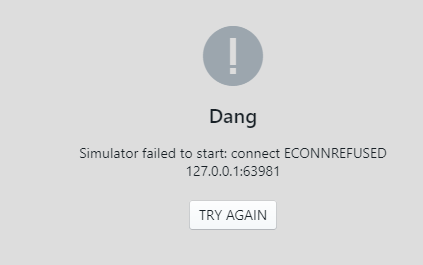
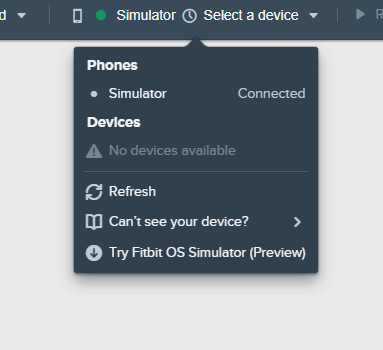
Installed the simulator yesterday and it worked great. But today I get "Simulator failed to start: connect ECONREFUSED 127.0.0.1:63981 The studio sees the simulator and says its connected thou, but list new available devices.



 Fitbit Developers oversee the SDK and API forums. We're here to answer questions about Fitbit developer tools, assist with projects, and make sure your voice is heard by the development team.
 Fitbit Developers oversee the SDK and API forums. We're here to answer questions about Fitbit developer tools, assist with projects, and make sure your voice is heard by the development team.
What type of graphics card do you have in your machine? I believe we have a known issue with some AMD ones. We're working on it.
 Best Answer
SunsetRunner
Mines a Nvidia 1060 GTX 6GB, Windows 10 pro. Chrome browser. It worked fine again after a reboot yesterday.
Best Answer
Im running an AMD GPU, still no luck.AMD Radeon R4
Best Answer
FWIW, I get an ECONREFUSED message in Visual Studio Code when I block its internet access with a firewall. I understand that Visual Studio Code has Electron at its core, as does the Fitbit simulator. This is why I suspect that the problem is firewall, or at least internet access, related.
Gondwana Software
Best Answer
Ok guys, after the update i can now connect to the simulator but now there is a new issue. The ionic simulator keeps giving me an error, the versa works fine but when I try to run the app on the ionic simulator i just get the connection error again. If I check the settings on the ionic simulator i get 'failed to load application list' under installed applications, this is not the case on the versa version.
Any ideas?

Same issue. Was working fine for both ionic and versa simulator. Went to make another versa face when it stopped working. Ionic simulator works, but versa (the one I actually need) doesn't. Error when running clock face. 😬

I have this issue every time on Windows in Virtualbox.
output:
https://pastebin.com/EPCzhLNs
Pls, release Fitbit simulator for Linux
Fitbit Developers oversee the SDK and API forums. We're here to answer questions about Fitbit developer tools, assist with projects, and make sure your voice is heard by the development team.
I believe there's a specific issue with the graphics drivers in VirtualBox: you might wish to try VMWare instead.
Best Answer
Same message here. My workstation has an Nvidia card. In my case, the problem was nothing to do with graphics, it's the TCP/IP socket connection (or along those lines). My high-end workstation sits in the bedroom which is not so convenient for sitting on the couch with my feet up. So sitting on the couch with my feet up, I'm using Remote Desktop to access my workstation from my feeble laptop (yes, I'll go get some exercise later 😉 Anyway, if I try to start the Simulator through RD (Studio and Simulator are both running on the workstation), I get the ECONNREFUSED error. If I get off my butt, walk all the way to the bedroom and start the Simulator on the workstation locally, then go back and restart the (now disconnected) RD session on my laptop, everything works fine. Easy workaround and I probably need the exercise 🙂
Best Answer
I'm also getting the "Simulator failed to start" message. I'm running Windows 7 on a tardy old Intel box with just on-board VGA.
I never could get my head round why it could be a firewall issue when it's only dealing with localhost, but disabled all firewall (and related) software just to test .. no difference. Besides, "netstat -b" shows that "Fitbit OS Simulator.exe" has already established 4 TCP/IP connections from 127.0.0.1 to 4 ports on the same machine.
If one of the Fitbit dev guys wants to send me a version of the simulator with debug enabled, please PM me. I'm happy to help get this fixed.
Fitbit Developers oversee the SDK and API forums. We're here to answer questions about Fitbit developer tools, assist with projects, and make sure your voice is heard by the development team.
The localhost related error is somewhat misleading, generally it just means one of the components of the simulator failed to start, and so the UI component failed to connect.
There are log files you can look at that may give more of an idea what's happening:
OS X: ~/Library/Logs/Fitbit OS Simulator/log.log
Windows: %USERPROFILE%\AppData\Roaming\Fitbit OS Simulator\log.log
Best Answer
Thanks for the reply Liam.
I've taken a look at the logfiles and, unfortunately, I'm non-the-wiser. Is there a way to increase the verbosity of the logging?
Would it be of interest to you if I were to forward my logfiles? If so, do you have a preferred way of receiving the information? I've also noticed an AppData\Roaming\Fitbit OS Simulator\sentry\breadcrumbs.json file. Is that of interest?
Thanks and regards.
Best Answer
Fitbit Developers oversee the SDK and API forums. We're here to answer questions about Fitbit developer tools, assist with projects, and make sure your voice is heard by the development team.
They're verbose by default. You can DM me log files on here for me to take a look at. It'd help if you provided full information about your system too, in particular what graphics card and OS version.
Best Answer