
Join us on the Community Forums!
-
Community Guidelines
The Fitbit Community is a gathering place for real people who wish to exchange ideas, solutions, tips, techniques, and insight about the Fitbit products and services they love. By joining our Community, you agree to uphold these guidelines, so please take a moment to look them over. -
Learn the Basics
Check out our Frequently Asked Questions page for information on Community features, and tips to make the most of your time here. -
Join the Community!
Join an existing conversation, or start a new thread to ask your question. Creating your account is completely free, and takes about a minute.
Not finding your answer on the Community Forums?
- Community
- Product Help Forums
- Sense
- Sense new firmware popup message
- Mark Topic as New
- Mark Topic as Read
- Float this Topic for Current User
- Bookmark
- Subscribe
- Mute
- Printer Friendly Page
- Community
- Product Help Forums
- Sense
- Sense new firmware popup message
Sense new firmware popup message
- Mark Topic as New
- Mark Topic as Read
- Float this Topic for Current User
- Bookmark
- Subscribe
- Mute
- Printer Friendly Page

Hi.
I got a message on my Fitbit iOS app that there is a new firmware update for it.
I am afraid to update. Each time Fitbit release an update, there are a lot of bugs and devices getting bricked. I had this experience with my Ionic device.
So, what is all about? I looked on the changelog and it says nothing about the fixes and features updated.
I will hold until there will be no issues after this release.
Thanks
Julian

 Fitbit Product Experts Alumni are retired members of the Fitbit Product Expert Program. Learn more
Hi @lucaiuli - this is good advice - if you don't know what an update, firmware or Fitbit App, is intended to do, there is a risk of it stopping something that is currently working, besides not fixing your issue, if you have one. Wait till there is an announcement of what is affected before modifying things.
Author | ch, passion for improvement.

You will have a long wait, Fitbit reports 'bug fixes and performance updates' but I haven't seen any specifications mentioned before 😊
But this update is a weird one because it is rolling out (I updated yesterday) but still no official announcement.

This one, or the previous one?
I see posts with issues way back in time. I just got the update message yesterday.
As I said, I've been burned with my Ionic being bricked and I had a long conversation with support and finally got it replaced.
I am with fitbit since 2013 starting with their first Flex device and I simply can't switch to anything 🙂 even though I can download my fitbit data from their servers I can't switch 🙂
Everytime I went and bought their top product just to be sure I will get to have it for some years to come, but it looks like their buggy firmware updates makes impossible to keep the device working for long periods of time...
 Best Answer
Hi,
I've installed it without any problem.
BTW since I use Fitbit, I always installed the actual firmwares and there was no issue with them except for one case long ago when Google modified the Android Bluetooth implementation. But it was years ago.
 Best Answer

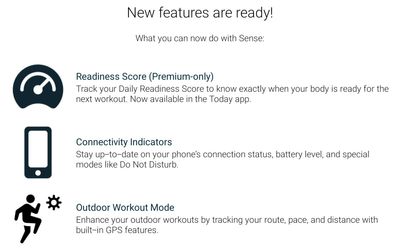
Isralled without issue, also. Put watch on charger, place phone near watch, start update, don't interrupt it. The image shows what was changed.
Edit: Lastly, restarted the watch and phone once the update completed,
Thanks.
Yes. The update process may be smoothly and without issue, but that doesn't mean that the issues won't come after that. I just don't trust it for now...
My Sense is working normal now and I don't have any issues with it. Plan to stay this way for a while.
Thank you for your reports @Gunnerp245 and @Oopee
Best Answer
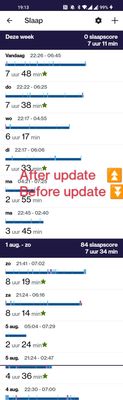
No sleepscore/sleep stages before and after the update.
 Best Answer
I installed this update yesterday for my Sense. It took about half an hour.
I had great hopes that it would solve my problems with Bluetooth connectivity, but, alas, it didn't change anything. However, it didn't cause any harm either,
Best Answer
The update message appeared yesterday. I was busy and delayed till today. Charge was down to 12%. I charged it to 30% before applying the update. During setup I had setup the Wi-Fi connection. This eliminates the issues I had updating my Blaze. The update took less then 10 minutes.
What is in the update is posted by Fitbit. It took a bit to find. What's changed in the latest Fitbit OS update? It looks like I received the 5.3 and 5.3.1 fix. The main reason I see for the update is the security part. The minor feature additions currently are of no interest to me.
This is my sixth Fitbit device. Only my first device, the Fitbit One, ever bricked during an update. The Blaze is the only one to have issues with connecting to do the update. This was the first update I have seen for the Sense. It is possible that the setup after the screen was repaired pulled in a newer update than the initial setup when I purchased it several months ago.
Since the 5.3.1 fix was issued, it is likely that the update should work for you. However, if you update through your phone, rather than through Wi-Fi, your phone could cause a problem, like mine did for the Blaze.
Best Answer