
Join us on the Community Forums!
-
Community Guidelines
The Fitbit Community is a gathering place for real people who wish to exchange ideas, solutions, tips, techniques, and insight about the Fitbit products and services they love. By joining our Community, you agree to uphold these guidelines, so please take a moment to look them over. -
Learn the Basics
Check out our Frequently Asked Questions page for information on Community features, and tips to make the most of your time here. -
Join the Community!
Join an existing conversation, or start a new thread to ask your question. Creating your account is completely free, and takes about a minute.
Not finding your answer on the Community Forums?
- Community
- Developers
- Web API Development
- Can't get spo2 but can get intraday heart rate
- Mark Topic as New
- Mark Topic as Read
- Float this Topic for Current User
- Bookmark
- Subscribe
- Mute
- Printer Friendly Page
- Community
- Developers
- Web API Development
- Can't get spo2 but can get intraday heart rate
Can't get spo2 but can get intraday heart rate
- Mark Topic as New
- Mark Topic as Read
- Float this Topic for Current User
- Bookmark
- Subscribe
- Mute
- Printer Friendly Page

Hi All - I'm trying and failing to get oxygen saturation data through the web API.
I have authorized the oxygen_saturation scope (see screenshot below).
The app is designated as "Personal".
A request for heart rate data works fine. The URL looks like...
https://api.fitbit.com/1/user/-/activities/heart/date/2022-07-29/1d/1sec.json
A request for spo2 returns a 403 error with a message that says...
'API client is not authorized by Fitbit to access the resource requested. Visit https://dev.fitbit.com/docs/oauth2 for more information on the Fitbit Web API authorization process.'
The spo2 request look like the one below, which seems to match the documentation.
https://api.fitbit.com/1/user/-/spo2/date/2022-07-29/all.json
Any thoughts on what is going on?
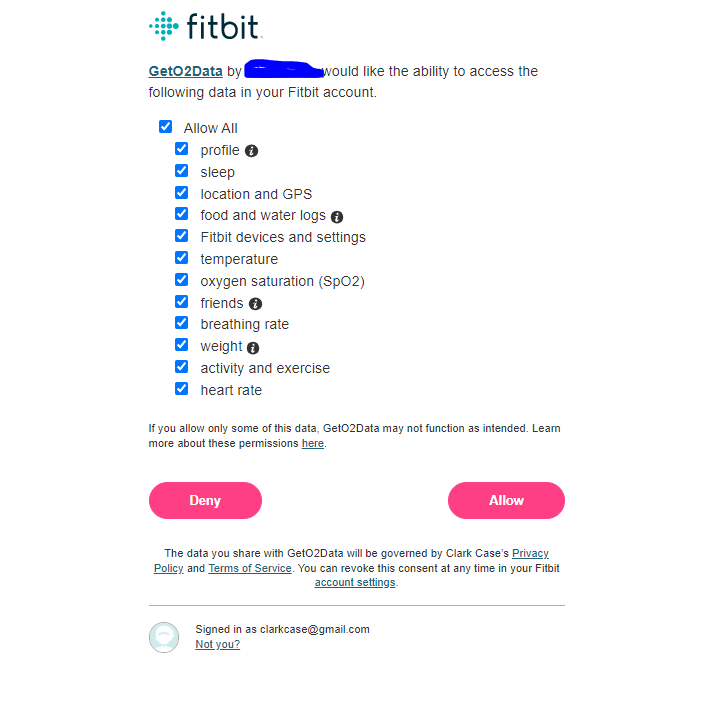
I am getting the same result using the OAuth 2.0 tutorial page to get tokens and the curl commands it provides to request data. Intraday heart rate works fine, spo2 doesn't work at all.
jwt.io reports that my token has the necessary scopes:
"iss": "Fitbit",
"typ": "access_token",
"scopes": "rsoc rset roxy rpro rnut rsle ract rloc rres rwei rhr rtem"
So it seems like the problem has to be on the Fitbit side of things.
 Best Answer
I CAN get spo2 data with https://dev.fitbit.com/build/reference/web-api/explore/
This implies that my "Personal" app can not get this data even though according to https://dev.fitbit.com/build/reference/web-api/intraday/
A Fitbit developer’s personal Intraday data is automatically available through the “Personal” application type. You do not need to submit a request.
This further suggests the problem is on the Fitbit side of things.
Best Answer
I would also add that this seems to also be affecting the Breathing Rate Intraday API, I would also add that the Breathing Rate Summary API and SPO2 Summary API return exected responses across the same date ranges, validating scope and data range validity, but like you @mmcc73 I can access heart rate intraday just fine. My access is also set to "personal".
Someone I was communicating with in a different forum is also experiencing this. I suppose I'll have to figure out how to submit a real support ticket.
Best Answer
well glad to know that it isn't just me, was scratching my head for a bit on why this wouldn't work, hopefully this post and the other forum to which you have referred to get some others stating that this is affecting them and it gets some attention. If it isn't too much trouble can you drop a link to the other forum you are on so I can follow progress there as well?
Best Answer
It’s a thread in an issue for a python library for interacting with the api:
https://github.com/orcasgit/python-fitbit/issues/171
I also submitted a support ticket as it isn’t looking like anyone from Fitbit is paying attention to this thread.
 Best Answer
Thanks for the link @mmcc73 for what it’s worth I built my own code for accessing the Fitbit api (using swagger-codegen) and im running into the same issue as you are with the python-fitbit package you are using. I think the same issues arising from two separate approaches provides some validity to your theory suggested in the link that this this is indeed something to do with the Web api permissions and not the python-fitbit codebase. Not fun that it is out of our hands but worth noting to help diagnosis issue and prevent unnecessary effort with the maintainers of the python-fitbit module
Best Answer
I heard back from Fitbit support, and...
We've identified an issue with the personal application setting for querying intraday data from the new endpoints (SpO2, HRV, and Breathing Rate). While it is intended for personal applications to fetch this data, it is currently not behaving as expected today.
We're working with engineering to resolve this as soon as possible. In the meantime, I recommend continued use of the Web API Explorer to pull the data from your account.
I'll post back here if I get any more info.
Best Answer
Here is a response from @Gordon-C on another thread: https://community.fitbit.com/t5/Web-API-Development/API-client-is-not-authorized-by-Fitbit-to-access....
Best Answer


 Fitbit Developers oversee the SDK and API forums. We're here to answer questions about Fitbit developer tools, assist with projects, and make sure your voice is heard by the development team.
Hi everyone,
We have fixed the problem where applications could not retrieve HRV and Breathing Rate intraday data for "personal" applications. We are still working on SpO2. We will update the community posts when SpO2 is available.
Gordon
Senior Technical Solutions Consultant
Fitbit Partner Engineering & Web API Support | Google
Best Answer
May I ask is this function for SpO2 fixed? I face the same problem getting error
'fitbit.exceptions.HTTPForbidden: <Response [403]>'
when accessing Breathing Rate and SpO2 with
'https://api.fitbit.com/1/user/-/spo2/date/today/all.json' and 'https://api.fitbit.com/1/user/-/br/date/today/all.json'.
It works on HRV and other data (like activities and body).
The app is set as "Personal".
Best Answer
Very late to the party - but I am experiencing the same - I cannot get to my own SpO2 data via the API
It works fine on the swagger page (with my same account)
API still only gives 403
I am also looking into some of the values I get on the swagger page and it does not correlate to Oxygen Variation on the app at least not that I can make any sense of.
Still would be nice to be able to get the API to work for all endpoints - going by this thread, I guess not
Best Answer
Fitbit Developers oversee the SDK and API forums. We're here to answer questions about Fitbit developer tools, assist with projects, and make sure your voice is heard by the development team.
Hi @MartindV
Welcome to the community!
It's a known issue that those data is not enabled by default for applications with "Personal" settings. While our engineering team is addressing the issue, we do not have a public timeline for the fix at this time.
However, we have a workaround. We can manually enable this access for your application. To request this, please submit a ticket via our official developer issue tracker: https://b.corp.google.com/issues/new?component=1677887&template=2088089
Once you have submitted the request, our team will be able to review it and get the necessary access enabled for you.
Thank you for your understanding.
Best Answer
Hi,
I tried to get into the issue tracker - but it asks for SSO. Can you let me know what credentials I should be using?
Regards
Martin
Best Answer
Fitbit Developers oversee the SDK and API forums. We're here to answer questions about Fitbit developer tools, assist with projects, and make sure your voice is heard by the development team.
Hi @MartindV,
Sorry for the confusion.
Please use this link to the issue tracker: https://issuetracker.google.com/issues/new?component=1677887&template=2088089
Best Answer