
Join us on the Community Forums!
-
Community Guidelines
The Fitbit Community is a gathering place for real people who wish to exchange ideas, solutions, tips, techniques, and insight about the Fitbit products and services they love. By joining our Community, you agree to uphold these guidelines, so please take a moment to look them over. -
Learn the Basics
Check out our Frequently Asked Questions page for information on Community features, and tips to make the most of your time here. -
Join the Community!
Join an existing conversation, or start a new thread to ask your question. Creating your account is completely free, and takes about a minute.
Not finding your answer on the Community Forums?
- Community
- Developers
- Web API Development
- Re: Google account selection on Fitbit Authorizati...
- Mark Topic as New
- Mark Topic as Read
- Float this Topic for Current User
- Bookmark
- Subscribe
- Mute
- Printer Friendly Page
- Community
- Developers
- Web API Development
- Re: Google account selection on Fitbit Authorizati...
Google account selection on Fitbit Authorization page doesn't work for some users
ANSWERED- Mark Topic as New
- Mark Topic as Read
- Float this Topic for Current User
- Bookmark
- Subscribe
- Mute
- Printer Friendly Page

Some users get stuck on the Fitbit authorization page when they have to select the Google account they use for Fitbit. These users migrated their Fitbit account to a Google account previously. The problem occurs for several users since yesterday (September 16) or today. On our test device it works fine. The users who report this issue, experience the same problem when trying to connect other apps with their Fitbit account. Previously it worked fine for these users, also after the migration to their Google account.
When they authorize our app to access their Fitbit account, the following happens:
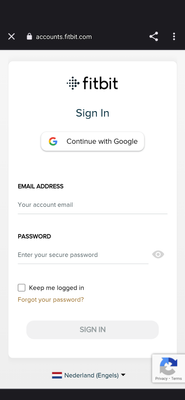
- First the Fitbit Sign In page is shown. Users with a Fitbit account (not migrated) login on that page with email and password, but users with a Google account have to click on "Continue with Google", so the user clicks on "Continue with Google"
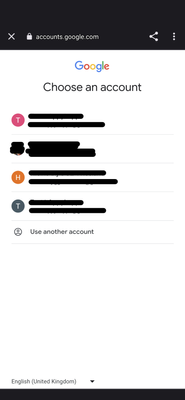
- Then the uses sees the "Choose an account" page from Google with one or more accounts
- When the users clicks on the account the is used for Fitbit, nothing happens, so here the user gets stuck
We see this happen with several users. Is this a bug that Fitbit/Google needs to solve, or is this a problem the user can solve?
Answered! Go to the Best Answer.
Accepted Solutions


 Fitbit Developers oversee the SDK and API forums. We're here to answer questions about Fitbit developer tools, assist with projects, and make sure your voice is heard by the development team.
I found out the problem is related to a bug in Chrome. The bug has been fixed and was pushed out on Monday, Oct 2nd. When you get notified to update Chrome on your Android device, please do so to resolve the problem.
Senior Technical Solutions Consultant
Fitbit Partner Engineering & Web API Support | Google
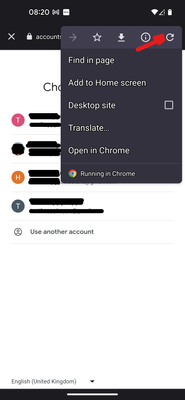
It seems that users with this problem can solve it when they refresh the Google account selection page with the refresh button. This is nice for users who contact us, but many (new) users who experience this problem, will just uninstall our app due to the bad experience. This never happened before September 16, 2023, so please look into this.
Fitbit Developers oversee the SDK and API forums. We're here to answer questions about Fitbit developer tools, assist with projects, and make sure your voice is heard by the development team.
Hi @Hielko
Thank you for reporting this problem. Do you have a video which demonstrates this issue? If not, I'd like to reproduce it myself. Would you be able to answer the following?
1. What platform are the users trying to sign into your application?
2. What browser are the people using when they are presented with the "Continue with Google" page?
3. Just to confirm, this problem only occurs after a user has already migrated their account to Google?
4. Do you know if these users are trying to migrate their account to Google at this time?
Senior Technical Solutions Consultant
Fitbit Partner Engineering & Web API Support | Google
 Best Answer
Hi Gordon,
Thanks for your reply. We can reproduce the issue now on several test devices. Not only with our app, but also with MyFitnessPal (when trying to connect with the Google - Fitbit account) and FatSecret. I don't have a video because of the privacy with the account screen, but I add a few screenshots.
- Android platform (test devices are Pixel phones, one with Android 13, one with Android 14 latest beta)
- Browser is Chrome
- User already migraged to Google account in the past (this also answers your question 4)
The user first gets the Fitbit authorization screen, selectes the "Continue with Google" option, and in the following screen (the Google: choose an account screen) nothing can be done, the page seems to be frozen. But when the user selects the three dots menu of the browser page and clicks on the refresh button, then the page unfreezes, and the user can select the account.
Please let me know if you need more information.
Hielko
appyhapps.nl
Best Answer
Hi @Gordon-C,
Maybe you can't reproduce the issue? Can you ask more colleagues to check this issue, we keep getting reports from users all around the world with this issue. My impression is that not everyone has this problem.
I can reproduce the problem on a Pixel 5 phone, so if you want a phone bug report or anything else, please let me know how to send you the data you need.
Kind regards,
Hielko
Best Answer
Hello @Gordon-C
I'm sorry, but the problem still persists. There are users all around the world experiencing a frozen Google account selection screen, when they select "Continue with Google" in the Fitbit OAuth authorization screen.
Please let me know if you need more information or if we need to report this directly with Google.
Kind regards,
Hielko
Fitbit Developers oversee the SDK and API forums. We're here to answer questions about Fitbit developer tools, assist with projects, and make sure your voice is heard by the development team.
Hi @Hielko
I finally got access to an Android device and I'm going to try to reproduce the problem today. Would you please let me know what version of Android OS you can reproduce this issue?
Thanks!
Senior Technical Solutions Consultant
Fitbit Partner Engineering & Web API Support | Google
Fitbit Developers oversee the SDK and API forums. We're here to answer questions about Fitbit developer tools, assist with projects, and make sure your voice is heard by the development team.
Hi @Hielko
I've tried several accounts and cannot reproduce the problem. I'm going to send you an email so I can get the bug report from you and some other information about the same device.
Gordon
Senior Technical Solutions Consultant
Fitbit Partner Engineering & Web API Support | Google
Fitbit Developers oversee the SDK and API forums. We're here to answer questions about Fitbit developer tools, assist with projects, and make sure your voice is heard by the development team.
Thank you for reporting this problem. We have submitted a ticket to engineering and will report back when we get more information. In the meantime, we have heard that reloading the page will make the screen responsive. If this doesn't work for you, please let us know.
Best,
Gordon
Senior Technical Solutions Consultant
Fitbit Partner Engineering & Web API Support | Google
Fitbit Developers oversee the SDK and API forums. We're here to answer questions about Fitbit developer tools, assist with projects, and make sure your voice is heard by the development team.
I have not heard a fix is available for this problem. I will update the forum post when I get information from engineering.
Senior Technical Solutions Consultant
Fitbit Partner Engineering & Web API Support | Google
Fitbit Developers oversee the SDK and API forums. We're here to answer questions about Fitbit developer tools, assist with projects, and make sure your voice is heard by the development team.
I found out the problem is related to a bug in Chrome. The bug has been fixed and was pushed out on Monday, Oct 2nd. When you get notified to update Chrome on your Android device, please do so to resolve the problem.
Senior Technical Solutions Consultant
Fitbit Partner Engineering & Web API Support | Google
Hi @Jade_87
I suggest that you try the reload of the authorization page, as explained in my previous post (September 19, at 23:37). Or clear all the Chrome browser cookies, maybe it helps.
Best Answer
connected to watch too and get my free 6 month premium subscription
Best Answer