
Join us on the Community Forums!
-
Community Guidelines
The Fitbit Community is a gathering place for real people who wish to exchange ideas, solutions, tips, techniques, and insight about the Fitbit products and services they love. By joining our Community, you agree to uphold these guidelines, so please take a moment to look them over. -
Learn the Basics
Check out our Frequently Asked Questions page for information on Community features, and tips to make the most of your time here. -
Join the Community!
Join an existing conversation, or start a new thread to ask your question. Creating your account is completely free, and takes about a minute.
Not finding your answer on the Community Forums?
- Community
- Product Help Forums
- Zip
- Re: You can go the activities tab in the log (you ...
- Mark Topic as New
- Mark Topic as Read
- Float this Topic for Current User
- Bookmark
- Subscribe
- Mute
- Printer Friendly Page
- Community
- Product Help Forums
- Zip
- Re: You can go the activities tab in the log (you ...
How to show monthly total steps?
- Mark Topic as New
- Mark Topic as Read
- Float this Topic for Current User
- Bookmark
- Subscribe
- Mute
- Printer Friendly Page
- « Previous
-
- 1
- 2
- Next »


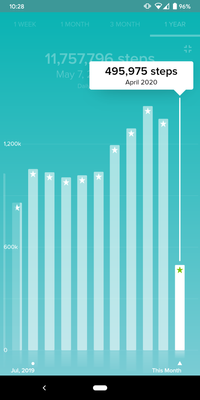
If you click one year, it will show each month as their own entity.
 Best Answer
When you click the Year icon up top it shows each month as their own entity.
Best Answer
When I follow those steps mine says daily average not total. Is there a way to change that?
Best Answer
iPhone app shows average only where as android app shows total and average steps. Not sure why 2 apps are different. I just moved from Samsung to Apple phone and I have same frustration that now I only see the average steps
Best Answer
Charts still only shows daily averages for week or daily averages for month or daily averages for year and you can’t just multiply the number days in a month times the reported daily average for that month. It yields a very wrong answer. If the feature exists in the mobile app it’s buried and i haven’ found it which means for me its not user friendly.
Best Answer
This doesn’t work on an iPhone. Why do Fitbit only allow iPhone to sync, but won’t allow us to see the data
Best Answer
I agree, I can only get a monthly total by adding weeks. My wife’s Fitbit app shows a large total monthly miles total above the average. Mine does not. Can’t figure this out.
Best Answer
I get to that page but the large total # does not show, yet in my wife’s Fitbit app it does. So frustrating! I need that number without adding the weekly totals up!
Best Answer
I as able to get totals but since an update, can only see averages which is quite frustrating. I'm on android. I don't need the averages, just the totals. Has anyone worked out how to do this yet please?

- « Previous
-
- 1
- 2
- Next »