
Join us on the Community Forums!
-
Community Guidelines
The Fitbit Community is a gathering place for real people who wish to exchange ideas, solutions, tips, techniques, and insight about the Fitbit products and services they love. By joining our Community, you agree to uphold these guidelines, so please take a moment to look them over. -
Learn the Basics
Check out our Frequently Asked Questions page for information on Community features, and tips to make the most of your time here. -
Join the Community!
Join an existing conversation, or start a new thread to ask your question. Creating your account is completely free, and takes about a minute.
Not finding your answer on the Community Forums?
- Mark Topic as New
- Mark Topic as Read
- Float this Topic for Current User
- Bookmark
- Subscribe
- Mute
- Printer Friendly Page
Activities not updating on iOS app
ANSWERED- Mark Topic as New
- Mark Topic as Read
- Float this Topic for Current User
- Bookmark
- Subscribe
- Mute
- Printer Friendly Page

 Community Moderator Alumni are previous members of the Moderation Team, which ensures conversations are friendly, factual, and on-topic. Moderators are here to answer questions, escalate bugs, and make sure your voice is heard by the larger Fitbit team. Learn more
Hi Everyone - I've merged a few reports. We are currently looking into user reporting that activities are not populating on iOS. To help investigate can you please share your iOS device and OS?
Thanks for reports!
Actively managing your weight? Find accountability buddies on the Manage Weight board
Answered! Go to the Best Answer.
Accepted Solutions
08-06-2019
09:13
- last edited on
03-08-2025
09:09
by
MarreFitbit

Community Moderator Alumni are previous members of the Moderation Team, which ensures conversations are friendly, factual, and on-topic. Moderators are here to answer questions, escalate bugs, and make sure your voice is heard by the larger Fitbit team. Learn more
08-06-2019
09:13
- last edited on
03-08-2025
09:09
by
MarreFitbit
Currently, we are unable to reproduce what is reported here. Since this is an older report, we are going to close this thread. If activities are still not loading, please start a new thread. Helpful things to include in your report would be:
- Can you see your activities on Fitbit.com? Is it just the iOS app that doesn't show activities?
- Is this happening to all of your activities?
- If it's only happening to some, which activities and when did this occur?
- Provide any screenshots showing the issue.
Thank you!
Actively managing your weight? Find accountability buddies on the Manage Weight board
 Best Answer

I'm also having this issue this week. Frustrating as I'm missing the tick on the calendar and if i go to add manually then it adds the data doubled but if leave it ok to automatic then doesnt show at all. Arggghhh!

I updated my Fitbit app today and am on iOS 12.1.4 and it is still only recognizing less than half my workout. I went on a 35 min fast walk/jog. Active mi urea recorded 35 minutes. Exercise auto recorded 14 minutes.

Hello. My charge 2 isn't giving me credit for the days I exercise. It gives calorie count, steps, stairs, etc. This has been taking place for several days now. I currently up to date with the new ios software 12.2 as well as the latest fitbit update.
Please help!

 Community Moderator Alumni are previous members of the Moderation Team, which ensures conversations are friendly, factual, and on-topic. Moderators are here to answer questions, escalate bugs, and make sure your voice is heard by the larger Fitbit team. Learn more
Hello @KHamlin thanks for joining the conversation, it's great to have you on board the Fitbit Community. 🙂
I appreciate your participation in the Forums and for sharing your experience with us. Tell me, are you able to see your recorded activities when you tap on the Exercise Tile? At this moment our team is currently investigating an issue affecting the Exercise Tile in which the days are not showing correctly, meaning that if you exercise for 5 days, it's possible you will only see 4 days. Is this the issue you're experiencing? If so, our team is still working on a solution for it.
Having this information will be very helpful for us to check this further. Thanks for your patience and understanding, we'll be waiting for your reply.


My activities were logging okay, but early this week an entire week and a half of exercise data disappeared. It’s not showing up in the app or in the activity log online either. I have a charge 3 and my phone is running iOS 12.2. Uninstalling and reinstalling the app, restarting my Fitbit, and restarting my phone haven’t brought back the missing exercise data. Like others have mentioned all the other data (heart rate, sleerp, steps, calories, etc are still there)
Community Moderator Alumni are previous members of the Moderation Team, which ensures conversations are friendly, factual, and on-topic. Moderators are here to answer questions, escalate bugs, and make sure your voice is heard by the larger Fitbit team. Learn more
Hello @sheen084 thanks for joining the Fitbit Community, it's great to have you on board. 😄
I appreciate your participation in the Forums and for sharing your experience with us. Would it be possible for you to reply to us with a screenshot detailing this issue? This will be very helpful for us to check this further.
Thanks for your patience and understanding, we'll be waiting to hear from you.
Best Answer
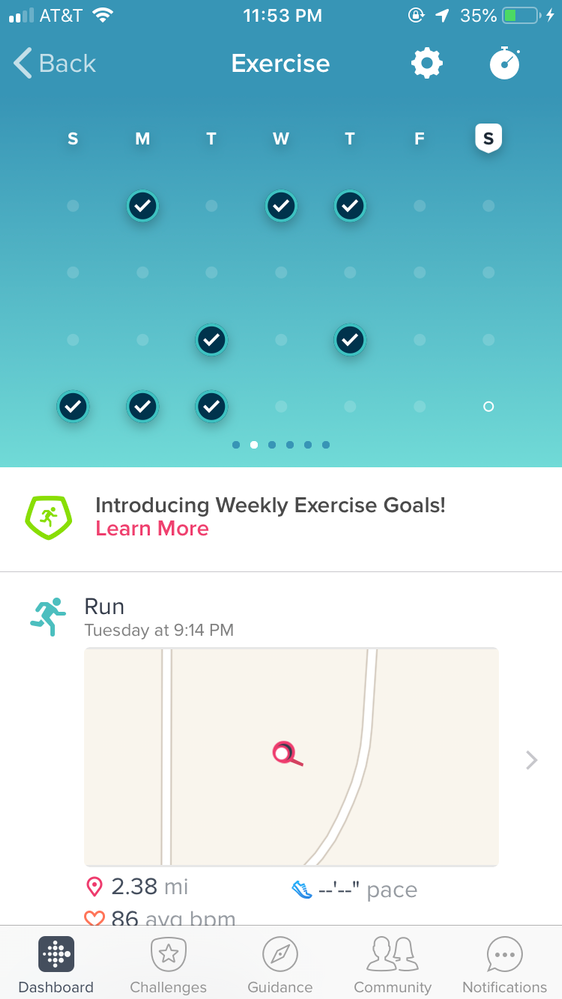
I also exercised on Wednesday and Thursday for about an hour each time, and both were initially auto-detected and logged (Wednesday was aerobic activity and Thursday was a walk), and my log was showing exercise for five days of the week as of yesterday. But today when I opened the app the exercise activities from Wednesday and Thursday had disappeared from the exercise log (although I still have HR data/steps/calories etc for those days). I haven’t changed anything with my phone, or the app, or my Fitbit. This is the second time that exercise has just disappeared from my log. I’ve tried restarting my phone, restarting my Fitbit, charging the Fitbit, plugging my Fitbit in to my computer to check for updates, and reinstalling the app on my phone. None of that has fixed the problem.
Community Moderator Alumni are previous members of the Moderation Team, which ensures conversations are friendly, factual, and on-topic. Moderators are here to answer questions, escalate bugs, and make sure your voice is heard by the larger Fitbit team. Learn more
Hello @sheen084 I hope you're doing well, thanks for taking the time to reply and provide the screenshot requested.
I would also like to thank you for letting us know the troubleshooting steps you've tried so far. At this moment, our team is aware of this issue and is working to identify a resolution as quickly as possible.
We're sorry for any trouble. We appreciate your patience and look forward to getting you back on track.
Please let us know if there's anything we can do to assist you in the meantime.

SunsetRunner
I am also having an issue with my activities populating on my iOS Fitbit App. I have the Versa special edition. Phone is iPhone 8+ with OS 12.2. Please let me know if you require additional information or a screenshot. Thank you
Best Answer
SunsetRunner
Sleep tracking stopped working for me as well. Steps and HR are still working, but sleep has not shown in the app since last Friday. I already removed my Fibit from the app and added it back as a new device and the app shows last synced today a few minutes ago, but still no recent sleep data.
Fitbit Alta HR v26.63.2
Fitbit app v2.92
iPhone Xs Max
iOS v12.2
Best Answer
SunsetRunner
Sleep data form last night showed up for the first time in three days.
Wonder if something changed on the server side or due to me removing/adding my Fitbit as a new device?
Best Answer
Community Moderator Alumni are previous members of the Moderation Team, which ensures conversations are friendly, factual, and on-topic. Moderators are here to answer questions, escalate bugs, and make sure your voice is heard by the larger Fitbit team. Learn more
Hello @SunsetRunner and @MaliniKannan thanks for joining the Fitbit Community. It's nice to see you around @SunsetRunner I hope you're doing well.
I appreciate you have taken the time to report this situation and for providing information about your device and your phone. At this moment, I would like to ask you to go to the online Dashboard and check if your Activities and Sleep are showing here correctly. If they are, please try the following in the Fitbit app:
- Force-quit the app, open it again and if the data is still not showing:
- Log out from the app, restart your phone and log back in.
Give this a try and let us know the outcome, we'll be happy to continue assisting you.
SunsetRunner
None of those steps worked, I tried those first. I think removing and adding my Fitbit as a new device is what fixed the sleep tracking for me as it has been working the last couple of days.
SunsetRunner
Activities are still not showing on the online dashboard or the app. Monday and today I walked at least 20 minutes nonstop and it didn't populate my weekly exercise section. It shows in my active minutes though. Thanks
Same issue. I walked for 35 minutes yesterday and my Charge 2 recognized it and it showed up. Today it is gone. It still shows my walk from Monday, but nothing from yesterday (Tuesday). This is happening on the app (android) and also on the actual website.