
Join us on the Community Forums!
-
Community Guidelines
The Fitbit Community is a gathering place for real people who wish to exchange ideas, solutions, tips, techniques, and insight about the Fitbit products and services they love. By joining our Community, you agree to uphold these guidelines, so please take a moment to look them over. -
Learn the Basics
Check out our Frequently Asked Questions page for information on Community features, and tips to make the most of your time here. -
Join the Community!
Join an existing conversation, or start a new thread to ask your question. Creating your account is completely free, and takes about a minute.
Not finding your answer on the Community Forums?
- Mark Topic as New
- Mark Topic as Read
- Float this Topic for Current User
- Bookmark
- Subscribe
- Mute
- Printer Friendly Page
Average steps overall
ANSWERED- Mark Topic as New
- Mark Topic as Read
- Float this Topic for Current User
- Bookmark
- Subscribe
- Mute
- Printer Friendly Page

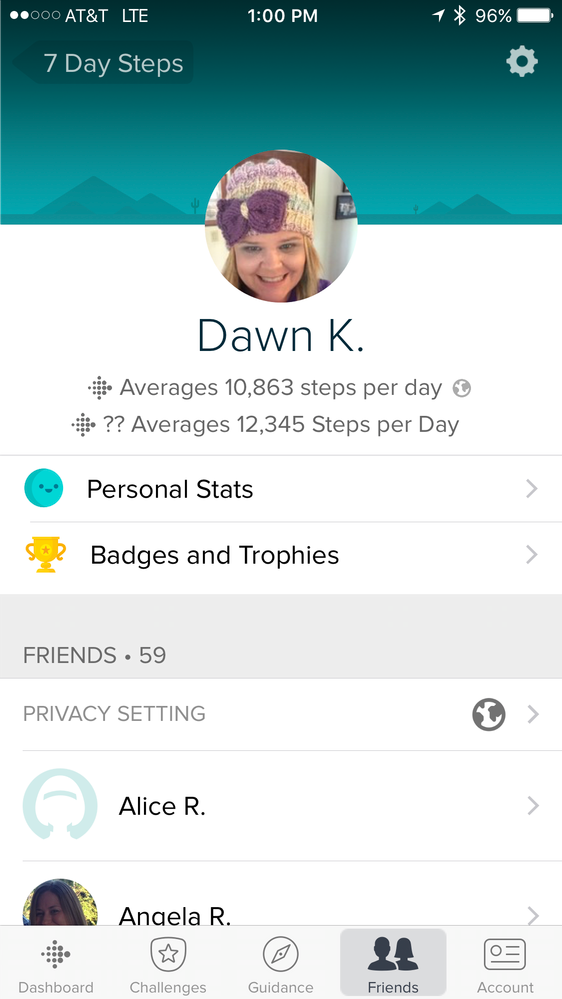
Why are there now two numbers for the average number of steps? What is the difference?
Answered! Go to the Best Answer.
Accepted Solutions


 Community Moderator Alumni are previous members of the Moderation Team, which ensures conversations are friendly, factual, and on-topic. Moderators are here to answer questions, escalate bugs, and make sure your voice is heard by the larger Fitbit team. Learn more
Hi everybody,
I've seen a number of instances where the following steps resolve this problem, I'd recommend giving them a try.
- Open the Fitbit App > tap the Account button > and tap the tile with your profile at the top.
- Tap the gear icon in the top right-hand corner.
- Tap Location.
- Tap country and add your country.
You also can choose to set your location to private if you don't want others to see your location, but adding a location seems to resolve this issue.
Hope this helps!
Community Moderator Alumni are previous members of the Moderation Team, which ensures conversations are friendly, factual, and on-topic. Moderators are here to answer questions, escalate bugs, and make sure your voice is heard by the larger Fitbit team. Learn more
@dawn102677 That's very weird.
Out of curiosity, what type of iOS device are you using (ie iPhone 7, iPhone SE, etc)?
Also, what iOS version are you running (ie iOs 10, iOS 9, etc)?
Please keep me posted!
iPhone 7 plus. iOS 10. The most recent versio.
 Best Answer


I looked again at your photo. The 2nd line is 12,345 avg steps. That is also the exactly what mine says. Maybe it's some sort of example number since it is 1 2 3 4 5 ? Idk just a thought.

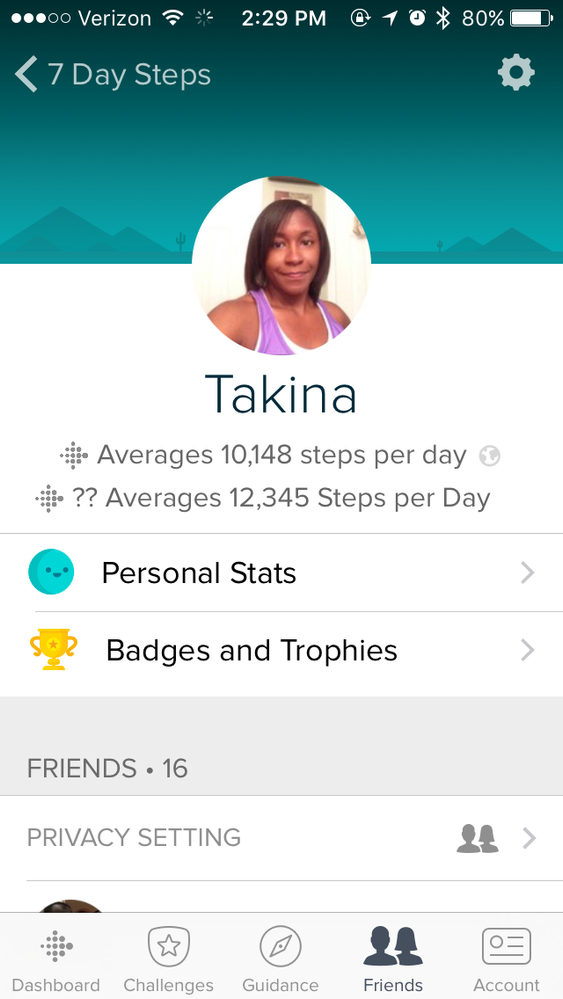
My dashboard is showing two sets of average steps per day. The first (10,148) has the globe (public) icon beside it, the second has question marks ?? before the average (12,345). It's been like this for at least a couple of days that I've noticed..... and hasn't updated although my Surge has synced properly. Anyone know what this means?
 Community Moderator Alumni are previous members of the Moderation Team, which ensures conversations are friendly, factual, and on-topic. Moderators are here to answer questions, escalate bugs, and make sure your voice is heard by the larger Fitbit team. Learn more
Hi @tma7316! Please receive a warm welcome to the Fitbit Family! It's great to see you participating in our Community! 
Wow! that sounds odd, which model of phone are you using? If you can attach a picture that would be great, so I can have a better view of what you have there!
I'll be waiting! 
Want to get more active? ᕙ(˘◡˘)ᕗ Visit Get Moving in the Health & Wellness Forums.
Comparte tus sugerencias e ideas para nuevos dispositivos Fitbit ✍ Sugerencias para Fitbit.

Hi tma!
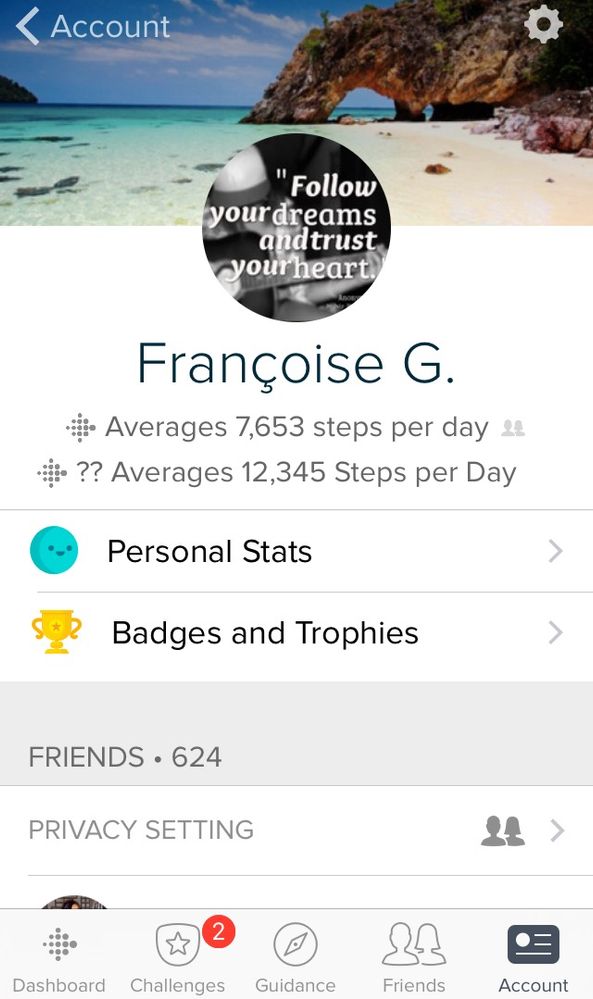
Thank you for posting this question. I'm seeing the same thing on my Fitbit app profile. My profile shows this:
Averages 7,653 steps per day
?? Averages 12,345 Steps per Day
I, too, have been noticing it the last couple days and am guessing it's a result of one of the latest updates. Would like to know if the second figure is a weekly, monthly or YTD average or if it is just a glitch that will be corrected.
Have a good day tma
Community Moderator Alumni are previous members of the Moderation Team, which ensures conversations are friendly, factual, and on-topic. Moderators are here to answer questions, escalate bugs, and make sure your voice is heard by the larger Fitbit team. Learn more
Hi @Françoise! Thanks for popping by the forums!
Thank you for adding your question to this thread, I'm still waiting for the screenshot. But if you have the option to provide it, it'd be great. I'd like to check with you if this is an incoming issue or a change from the last update as you mentioned.
Let me know if you can do so!
Want to get more active? ᕙ(˘◡˘)ᕗ Visit Get Moving in the Health & Wellness Forums.
Comparte tus sugerencias e ideas para nuevos dispositivos Fitbit ✍ Sugerencias para Fitbit.
Hi Yojana!
Thank you for replying. I tried uploading a pic with my post but I wasn't able to. I think because I am posting via my iPhone.
Best Answer
It worked this time. Not sure why it didn't before.
iPhone 5
iOS 10.2.1
Best Answer
Community Moderator Alumni are previous members of the Moderation Team, which ensures conversations are friendly, factual, and on-topic. Moderators are here to answer questions, escalate bugs, and make sure your voice is heard by the larger Fitbit team. Learn more
Hi everybody,
I've seen a number of instances where the following steps resolve this problem, I'd recommend giving them a try.
- Open the Fitbit App > tap the Account button > and tap the tile with your profile at the top.
- Tap the gear icon in the top right-hand corner.
- Tap Location.
- Tap country and add your country.
You also can choose to set your location to private if you don't want others to see your location, but adding a location seems to resolve this issue.
Hope this helps!
