
Join us on the Community Forums!
-
Community Guidelines
The Fitbit Community is a gathering place for real people who wish to exchange ideas, solutions, tips, techniques, and insight about the Fitbit products and services they love. By joining our Community, you agree to uphold these guidelines, so please take a moment to look them over. -
Learn the Basics
Check out our Frequently Asked Questions page for information on Community features, and tips to make the most of your time here. -
Join the Community!
Join an existing conversation, or start a new thread to ask your question. Creating your account is completely free, and takes about a minute.
Not finding your answer on the Community Forums?
- Mark Topic as New
- Mark Topic as Read
- Float this Topic for Current User
- Bookmark
- Subscribe
- Mute
- Printer Friendly Page
Can I get the old dashboard back?
- Mark Topic as New
- Mark Topic as Read
- Float this Topic for Current User
- Bookmark
- Subscribe
- Mute
- Printer Friendly Page
05-25-2016
17:44
- last edited on
06-28-2016
15:04
by
DerrickS


05-25-2016
17:44
- last edited on
06-28-2016
15:04
by
DerrickS
I hate the new dashboard. Terrible. If I wanted to see the tiles, I would sign in on a desktop. I can't see what I want to see on my phone. Appreciate any help.
Moderator Edit: Edited thread title.

I just checked the app on my phone to see my stats and I see I have this new dashboard. Horrible! You have to stop what you are doing to read your stats where the original one was easy to read at a glance. I just called the 800 number and told them I wanted my old one back and why did they take it upon themselves to force us to use this. I was told there is no way to go back to the original dashboard. I am sending my Fitbit back with a letter and I want a full refund. I am going to switch to another company's device having used Fitbit for many many years. It's fine if they want to offer new "improvements" but let people have the option of continuing with a previous system that works. "If it ain't broke....."

Sent from Yahoo Mail on Android
recharge every 5 days, so time to look at another form of monitor. I loved
my fitbit, but I really don't like this new dashboard. Time to look
elsewhere. Thank you

i want to old display back.. i kept the old one for months even after the changes. There was an option to keep it at settings but now I can not see that option anymore.. please give me back my old display. Thanks!


I hate the new dashboard! I have been using the old one since July 2016. If they do not bring back the option to use it I will be purchasing a Samsung Tracker and throwing my Fitbit Alta in the garbage.
BRING BACK OPTION TO USE OLD DASHBOARD!!!!!

Sorry to say that the option to change back to the old dashboard no longer exists..We have been abandoned by the manufacturer..Customer care is non existent....GARMON do a fine monitor and the battery life is way better..I have never got more than 3 days on my charge hr and that's with sync and Bluetooth off all day..
They have our money and theydon't give a **ahem** about us..
Please try the following to get your Old Dashboard back:
1) Click on Account icon (upper right hand side of screen on your smartphone). 2) Once you're on the Account screen, click on Advanced Settings. 3) When on Advanced Settings screen, click on "Switch back to Old Dashboard" on top of the page. 4) You're Done! You should now have your Old Dashboard back. - Hope this has helps. -Chubbycat (Aka: Diana L.)
Dashboard back!
![Screenshot_20170506-094009[1].png](https://community.fitbit.com/t5/image/serverpage/image-id/58765iFE1F455D02E107A1/image-size/large?v=v2&px=999 "Screenshot_20170506-094009[1].png")
![Screenshot_20170506-094021[1].png](https://community.fitbit.com/t5/image/serverpage/image-id/58766iEBBD5D9879F7B157/image-size/large?v=v2&px=999 "Screenshot_20170506-094021[1].png")
![Screenshot_20170506-094027[1].png](https://community.fitbit.com/t5/image/serverpage/image-id/58767i28BD17123454B378/image-size/large?v=v2&px=999 "Screenshot_20170506-094027[1].png")
 Best Answer
Please take a look at my last post (about 2 minutes ago). I have included instructions on how to get your Old Dashboard back. It should help.
I've been going back and forth from the New Dashboard and back to the Old... just to make sure that my instructions work. It does!
-Chubbycat (Diana L.)
Best Answer
 Fitbit Product Experts Alumni are retired members of the Fitbit Product Expert Program. Learn more
If you are running the most recent version of the iOS app, that function is no longer available unfortunately. (It was removed some time ago)
Here is screen shot of current app:
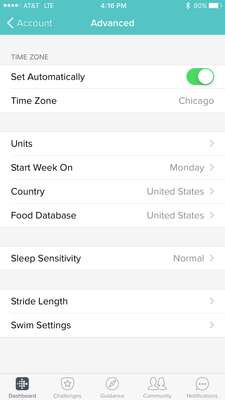
You can search the feature request section, and place your vote for this to be an option again for users.
Kelly | Oklahoma
Alta HR, Blaze, Flex 2, Charge 2, Charge, and Aria * IPhone 7+
I do not have the icons in your instructions. My display only has two lines
of icons not three. I do not show the settings icon. I have done an update
... so I have the latest version so that is not the issue.
I'm sorry that my instructions are Not helping you get the Old Dashboard back. (I, too, have the latest Update.) I am using an android smartphone.
-Chubbycat (Diana L.)
Best Answer
s5 the only option in "account" is to go to to advanced settings.And no
choice of dashboard is available there...We are all stuck with an
unfriendly non intuitive crap dashboard. ....from a non customer friendly
company....
I have loved my Fit bit up till now . I have been very successful
with it as well.
The last few days I haven't bothered to even sync it.
It was the 1st thing I would do in the morning and would monitor
throughout the day .
