
Join us on the Community Forums!
-
Community Guidelines
The Fitbit Community is a gathering place for real people who wish to exchange ideas, solutions, tips, techniques, and insight about the Fitbit products and services they love. By joining our Community, you agree to uphold these guidelines, so please take a moment to look them over. -
Learn the Basics
Check out our Frequently Asked Questions page for information on Community features, and tips to make the most of your time here. -
Join the Community!
Join an existing conversation, or start a new thread to ask your question. Creating your account is completely free, and takes about a minute.
Not finding your answer on the Community Forums?
- Mark Topic as New
- Mark Topic as Read
- Float this Topic for Current User
- Bookmark
- Subscribe
- Mute
- Printer Friendly Page
Not receiving text or calls since I grading to iPhone 8
- Mark Topic as New
- Mark Topic as Read
- Float this Topic for Current User
- Bookmark
- Subscribe
- Mute
- Printer Friendly Page
- « Previous
- Next »



 Community Moderator Alumni are previous members of the Moderation Team, which ensures conversations are friendly, factual, and on-topic. Moderators are here to answer questions, escalate bugs, and make sure your voice is heard by the larger Fitbit team. Learn more
Hello @J3kfarms, I hope you're doing well, thanks for taking the time to reply. It's nice to see you around too @C0URTN3Y, I appreciate your help with this situation. 
@J3kfarms, I appreciate you have already tried the previous troubleshooting steps. If you haven't done it yet, please take @C0URTN3Y's suggestion in consideration and go to your phone Settings > Notifications > Fitbit and Settings > Notifications > Messages and check that both look this way:

If your settings are already like this, please disable them, restart your phone and enable them back.
I hope this can be helpful, give it a try and keep me posted!


I have tried all of the above suggestions. I have removed my Charge 2 device, restarted my phone, unpaired, removed all other Bluetooth devices and checked all the settings. Nothing works. Very frustrating since one of the selling points for buying this Fitbit was the call and text notifications. Please help! Thank you!
 Best Answer
Community Moderator Alumni are previous members of the Moderation Team, which ensures conversations are friendly, factual, and on-topic. Moderators are here to answer questions, escalate bugs, and make sure your voice is heard by the larger Fitbit team. Learn more
Best Answer
Community Moderator Alumni are previous members of the Moderation Team, which ensures conversations are friendly, factual, and on-topic. Moderators are here to answer questions, escalate bugs, and make sure your voice is heard by the larger Fitbit team. Learn more
Hello @Cheriebrinkley, I hope you're having a great day, thanks for joining the Fitbit Community!
Thanks for bringing this to my attention. I appreciate you have already tried the suggestions provided above in hopes to try to fix this issue affecting Notifications. At this moment, as you have already restarted your phone and re-paired your tracker in your account, I would like to suggest you to reset Notifications from the Fitbit app following these steps:
- Go to the Bluetooth settings on your phone and tap on tracker. Then tap on Forget this Device.
- Force-close the Fitbit app by double tapping the home button on your phone and swiping up the app.
- Open the app again and tap on Account > Your Tracker > Notifications. You will receive the following Pop-up:
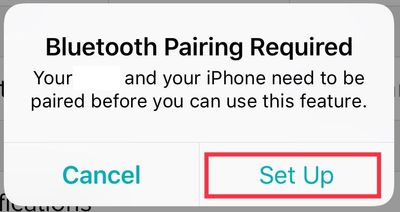
- Then, once you tap on Set Up, the app will begin setting up your tracker with the Bluetooth on your phone, which will prompt the next pop-up:
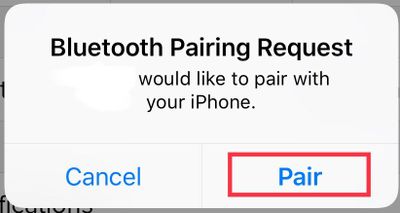
- Tap Pair
- Once you get back to the tracker options, tap on Notifications an enable the ones you'd like to receive.
Additionally, please make sure your Charge 2 is not currently in the "do not disturb" mode by pressing down the button on the side for 2 seconds, if the DND is enabled you will see a message and a vibration indicating it has been turned off.
I hope this can be helpful, give it a try and keep me posted!
Best Answer
Sent from Cherie Brinkley's iPhone
Best Answer
Community Moderator Alumni are previous members of the Moderation Team, which ensures conversations are friendly, factual, and on-topic. Moderators are here to answer questions, escalate bugs, and make sure your voice is heard by the larger Fitbit team. Learn more
Hello @Cheriebrinkley, I hope you're doing well, thanks for taking the time to reply.
I appreciate you have tried the troubleshooting steps I've provided and for letting me know you're able to receive call Notifications. That means, something on the iMessage settings is acting up. This time I would like to suggest you to go to your phone Settings > Notifications > Messages and uncheck the boxes for the following:
- Allow Notifications
- Show on Lock Screen
- Show in History
Then, restart your phone. After that, open again Settings > Notifications > Messages and enable the boxes back. Open the Fitbit app and sync your tracker, then monitor it to check if you start receiving text notifications.
I hope this can be helpful, give it a try and let me know the outcome!
Best Answer
I'm not one who normally joins these chats but I must say, enabling "Show in History" of the fitbit setting or even the messaging settings will allow the text notifications to come through, however you will NOT see the notifications on your phone. It's very frustrating. This was not a problem on my iPhone 5 or 6 but has been since day one my iPhone 6s
Best Answer

- « Previous
- Next »