
Join us on the Community Forums!
-
Community Guidelines
The Fitbit Community is a gathering place for real people who wish to exchange ideas, solutions, tips, techniques, and insight about the Fitbit products and services they love. By joining our Community, you agree to uphold these guidelines, so please take a moment to look them over. -
Learn the Basics
Check out our Frequently Asked Questions page for information on Community features, and tips to make the most of your time here. -
Join the Community!
Join an existing conversation, or start a new thread to ask your question. Creating your account is completely free, and takes about a minute.
Not finding your answer on the Community Forums?
- Mark Topic as New
- Mark Topic as Read
- Float this Topic for Current User
- Bookmark
- Subscribe
- Mute
- Printer Friendly Page
Step counter disappeared off app
ANSWERED- Mark Topic as New
- Mark Topic as Read
- Float this Topic for Current User
- Bookmark
- Subscribe
- Mute
- Printer Friendly Page

Please help
Answered! Go to the Best Answer.
Accepted Solutions

Che C., Production manager, Silver Screen Design

SunsetRunner
Hi @Stephhy
Moved your question to the corresponding section to increase the chance of getting a solution. 
Check out the Fitbit Article: URL: How do I change my dashboard on the Fitbit app for iOS?
Hope it helps.
 Best Answer
Me too!
My wife has a Fitbit and it was all working fine. Just got myself one and have the steps and sleep tiles have disapeared. Tried logging out (but now that option has disapeared as well. Tried deleting.
Getting really fed up and ready to throw it into the bin!
Thanks
Karl


 Community Moderator Alumni are previous members of the Moderation Team, which ensures conversations are friendly, factual, and on-topic. Moderators are here to answer questions, escalate bugs, and make sure your voice is heard by the larger Fitbit team. Learn more
@knclare @JaniceO That's really weird. Have you tried the following?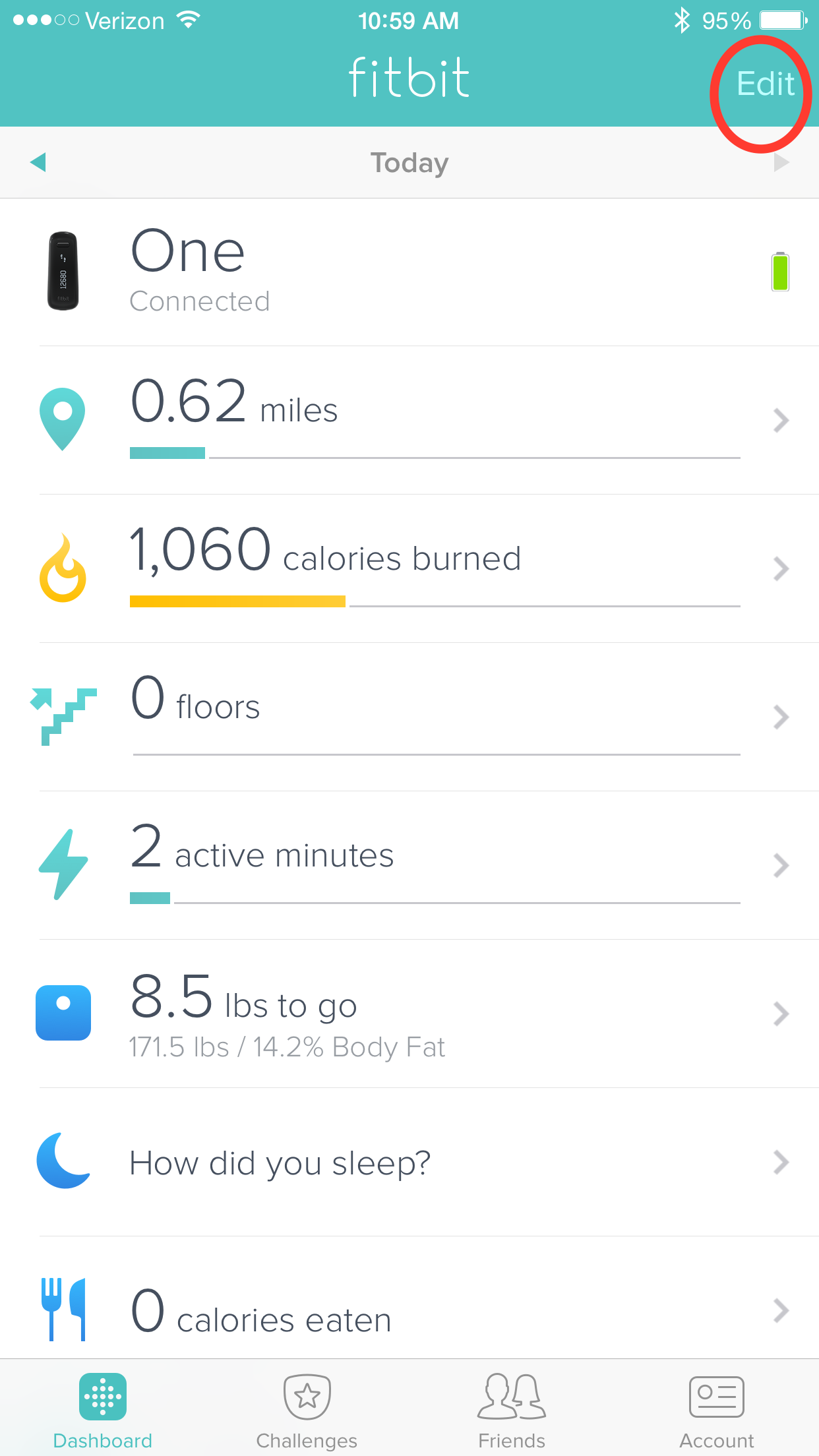
2. Click the dashboard button in the bottom left-hand corner.
3. Click the Edit button at the top right-hand corner.
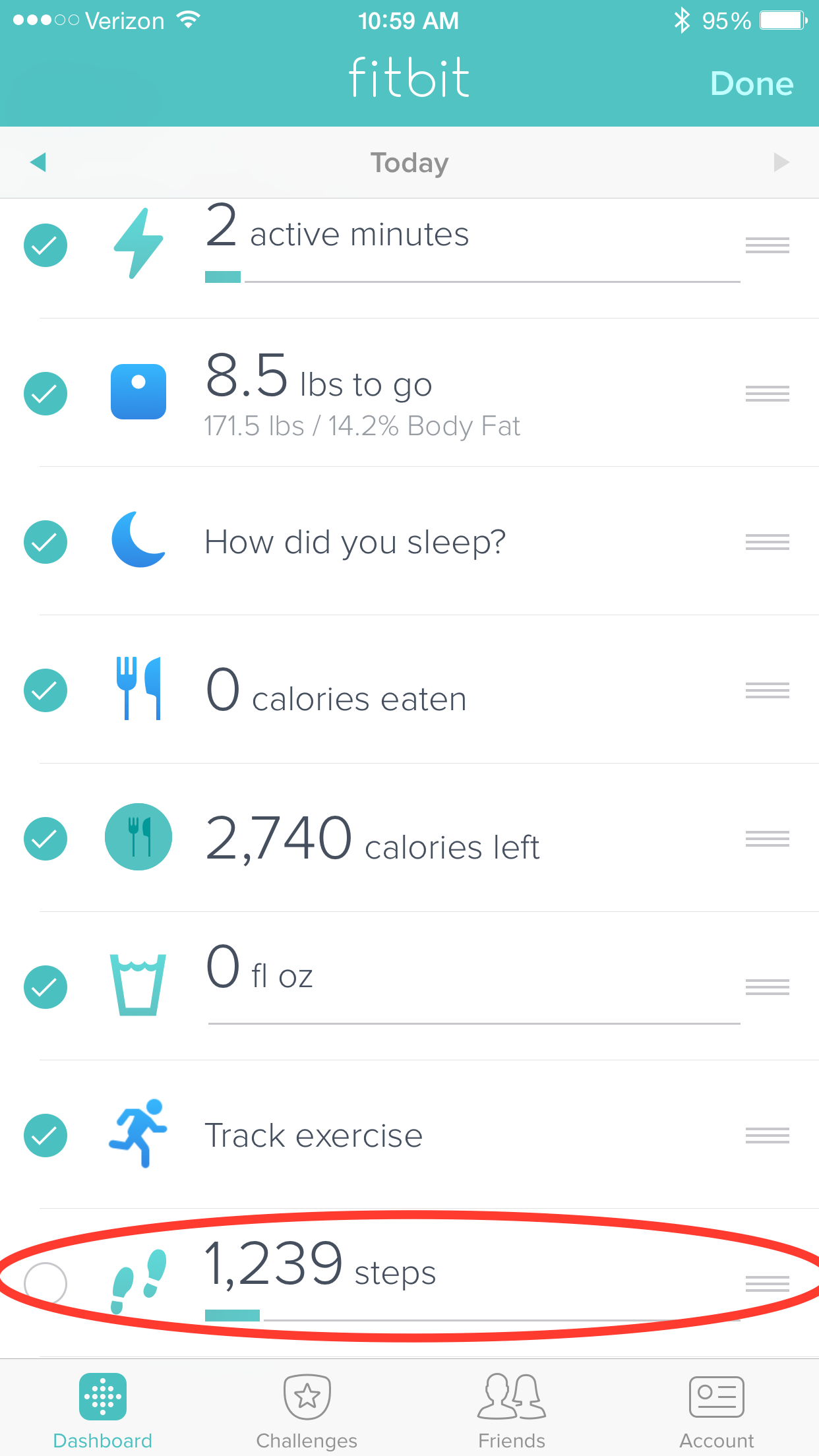
5. Make sure it is checked.
6. If you want, select the three lined icon on a tile to drag and drop to a preferred location.
7. Click the Done button (where the Edit button once was).
Keep me posted if this helps you out!
 Community Moderator Alumni are previous members of the Moderation Team, which ensures conversations are friendly, factual, and on-topic. Moderators are here to answer questions, escalate bugs, and make sure your voice is heard by the larger Fitbit team. Learn more
@Klmnop Have you tried re-pairing your tracker to your account using the replacement setup process?
Keep me posted if this helps!
Best Answer
For some reason my calories burned is moving so it's syncing something somewhere somehow. I don't get it

My dashboard is missing steps and sleep. When I click edit there is nothing else at the bottom to add. What do I need to do to get sleep and steps back?
![IMG_2783[1].PNG](https://community.fitbit.com/t5/image/serverpage/image-id/20036i5E04657A5AE2AB1F/image-size/original?v=mpbl-1&px=-1 "IMG_2783[1].PNG")
![IMG_2784[1].PNG](https://community.fitbit.com/t5/image/serverpage/image-id/20037i789C8D67260CEC1C/image-size/original?v=mpbl-1&px=-1 "IMG_2784[1].PNG") Best Answer
Best Answer
Che C., Production manager, Silver Screen Design
Community Moderator Alumni are previous members of the Moderation Team, which ensures conversations are friendly, factual, and on-topic. Moderators are here to answer questions, escalate bugs, and make sure your voice is heard by the larger Fitbit team. Learn more
@tekpere to expand a little bit on @CheChristi's post, please use the replacement setup process to re-pair your tracker to your account.
Also, please be sure that you have updated the Fitbit iOS App to version 2.9 as well!
Please keep me posted if this helps and welcome to the Fitbit Community.
Best Answer
Mine, too, on PC as well. In several days of trying to set up 2 flexes and 1 charge HR (family members), I've come to the sad conclusion these Fitbit devices are buggy pieces of **ahem**. I'm ready to chuck all of them, quite honestly, as are my family.
The remedies for these annoying little issues are becoming increasingly convoluted and hit-or-miss. "Try this and see if it works! Thanks!"; "Do the replacement setup process to re-pair your tracker to your account after updating to 2.9" "Then keep me posted. Thanks!"
WTF??
How am I supposed to leave 2 elderly parents in charge of these devices without the devices failing after 2 **ahem**ing days and my parents dumping them in a bin?
thanks! It worked!

How do u do that with a Fitbit Alta I tried to do that and it doesn't work
Best Answer
This worked but lost all my history of course. But this worked when everything else failed. good job!
Best Answer Community Moderator Alumni are previous members of the Moderation Team, which ensures conversations are friendly, factual, and on-topic. Moderators are here to answer questions, escalate bugs, and make sure your voice is heard by the larger Fitbit team. Learn more
Hello @Grinchy67, have a warm welcome to the Fitbit Community. 
I appreciate your participation in the Forums and for sharing your experience with us. I appreciate you have joined the conversation and let us know your issue has now been resolved. Please note that the information you sync from your device gets stored in our Servers and not on your mobile device. Additionally, your Fitbit device can store up to 7 days of detailed information in case you're unable to sync frequently.
Thanks for your patience and understanding, have a great day.
 Best Answer
I tried that and it didn't help. I also verified that I'm running the most current version of the software in both devices, my Luxe and my Note 20 Ultra. I don't even see it as an option to add and I went through both the lower screens under the edit function as well as the "discover" tabs and I didn't see it there, either.
Is there any other suggestions?
Best Answer