
Join us on the Community Forums!
-
Community Guidelines
The Fitbit Community is a gathering place for real people who wish to exchange ideas, solutions, tips, techniques, and insight about the Fitbit products and services they love. By joining our Community, you agree to uphold these guidelines, so please take a moment to look them over. -
Learn the Basics
Check out our Frequently Asked Questions page for information on Community features, and tips to make the most of your time here. -
Join the Community!
Join an existing conversation, or start a new thread to ask your question. Creating your account is completely free, and takes about a minute.
Not finding your answer on the Community Forums?
- Mark Topic as New
- Mark Topic as Read
- Float this Topic for Current User
- Bookmark
- Subscribe
- Mute
- Printer Friendly Page
What does the pace mean in the exercise details?
ANSWERED- Mark Topic as New
- Mark Topic as Read
- Float this Topic for Current User
- Bookmark
- Subscribe
- Mute
- Printer Friendly Page
07-06-2014
14:12
- last edited on
07-03-2020
13:14
by
LizzyFitbit


07-06-2014
14:12
- last edited on
07-03-2020
13:14
by
LizzyFitbit
I don't understand what the pace is measuring? Feet adn inches? If so, per what? Thanks for any replies!
Moderator Edit: Clarified subject
Answered! Go to the Best Answer.

Accepted Solutions

 Fitbit Product Experts Alumni are retired members of the Fitbit Product Expert Program. Learn more
Pace is minutes per km or mile. Divide that into 60 minutes and you have your speed/hour.
Ionic (OS 4.2.1, 27.72.1.15), Android App 3.45.1, Premium, Phone Sony Xperia XA2, Android 9.0

Pace is measuring how fast you are moving per kilometre or mile (depending what measurements you are using).
So if your pace is 9' 23" and you have your measurement set to metric, it means you have taken 9 mins & 23 secs to walk/run the last kilometre.
Lower values mean you are travelling faster. Higher values mean you being a snail 😉
Fitbit Product Experts Alumni are retired members of the Fitbit Product Expert Program. Learn more
Pace is minutes per km or mile. Divide that into 60 minutes and you have your speed/hour.
Ionic (OS 4.2.1, 27.72.1.15), Android App 3.45.1, Premium, Phone Sony Xperia XA2, Android 9.0
I get the mins per km part, but what's the bit in feet and inches? I thought it was the distance of my steps, but mine says 10' 13" and this seems a lot for the length of my pace.
Also, why does it report the mins/km correctly (metric), but the pace as imperial measurements. I've selected metric in my settings...
-------
Okay. So anyone reading my reply probably thought I'd lost the plot! Having been brought up on imperial measurements, to me 10' 13" means 10 foot, 13 inches. Not 10 minutes, 13 seconds!
Perhaps to other people in the world using ' and " always means minutes and seconds, but not to us British folk 🙂
On second reading of Colin's reply I realised my obvious mistake. 
Being in the software business myself. It just goes to show that no matter how hard you try to make a user interface as intuitive as possible. It is very difficult for one interface to account for all regions in the world.

I still didn't get it! I have set it to miles. Mine says 19' 46". If I divide 81/ by 19.6 (rounded 19"46"), I get 4.1mph. My net for this morning was 4.1 miles in roughly 1:21:10 hours. O.K., it works out. But what a complicated process just to find out my pace! Why should I have to open up a calculator to see how fast I am going?
Fitbit Product Experts Alumni are retired members of the Fitbit Product Expert Program. Learn more
@pacrimjim wrote:I still didn't get it! I have set it to miles. Mine says 19' 46". If I divide 81/ by 19.6 (rounded 19"46"), I get 4.1mph. My net for this morning was 4.1 miles in roughly 1:21:10 hours. O.K., it works out. But what a complicated process just to find out my pace! Why should I have to open up a calculator to see how fast I am going?
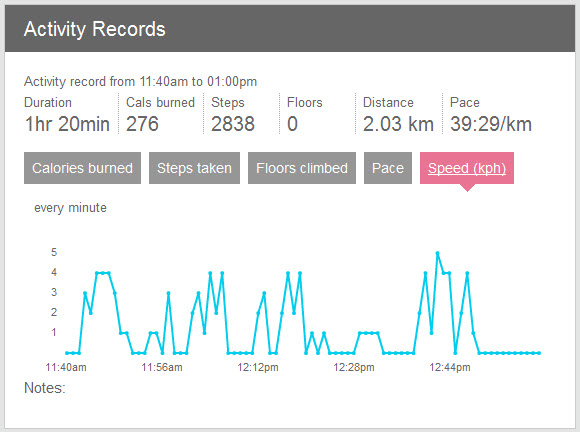
@pacrimjimI agree with you. A few of us have contacted support to change that to in our Activity Logs in the Dashboard because it is more meaningful to most Fitbitters. You may have also noted if you click on your profile picture and your Activity Records (timer based) you can examine speed and pace. If you click on the small white archive option you can view your history. This shows in the black bar area when you examine today's records. The weakness in this graph is that Fitbit calculations round up to the nearest speed increment, no decimal portions and that has been reported as well.
Ionic (OS 4.2.1, 27.72.1.15), Android App 3.45.1, Premium, Phone Sony Xperia XA2, Android 9.0

I'm new at this, so I'm still figuring things out. The one thing that still mystifies me is Pace. For me it looks like 20'34", which I now gather means that it takes me 20 minutes 34 seconds per mile. I'm pretty sure I walk faster than that - closer to 15 minutes/mile. So that means I should measure my stride to correct that?
Pace is measuring how fast you are moving per kilometre or mile (depending what measurements you are using).
So if your pace is 9' 23" and you have your measurement set to metric, it means you have taken 9 mins & 23 secs to walk/run the last kilometre.
Lower values mean you are travelling faster. Higher values mean you being a snail 😉


thank you for clear answer !

Hi,
I have the same question with pace conversion.
Do all simple users without contacting administrators have access to this data as shown in picture?
Or only premium users? I mean viewing not only pace 6'23" but also kmph.
Thanks for help.

This makes total sense, except that my pace shows 93'44"...??? I average about a 16-17 minute mile when I walk, so this make ZERO SENSE to me. Obviously something is off in my settings...how do I fix?

At first I thought it was feet and inches as well, which was annoying me. And also per what.
Explains well above, and just to add, minutes and seconds also use the same symbols when using coordinates.
http://www.rapidtables.com/convert/number/degrees-minutes-seconds-to-degrees.htm
Thanks for the answer.

SunsetRunner
Lol me too. I thought I was be recorded I only walked 30 feet not 30 minute miles. I was annoyed because I took my iPhone and knew I went over a mile not 30 feet. Now. Know it means 30 min mile, but I still every time I see it I think feet and inches, because that is the nomenclature used in the United States for distance, feet(') and inches (").

This is very well put. I knew the answer but not how to explain it. Makes me much happier when sections of my cycling read 3'4". I love my blaze but it lacking a GPS makes it cumbersome; would prefer not dragging phone with me or having to set activity while still in range of wi fi ( blue tooth alone is limited in stats).


Yes, I think adjusting the stride is the answer. This post is old enough, you probably did it. How did it turn out?
You can adjust your stride manually. Say your stride is "36 inches". That means you need 1760 steps in a mile. If your stride in your profile is set to 34 inches, Fitbit is just counting steps, so thinks you need more than 1760 steps for a mile (about 1900 steps).
If your Fitbit doesn't have a GPS, I don't think your Fitbit knows how to count miles, so it counts steps. If your stride in your profile is set to 36 inches, it counts ONE mile when you take 1760 steps. If your stride in your profile is set to 34 inches, then it counts 1864 steps you've taken, then counts that as ONE mile.

minutes' seconds" is actually correct. Both height and time use this notation, unfortunately this is the world we live in...


 Community Moderator Alumni are previous members of the Moderation Team, which ensures conversations are friendly, factual, and on-topic. Moderators are here to answer questions, escalate bugs, and make sure your voice is heard by the larger Fitbit team. Learn more
Hello @Michellevp and @prost22, I hope you're doing well, thanks for joining the conversation. 
@prost22 I appreciate your participation in the forums and for explaining how stride length and pace relate. I'm sure your explanation will be very helpful for many members of the Community.
@Michellevp, I understand it's a bit difficult to adjust to the nomenclature of minutes (') and seconds (") as they are the same as with feet and inches, It took me a while to get accustomed but then it's easier to tell apart.
Thanks again for your participation in the forums, if there's anything else you might want to add or if there's anything else I can do for you, please feel free to reply.

