
Join us on the Community Forums!
-
Community Guidelines
The Fitbit Community is a gathering place for real people who wish to exchange ideas, solutions, tips, techniques, and insight about the Fitbit products and services they love. By joining our Community, you agree to uphold these guidelines, so please take a moment to look them over. -
Learn the Basics
Check out our Frequently Asked Questions page for information on Community features, and tips to make the most of your time here. -
Join the Community!
Join an existing conversation, or start a new thread to ask your question. Creating your account is completely free, and takes about a minute.
Not finding your answer on the Community Forums?
- Community
- Product Help Forums
- Ace & Family Accounts
- Delete child profile
- Mark Topic as New
- Mark Topic as Read
- Float this Topic for Current User
- Bookmark
- Subscribe
- Mute
- Printer Friendly Page
- Community
- Product Help Forums
- Ace & Family Accounts
- Delete child profile
Delete child profile
ANSWERED- Mark Topic as New
- Mark Topic as Read
- Float this Topic for Current User
- Bookmark
- Subscribe
- Mute
- Printer Friendly Page

Set up child account for daughter before realising it’s just for Ace users (has Alta). How do I delete the profile? Looked everywhere & cannot find an option to remove this from account.
Answered! Go to the Best Answer.
 Best Answer
Accepted Solutions


 Community Moderator Alumni are previous members of the Moderation Team, which ensures conversations are friendly, factual, and on-topic. Moderators are here to answer questions, escalate bugs, and make sure your voice is heard by the larger Fitbit team. Learn more
@Hanah81 Welcome to the Community. In your family account, under children swipe left on the child you want to delete, you should see 'Remove.' Removing a child from the family account also deletes the child’s Fitbit account and all related data.
Actively managing your weight? Find accountability buddies on the Manage Weight board
Community Moderator Alumni are previous members of the Moderation Team, which ensures conversations are friendly, factual, and on-topic. Moderators are here to answer questions, escalate bugs, and make sure your voice is heard by the larger Fitbit team. Learn more
@Hanah81 Welcome to the Community. In your family account, under children swipe left on the child you want to delete, you should see 'Remove.' Removing a child from the family account also deletes the child’s Fitbit account and all related data.
Actively managing your weight? Find accountability buddies on the Manage Weight board

Is there a way to immediately delete a child's account?
I swiped to remove the account and clicked on approving that action in the email that was sent to me.
When I went back to my FitBit app, the child's account still shows up. When I go to delete the account again, a window pops up on my phone stating "A delete request for this child's account has already been sent."
It appears that I'm stuck in the seven day grace period that is described in the email that was sent to me. I accidentally created four accounts for the same child, thinking that the username I entered was already taken. I was expecting a confirmation that the account was made, but didn't so I kept entering the information with different usernames. Now I'm stuck with too many accounts and I can't get my phone to connect to the Fitbit Ace.
thanks.
Best Answer
Community Moderator Alumni are previous members of the Moderation Team, which ensures conversations are friendly, factual, and on-topic. Moderators are here to answer questions, escalate bugs, and make sure your voice is heard by the larger Fitbit team. Learn more
@beastmaster4 I'm afraid it does take 7 days to permanently delete.
Actively managing your weight? Find accountability buddies on the Manage Weight board

This is really frustrating. It was really confusing and i made a mistake and now I have to wait seven days to join my actual family account made correctly by my husband?! Why seven days?!

The whole family account thing is under-tested, poorly executed, and currently not fit for purpose in my opinion.
I had a fitbit Ace for my son and it's been sent back due to the poor software.
 Community Moderator Alumni are previous members of the Moderation Team, which ensures conversations are friendly, factual, and on-topic. Moderators are here to answer questions, escalate bugs, and make sure your voice is heard by the larger Fitbit team. Learn more
Hello @buzzbuzzbee, I'm sorry to see this has caused any inconvenience. The process takes 7 days in case you change your mind and you'd still like to recover the child account. For changes to the way this feature works, you could also post an idea in the Feature Suggestion board.
Thanks for taking the time to share your feedback as well @tallbird, I'll be around if you have any questions.
And thanks again for participating in the Community.
Best Answer
While I join others in their frustration about the 7 day “Grace” period for deleting accounts (which is unmerited), I want to restore or recover the account I was trying to delete ...
however, as I read that the option is to click on “switch to kid view” - and follow the prompt to recover - get the green box saying the switch is happening, then nothing else but a return to the unusable profile.
What can can I do to restore the child’s account?
Best Answer
Community Moderator Alumni are previous members of the Moderation Team, which ensures conversations are friendly, factual, and on-topic. Moderators are here to answer questions, escalate bugs, and make sure your voice is heard by the larger Fitbit team. Learn more
Hello @avandop, thanks for reporting this, and welcome to the Community forums.
Just as you mentioned, the account should be recovered by switching to kid view in the Fitbit app and taping Recover. If you haven't done so already, please try to perform a quick restart of the app by looging out, restarting your phone and logging back in, then try to perform the same steps once more to restore the child account.
Please keep me posted on the outcome, and thanks again for the feedback regarding the 7 day grace period. .
Best Answer
@DavideFitbit- so good news. I had done what you suggested, restarting app, restarting phone ... hadn't worked before. BUT now - it did! I was able to see the recovery request, and got the account recovered!
Thanks.
Best Answer
Community Moderator Alumni are previous members of the Moderation Team, which ensures conversations are friendly, factual, and on-topic. Moderators are here to answer questions, escalate bugs, and make sure your voice is heard by the larger Fitbit team. Learn more
 Best Answer
Hi I have done the same, my son has upgraded to a charge 2 and I’m trying to set up his ace to my daughters account but it’s not recognising the ace when going through setup. Do I need to wait a week then the ace will be able to sync to her iPad and account? Thanks
Best Answer
Community Moderator Alumni are previous members of the Moderation Team, which ensures conversations are friendly, factual, and on-topic. Moderators are here to answer questions, escalate bugs, and make sure your voice is heard by the larger Fitbit team. Learn more
Hello @Clarawebb, it's good to see you visiting the forums for the first time.
The 7 day period is only applicable when you're deleting a child's account. In this case you're just trying to set up the Ace device to your daughter's account, so you shouldn't need to wait. Just to confirm, have you created a family account, and you're managing your child's account as well? Does your daughter have a child account, or is it an adult account?
Also make sure the Fitbit app is updated to the latest version, and try following the steps mentioned above ( try to perform a quick restart of the app by looging out, restarting your phone and logging back in, then try to perform the same steps once more to set up the Fitbit Ace).
I hope this helps, keep me posted.
Best Answer
Thanks I have set up her on child account in my family but the ace doesn’t seem to be picking up on her app. I thought it becausetge ace is still registered to my sons old account. Is there anyway to restart the ace xx
Best Answer
Community Moderator Alumni are previous members of the Moderation Team, which ensures conversations are friendly, factual, and on-topic. Moderators are here to answer questions, escalate bugs, and make sure your voice is heard by the larger Fitbit team. Learn more
Thank you for your reply @Clarawebb, the Fitbit Ace should be removed from your son's account automatically once you complete the set up process on your daughter's child account. However, if you're still having trouble to complete the set up process on your daughter's account, you can certainly try performing a restart, or following the steps here: Why can't I set up my Fitbit device?
Also check if the device she's using is currently listed as compatible.
I hope this helps.
Best Answer
Can you pair an Alta HR to a family account in the same way you connect an Ace? One son has an Ace, so that is connected fine. My older son has an Alta HR which, I would also like to connect to the family account...
Best Answer
Community Moderator Alumni are previous members of the Moderation Team, which ensures conversations are friendly, factual, and on-topic. Moderators are here to answer questions, escalate bugs, and make sure your voice is heard by the larger Fitbit team. Learn more
Hello @TrickyFOTS, thank you for your question, and welcome to the Community forums.
The family account is available for users across all devices (Alta HR as well), but Fitbit Ace is the only tracker available for child accounts. You can also create a child account without a tracker using MobileTrack.
I hope this helps.
Best Answer
I tried to swipe left to delete my child's account, but it did not give me an option to delete. Very frustrating trying to set this up properly. My daughter has a Charge 2, not an Ace. Makes her child profile worthless. Need to delete and start over.
I am not even getting an option to remove my child. I have been trying to delete my son’s name and family so I can start again, but it is not working at all. I am super frustrated by this as none of his data is syncing and he is listed seven times since it wasn’t showing up. It literally does not give me the options presented in this thread.
Best Answer
Community Moderator Alumni are previous members of the Moderation Team, which ensures conversations are friendly, factual, and on-topic. Moderators are here to answer questions, escalate bugs, and make sure your voice is heard by the larger Fitbit team. Learn more
Thank you for your reply @jwm8238, and welcome to the forums @AmieConger.
You should be able to delete a child your the family account by following these steps. Try tapping just for a couple of seconds on the child's name and you should be able to get this option:
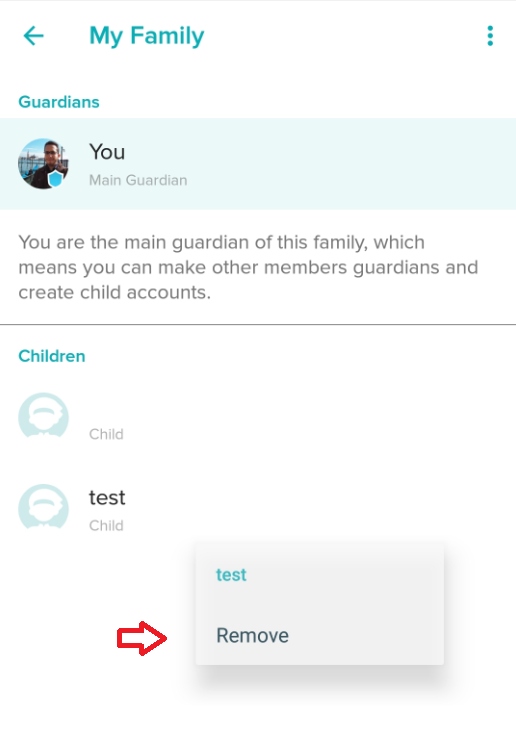
Please keep us posted if you're still not able to get the "Remove" option.
