
Join us on the Community Forums!
-
Community Guidelines
The Fitbit Community is a gathering place for real people who wish to exchange ideas, solutions, tips, techniques, and insight about the Fitbit products and services they love. By joining our Community, you agree to uphold these guidelines, so please take a moment to look them over. -
Learn the Basics
Check out our Frequently Asked Questions page for information on Community features, and tips to make the most of your time here. -
Join the Community!
Join an existing conversation, or start a new thread to ask your question. Creating your account is completely free, and takes about a minute.
Not finding your answer on the Community Forums?
- Community
- Platform
- Android App
- Re: Adding custom foods nutrition info
- Mark Topic as New
- Mark Topic as Read
- Float this Topic for Current User
- Bookmark
- Subscribe
- Mute
- Printer Friendly Page
- Community
- Platform
- Android App
- Re: Adding custom foods nutrition info
Adding custom foods nutrition info
ANSWERED- Mark Topic as New
- Mark Topic as Read
- Float this Topic for Current User
- Bookmark
- Subscribe
- Mute
- Printer Friendly Page

SunsetRunner
Answered! Go to the Best Answer.
Accepted Solutions



 Community Moderator Alumni are previous members of the Moderation Team, which ensures conversations are friendly, factual, and on-topic. Moderators are here to answer questions, escalate bugs, and make sure your voice is heard by the larger Fitbit team. Learn more
Hi there @SunsetRunner, thank you for letting us know which type of device you are using. You are right, so far is not possible to enter a decimal point when you are adding a custom food and thank you for bring this feedback to our attention.
As a workaround, you can use the web-based Dashboard to enter your custom food, since from the web Dashboard version you can enter decimals at the moment to add nutritional facts. You can do this from your Food Page and by typing on the search bar a new option will appear to Add Custom Food. Just select the option to Add Nutritional Information and a similar screen as the screenshot shows, should appear.
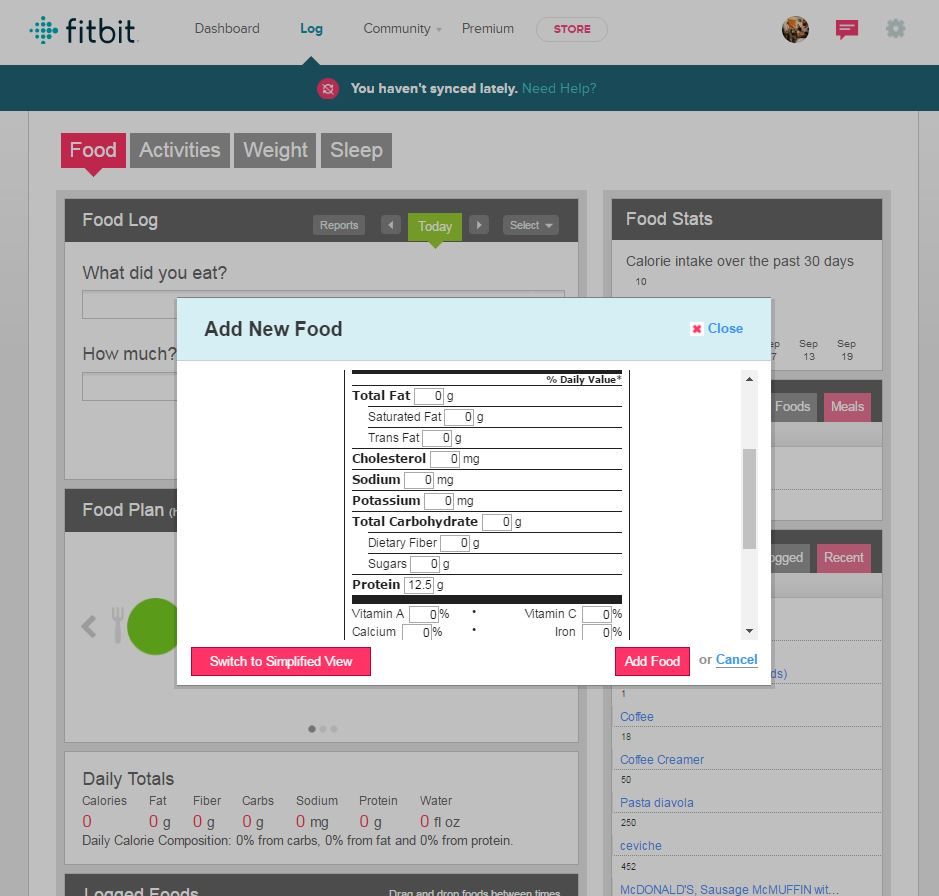
Note this is also an idea on our Suggestion board, so perhaps you can share your vote and leave your comments here: Decimal point when adding custom foods on app. By supporting this idea you help it grows in popularity and be implemented in a near future.
Hope this workaround helps in the meantime and let me know if you have questions.
"Great things are done by a series of small things brought together.” What's Cooking?
 Community Moderator Alumni are previous members of the Moderation Team, which ensures conversations are friendly, factual, and on-topic. Moderators are here to answer questions, escalate bugs, and make sure your voice is heard by the larger Fitbit team. Learn more
Community Moderator Alumni are previous members of the Moderation Team, which ensures conversations are friendly, factual, and on-topic. Moderators are here to answer questions, escalate bugs, and make sure your voice is heard by the larger Fitbit team. Learn more
Community Moderator Alumni are previous members of the Moderation Team, which ensures conversations are friendly, factual, and on-topic. Moderators are here to answer questions, escalate bugs, and make sure your voice is heard by the larger Fitbit team. Learn more
Hi there @SunsetRunner, thank you for letting us know which type of device you are using. You are right, so far is not possible to enter a decimal point when you are adding a custom food and thank you for bring this feedback to our attention.
As a workaround, you can use the web-based Dashboard to enter your custom food, since from the web Dashboard version you can enter decimals at the moment to add nutritional facts. You can do this from your Food Page and by typing on the search bar a new option will appear to Add Custom Food. Just select the option to Add Nutritional Information and a similar screen as the screenshot shows, should appear.
Note this is also an idea on our Suggestion board, so perhaps you can share your vote and leave your comments here: Decimal point when adding custom foods on app. By supporting this idea you help it grows in popularity and be implemented in a near future.
Hope this workaround helps in the meantime and let me know if you have questions.
"Great things are done by a series of small things brought together.” What's Cooking?
 Community Moderator Alumni are previous members of the Moderation Team, which ensures conversations are friendly, factual, and on-topic. Moderators are here to answer questions, escalate bugs, and make sure your voice is heard by the larger Fitbit team. Learn more
Hello @Busse70179, it's nice to see you again. I saw you edited your post. Were you experiencing some sort of issue or you wanted to share something?
Feel free to let me know if you have questions or you want to share an experience you had.
Catch ya later!
"Great things are done by a series of small things brought together.” What's Cooking?
 Best Answer
Good to see there's a work around, but hard to imagine why any dev used floor() instead of round(), especially when the backend still supports floats.
Mistakes happen, but I'd politely like ask the coding team learns from this one.
Best Answer