
Join us on the Community Forums!
-
Community Guidelines
The Fitbit Community is a gathering place for real people who wish to exchange ideas, solutions, tips, techniques, and insight about the Fitbit products and services they love. By joining our Community, you agree to uphold these guidelines, so please take a moment to look them over. -
Learn the Basics
Check out our Frequently Asked Questions page for information on Community features, and tips to make the most of your time here. -
Join the Community!
Join an existing conversation, or start a new thread to ask your question. Creating your account is completely free, and takes about a minute.
Not finding your answer on the Community Forums?
- Community
- Platform
- Android App
- Re: Can't clear notification on Google Pixel
- Mark Topic as New
- Mark Topic as Read
- Float this Topic for Current User
- Bookmark
- Subscribe
- Mute
- Printer Friendly Page
- Community
- Platform
- Android App
- Re: Can't clear notification on Google Pixel
Can't clear notification on Google Pixel
ANSWERED- Mark Topic as New
- Mark Topic as Read
- Float this Topic for Current User
- Bookmark
- Subscribe
- Mute
- Printer Friendly Page

For the past several months, I can't get the Fitbit notification that tells me Fitbit is running in the background to clear on my Google Pixel. The only way I've found to get rid of them is to turn notifications off but then I don't get any notifications from my Fitbit. How do I get them to clear?
Answered! Go to the Best Answer.
 Best Answer
Accepted Solutions



 Community Moderator Alumni are previous members of the Moderation Team, which ensures conversations are friendly, factual, and on-topic. Moderators are here to answer questions, escalate bugs, and make sure your voice is heard by the larger Fitbit team. Learn more
Hello @Cjd6738, welcome aboard to the Fitbit Community! To remove this notification you need to disable the Notification Widget without the need to disable the notification feature.
Go to your Android Fitbit app and go to the Account icon located in the right upper corner. Tap your tracker tab and go to your notifications option. Disable the Notification Widget and this should be resolved.
See you later and hope this helps.
"Great things are done by a series of small things brought together.” What's Cooking?
Community Moderator Alumni are previous members of the Moderation Team, which ensures conversations are friendly, factual, and on-topic. Moderators are here to answer questions, escalate bugs, and make sure your voice is heard by the larger Fitbit team. Learn more
Hello @Cjd6738, welcome aboard to the Fitbit Community! To remove this notification you need to disable the Notification Widget without the need to disable the notification feature.
Go to your Android Fitbit app and go to the Account icon located in the right upper corner. Tap your tracker tab and go to your notifications option. Disable the Notification Widget and this should be resolved.
See you later and hope this helps.
"Great things are done by a series of small things brought together.” What's Cooking?
Community Moderator Alumni are previous members of the Moderation Team, which ensures conversations are friendly, factual, and on-topic. Moderators are here to answer questions, escalate bugs, and make sure your voice is heard by the larger Fitbit team. Learn more
Hello @Cjd6738, Thank you for keep me posted and I'm glad to hear you were able to remove the notification bar from your phone.
Stay awesome and keep visiting our Fitbit Community!
"Great things are done by a series of small things brought together.” What's Cooking?
Best Answer
I hate to be such a dummy but where is the Android App located to make this fix?
Best Answer
Mine just started doing this today too and I cannot figure out how to make this go away on my phone. I used to have a Samsung and could fix it through this method. But I changed to a Moto Z2 and don't see that button anymore. It's driving me nuts.
Best Answer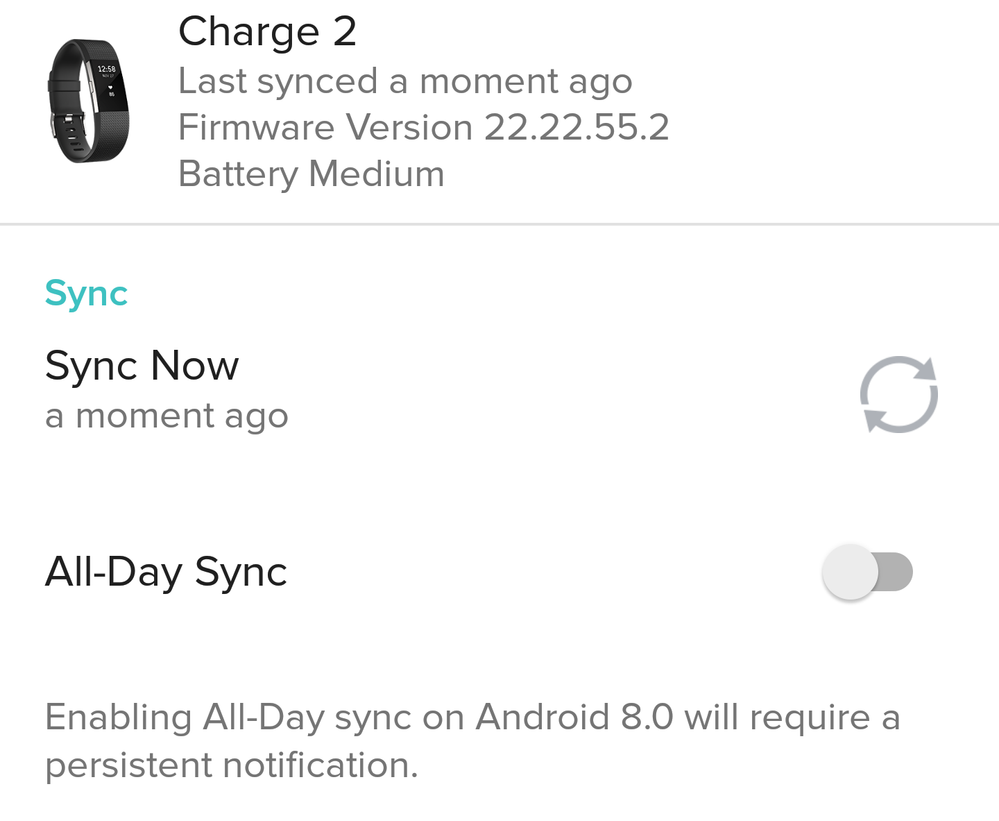 Community Moderator Alumni are previous members of the Moderation Team, which ensures conversations are friendly, factual, and on-topic. Moderators are here to answer questions, escalate bugs, and make sure your voice is heard by the larger Fitbit team. Learn more
Hello there @meh-fit. Welcome aboard to the Fitbit Community @ladytriker. My apologies for the late response.
@ladytriker, the fault is mine. I should have specified that I was referring to the Fitbit app for Android. Note that in the solution I'm referring to the Fitbit app so I made the corrections to my previous post to not confuse other users; my bad!
@meh-fit yes, this has been changed with the latest versions of the Fitbit app. Beginning with the release of Android 8.0 (Oreo), Google changed the way you’re notified about apps running in the background on your phone. If your phone is running the Android 8 operating system, you’ll receive a Fitbit Sync Service alert on your phone to inform you that the Fitbit app is running in the background or if you enable the all day sync, due to this will make the app work in the background, hence will send this notification.
I took a portion of the explanation from our article, so if you want to learn more, please feel free to review this: Why is the Fitbit app sending a notification to my Android phone?
See you later and hope this helps.
"Great things are done by a series of small things brought together.” What's Cooking?
Best Answer
Roberto,
Thank you for your help but this did not work for me. The notifications are turned off within the app as well as through the settings\notifications on my phone. The All-Day Sync is turned off and the notification is still there all the time. Any other ideas?

Hello,
I have Android 7.0 and the Versa and I don't see the Notification Widget under notifications.
Am I looking in the wrong place? I tried to follow your steps.
Best Answer
Funny, and I am looking for how to receive the FitBit icon (where I can pull it down from my menu - from the top of my Android powered BlackBerry KEYone). I had to do two factory resets. I found it after the first reset, but failed to write it down. It's the FitBit icon/logo that was in the top left-hand corner of my phone. I could sync from there as well as access my account from there. It's not a widget. Someone please help! I recall it being a very simple solution, hence my reasoning for not having written it down. So easy I forgot! I called FitBit and they told me to contact BlackBerry. I called BlackBerry and they told me to contact FitBit. It's an Android powered device. The solution was simple - I just can't recall where it is! All notifications are turned on under Settings.
Best Answer
SunsetRunner
I am having the same problem with a Samsung K30. The solution didn't work as I have already turned off all notifications!
Best Answer