
Join us on the Community Forums!
-
Community Guidelines
The Fitbit Community is a gathering place for real people who wish to exchange ideas, solutions, tips, techniques, and insight about the Fitbit products and services they love. By joining our Community, you agree to uphold these guidelines, so please take a moment to look them over. -
Learn the Basics
Check out our Frequently Asked Questions page for information on Community features, and tips to make the most of your time here. -
Join the Community!
Join an existing conversation, or start a new thread to ask your question. Creating your account is completely free, and takes about a minute.
Not finding your answer on the Community Forums?
- Community
- Platform
- Android App
- Re: Huawei p8 no notifications
- Mark Topic as New
- Mark Topic as Read
- Float this Topic for Current User
- Bookmark
- Subscribe
- Mute
- Printer Friendly Page
- Community
- Platform
- Android App
- Re: Huawei p8 no notifications
Huawei P9 & Lite Compatibility
ANSWERED- Mark Topic as New
- Mark Topic as Read
- Float this Topic for Current User
- Bookmark
- Subscribe
- Mute
- Printer Friendly Page
02-14-2016
14:37
- last edited on
03-30-2017
12:43
by
ErickFitbit


02-14-2016
14:37
- last edited on
03-30-2017
12:43
by
ErickFitbit
I have a surge paired to a Huawei p8. I have tried all the different fixes listed in various forums. I have notification on in the all on my phone set to Huawei contacts. I have notifications on on my surge. I get absolutely nothing. Anyone with a P8 solved this problem. I have later Android and fitbit versions.
Moderator edit: edited title for compatibility
Answered! Go to the Best Answer.
Accepted Solutions
04-03-2018
14:10
- last edited on
05-19-2025
10:59
by
MarreFitbit

 Community Moderator Alumni are previous members of the Moderation Team, which ensures conversations are friendly, factual, and on-topic. Moderators are here to answer questions, escalate bugs, and make sure your voice is heard by the larger Fitbit team. Learn more
04-03-2018
14:10
- last edited on
05-19-2025
10:59
by
MarreFitbit
Hi, everyone!
I wanted to make the following very clear for you all. The Fitbit app is compatible with more than 200 Apple, Android, and Windows 10 phones and tablets. We're continually adding more devices and improving our compatibility. However, due to Bluetooth issues that prevent Huawei Lite models, including P8 and P9 Lite, from syncing with some devices, like Fitbit devices, our products are not compatible with these mobile phones. Since we can confirm P9 lite will not be compatible, I'm going to close this thread for further comments.
Please remember to abide by our Community Guidelines when posting to keep the forums productive, respectful, and on-topic.
Thanks, everyone for your cooperation!
Want to get more steps? Visit Get Moving in the Health & Wellness Discussion Forum.


 Community Moderators ensure that conversations are friendly, factual, and on-topic. We're here to answer questions, escalate bugs, and make sure your voice is heard by the larger Fitbit team. Learn more
Hey my friend @srmellis, welcome to the Fitbit Community  ! We're very sorry to hear that your Fitbit and phone is not getting the call notifications.
Have you tried the suggestions posted in the My tracker isn't receiving notifications from my Android mobile device article?
Also, have you checked if your Fitbit app is up-to-date?
Give it a shot and let me know if this works!
Was my post helpful? Give it a thumbs up to show your appreciation! Of course, if this was the answer you were looking for, don't forget to make it the Best Answer! Als...
 Best Answer
Hi Srmellis,
did you manage to find a solution? I have the same problem with my Blaze. No notifications coming up. I have tried all available solutions, reboots, troubleshooting tips, but still nothing. It seems that even of I pair my tracker through the Fitbot app, my tracker does not appear under bluetooth connected devices but it still gets to sync with my phone.
Sofia
Best Answer
Community Moderators ensure that conversations are friendly, factual, and on-topic. We're here to answer questions, escalate bugs, and make sure your voice is heard by the larger Fitbit team. Learn more
Hey guys, thanks for getting back @SofiG @srmellis! My best recommendation at this point would be to get in touch with Customer Support directly.
They'll be more than glad to take a look into both accounts and see where the issue is coming from. When contacting them, just don't forget to mention all the steps you've done so far to avoid getting the same ones.
Don't give up yet, have a nice weekend!
Was my post helpful? Give it a thumbs up to show your appreciation! Of course, if this was the answer you were looking for, don't forget to make it the Best Answer! Als...
Best Answer
@srmellis not sure if you have replaced your tracker with another brand. This is just to let you know that after 2 weeks exchanging emails with Customer SUpport it appears that even if Huawei P8 is listed as a supported device, my GRA-L09 edition is not supported. Which is misleading, they should state in their website exactly which editions are supported and which are not. I am not aware if they are going to add this edition later, just thought that you should know that maybe this is the issue with your no notifications problem.
Community Moderators ensure that conversations are friendly, factual, and on-topic. We're here to answer questions, escalate bugs, and make sure your voice is heard by the larger Fitbit team. Learn more
It's nice to see you around @SofiG ! To see the latest list of supported devices, please go here. If your device isn't listed, you can check the link at a later date to see if device support has been added.
We appreciate your understanding while we work to improve this experience, and encourage you to let us know if you have any additional feedback on this and other features.
At the moment we cannot say when the Huawei P8 is gonna be included in our Supported Devices. Maybe it's under consideration by now, but we don't know yet. However, thanks a look for your feedback in regards to clarify which exactly editions are supported, I'll be forwarding this to our team. Thanks for the heads up!
Have a great day!
Was my post helpful? Give it a thumbs up to show your appreciation! Of course, if this was the answer you were looking for, don't forget to make it the Best Answer! Als...
Best Answer
Hi guys.
I also have these kind of problems.
Fitbit Blaze + Huawei P8 (Marshmellow)
No notifications, no music control, no connected GPS.
It just comunicates (fine) with Fitbit app.
I don't know if the problem will be resolved and I don't know if give back my Blaze.
Thanks
Hi @Giab71
I think the best thing to do, is email customer service via the Fitbit app. Go to account, Help, Contact Customer Support. In this way a summary of your mobile features will be included in the email, and the support team will be able to respond to your email more accurately. For me, (I had a P8 running Android 5.0.1) it appeared that my mobile edition GRA-L09 was not supported. You can see which edition your Huawei isvfrom your settings.
Sofia
Thanks for your advices, I have allready in comunication with support, they
told me that the problem is known and they are working on.
Meanwhile, since I love this Blaze and fitbit app, I found another
solution, I've just ordered another smartphone, this time fully supported
😉
Enjoy your workouts !
Gianluca
~ da smartphone
Best Answer
Hello @MarreFitbit,
will you give me a update when this problem is solved.
i have send the watch back, so i will order it again when this problem is solved
I gave up on Fitbit fixing the issue. When you list a phone like the P8
as compatible then actually restrict the versions of the phone sold
within that compatibility and do not tell the buyers its a farce.
For this reason I lost all faith that any issues would be resolved.
While my watch is still used I bought a Huawei watch which does all the
Fitbit does and more and actually works.
Cheers
Steve
 Community Moderator Alumni are previous members of the Moderation Team, which ensures conversations are friendly, factual, and on-topic. Moderators are here to answer questions, escalate bugs, and make sure your voice is heard by the larger Fitbit team. Learn more
Hey there @Psychmum! Welcome to the Community!
The Huawei p9 is currently not a supported device. Although the Huawei p9 hasn't been fully tested and listed as supported,
Hope it helps!

Hi there,
By any chance, do you have any idea of when the Huawei P9 would be a supported device? more likely days? weeks? months?
I see your post is dated from June so I was wondering...
Can't wait for my phone to sync again with my alta... *guilty*
Community Moderator Alumni are previous members of the Moderation Team, which ensures conversations are friendly, factual, and on-topic. Moderators are here to answer questions, escalate bugs, and make sure your voice is heard by the larger Fitbit team. Learn more
Welcome to the Fitbit family @Lilly_Noo!
I was checking at the list of compatible devices and is not listed yet however you should try the suggestions that I shared on my previous post.
Let me know how it goes!
Best Answer
I tried it a while ago (spent an entire day to do so withouth losing faith...) But eventually it didn't work.
Although, you might have misread my post as i was not asking for alternative solution and i obviously knew already that the device is not on the list. I was simply asking whether or not you guys have an idea of how long it can take to the team to add it on the supported devices list.
Don't answer me that the team is working on it : i know that, just let me know how long it could take...
Many many thanks,
Aurélie
 Community Moderator Alumni are previous members of the Moderation Team, which ensures conversations are friendly, factual, and on-topic. Moderators are here to answer questions, escalate bugs, and make sure your voice is heard by the larger Fitbit team. Learn more
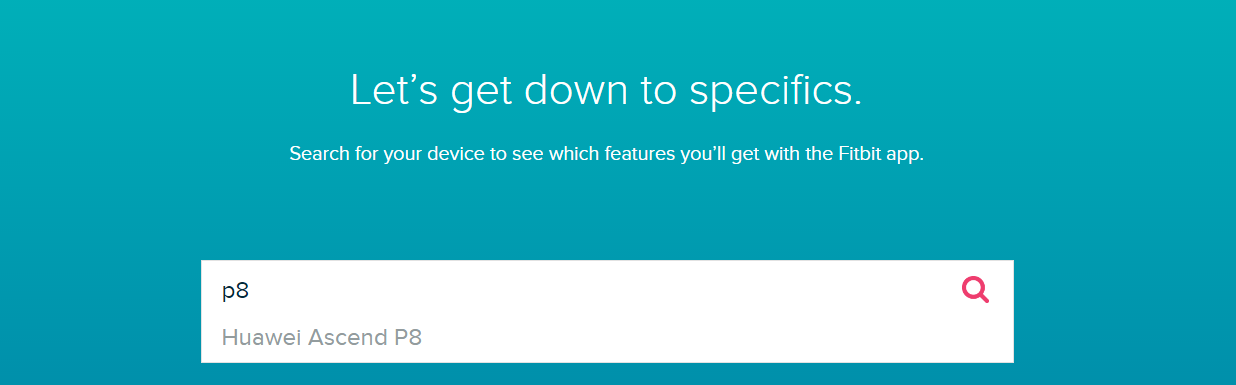
Welcome to the Community @Bohusko. I would like to know if you keep having problems with your phone and tracker? If you do, could you please be more specific about the inconvenience since actually, the P8 is a compatible phone (check the attached image). For more information about what features it includes you can check our list of compatible mobile devices.
Catch you later. 
find out that only thing gets better is sincing thrue the app.But i tryied
evrything to work the notifications and music controler but no chance.
Best Answer