
Join us on the Community Forums!
-
Community Guidelines
The Fitbit Community is a gathering place for real people who wish to exchange ideas, solutions, tips, techniques, and insight about the Fitbit products and services they love. By joining our Community, you agree to uphold these guidelines, so please take a moment to look them over. -
Learn the Basics
Check out our Frequently Asked Questions page for information on Community features, and tips to make the most of your time here. -
Join the Community!
Join an existing conversation, or start a new thread to ask your question. Creating your account is completely free, and takes about a minute.
Not finding your answer on the Community Forums?
- Community
- Platform
- Android App
- Re: Text Messaging not an option in versa 3 settin...
- Mark Topic as New
- Mark Topic as Read
- Float this Topic for Current User
- Bookmark
- Subscribe
- Mute
- Printer Friendly Page
- Community
- Platform
- Android App
- Re: Text Messaging not an option in versa 3 settin...
Text Messaging not an option in versa 3 settings
- Mark Topic as New
- Mark Topic as Read
- Float this Topic for Current User
- Bookmark
- Subscribe
- Mute
- Printer Friendly Page

I unpacked my Versa 3 last night and paired it with my Samsung Galaxy. Everything seems to be working including receiving calls but for some reason the "text messaging" option isn't showing up in the menu. I've powered both devices down and restarted them. I've also deleted the app and reinstalled it. I am pretty confident that my notification settings are set up correctly as well. I have received some notifications from fitbit on my phone.
Any ideas as to why text messaging is not showing up in the menu?
 Best Answer
 Fitbit Product Experts Alumni are retired members of the Fitbit Product Expert Program. Learn more
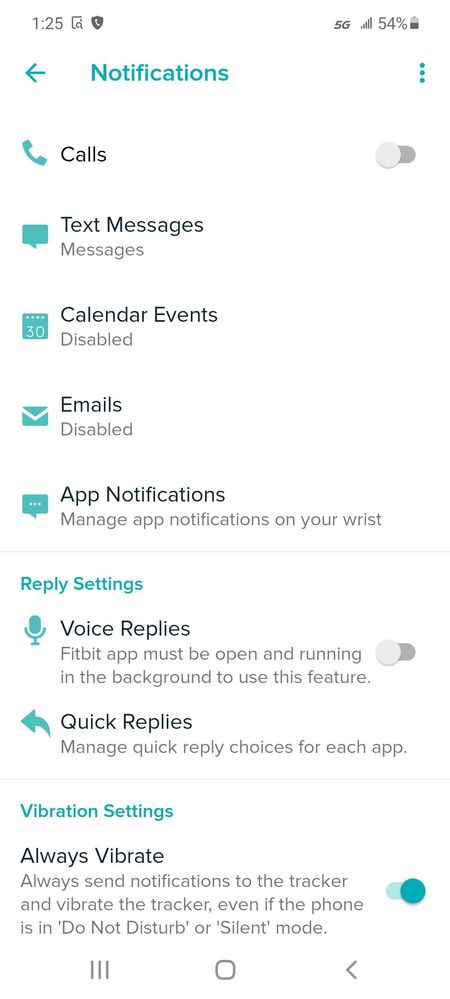
@Anthony27, do mean that "Text Messages" does not appear on the app Notifications screen, as in the screenshot below?
 Best Answer
Yes, I don't see the option for text messaging anywhere. My menu looks a little different as well. Wondering if I'm in the wrong settings menu?
Best Answer
Fitbit Product Experts Alumni are retired members of the Fitbit Product Expert Program. Learn more
@Anthony27 wrote:Yes, I don't see the option for text messaging anywhere. My menu looks a little different as well. Wondering if I'm in the wrong settings menu?
In the app, tap on your Profile icon, then select Versa 3, then Notifications.
Best Answer
My menu doesn't look like that when I hit the notification option. Yours has phone calls and text messaging. I only get "on-wrist calls" and then a whole bunch of others. Checked for updates and everything but haven't had any luck.
Best Answer
I think I found it. I had to enable the fitbit notifications in one menu to get the menu you showed in your initial post. I appreciate the help!
Best Answer