
Join us on the Community Forums!
-
Community Guidelines
The Fitbit Community is a gathering place for real people who wish to exchange ideas, solutions, tips, techniques, and insight about the Fitbit products and services they love. By joining our Community, you agree to uphold these guidelines, so please take a moment to look them over. -
Learn the Basics
Check out our Frequently Asked Questions page for information on Community features, and tips to make the most of your time here. -
Join the Community!
Join an existing conversation, or start a new thread to ask your question. Creating your account is completely free, and takes about a minute.
Not finding your answer on the Community Forums?
- Community
- Product Help Forums
- Blaze
- Blaze Music Control Information Post
- Mark Topic as New
- Mark Topic as Read
- Float this Topic for Current User
- Bookmark
- Subscribe
- Mute
- Printer Friendly Page
- Community
- Product Help Forums
- Blaze
- Blaze Music Control Information Post
Blaze Music Control Information Post
ANSWERED- Mark Topic as New
- Mark Topic as Read
- Float this Topic for Current User
- Bookmark
- Subscribe
- Mute
- Printer Friendly Page
02-22-2016
09:45
- last edited on
03-28-2016
07:40
by
AndreaFitbit


 Community Moderator Alumni are previous members of the Moderation Team, which ensures conversations are friendly, factual, and on-topic. Moderators are here to answer questions, escalate bugs, and make sure your voice is heard by the larger Fitbit team. Learn more
02-22-2016
09:45
- last edited on
03-28-2016
07:40
by
AndreaFitbit
Music Control gets a facelift with Blaze! Learn more about your power to control music below. For a more detailed look at Music Control on your Blaze, please see this help article.
Music Control:
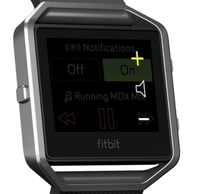
With Blaze, you can control your music with the touch of a button! To access Music Control, simply swipe downward on your home screen. Improvements to this feature include a Bluetooth Low Energy (BTLE) connection for iOS instead of BT Classic. We've also added the ability to rewind and increase/decrease the volume of the song, in addition to fast forwarding and play/pause.
Notes:
- Android and Windows phones will still use BT Classic for using Music Control.
- While in exercise mode, press/hold Blaze's top-right button for 2 seconds to bring Music Control up.
- You'll use both buttons on the right to control volume on Blaze. See image to the right.
- As with most other Bluetooth devices, if you connect another Bluetooth device and disconnect your Blaze, you will have to connect it again the next time you want to use it to control music.
No matter what you're rocking out to, we're sure you'll love using Music Control on Blaze!

Answered! Go to the Best Answer.

If no codes are showing them the two units are failing to communicate. Try restarting your Blaze, and on the phone tien the BT off/on. If ypir still having problems restartthe phone.
 Best Answer
compatibility issue
Best Answer
@Hut wrote:
After i followed restarting my phone and blaze per instructions, everything
worked fine.
What phone are you using?
I've doen that at least 10 times since I got my blaze and I still can't control music and use BT headphoens at the same time.
Best Answer Best Answer

I don't think this problem is related to a single blaze. It's a software problem that the blaze needs to fix.
 Best Answer
http://help.fitbit.com/articles/en_US/Help_article/How-do-I-restart-my-tracker/
Best Answer
Best Answer
This is exactly my life right now, and it shouldn't be so dang hinky because this is going to be much more obnoxious when I'm trying to change a song during a run. I feel like we're Beta testers 😞
Best Answer
Hello, I'm having problems with Blaze's music controls.
I'm using
- Blaze bluetooth classic setting on
- Allways connected on and off
- LG G4 (marshmallow 6.0)
- Spotify.
I can see the play button turning in to pause button when I start playing directly from the phone. Pressing the pause/play on the Blaze itself does nothing.
When I remove Blaze classic from the bluetooth settings and pair it again the buttons works about 15 minutes and after that they stop working again.
This maybe a problem where controls doesn't respond after x amount of time have passed.
Reading other posts in this thread it seems that the Blaze disconnects itself from the bluetooth source after certain period of time, so this is a software issue that needs to be corrected by Fitbit as a company
I just wish I could figure out the rhyme or reason for it. It happens so randomly. I have figured out you have to connect it first to be functional at all if pairing w/ a bluetooth speaker or headset as well, and this kinda makes sense seeing as they are kinda in conflict over which one can control play, pause, forward, back, etc, but even just linked to the phone sometimes it's just like, "nah, I don't want to change the sound anymore, go grab you phone and re-link me and maybe I'll think about it." I also sometimes have to do a hard reset because the thing just blinks "connecting/looking for music" eternally. Fitbit, I really like what I have on my wrist but this and an always on screen option for my timed/interval workouts, or to time my clients as a personal trainer, or my patients as a physical therapist assistant are really essential to make this a real tool rather than just a nifty gimmick. Heck I'd settle for just having to option of 1/3/5 minute on that resets when I tap if that's all you can give me lol.
Best Answer
This is what worked for me. Get the music going, make sure it's connected to the Blaze, then pair the wireless headphones (I use the Skullcandy wireless). 🙂
Best Answer
Can't get music to be controlled on my OnePlus Two or get any bloody notifications.
Completely pointless in buying the Blaze, so much for buying myself something nice to cheer me up from a **ahem** day... Excellent.
Best Answer
You can then push the back button, (left button) to go back to your exercise.
Best Answer