
Join us on the Community Forums!
-
Community Guidelines
The Fitbit Community is a gathering place for real people who wish to exchange ideas, solutions, tips, techniques, and insight about the Fitbit products and services they love. By joining our Community, you agree to uphold these guidelines, so please take a moment to look them over. -
Learn the Basics
Check out our Frequently Asked Questions page for information on Community features, and tips to make the most of your time here. -
Join the Community!
Join an existing conversation, or start a new thread to ask your question. Creating your account is completely free, and takes about a minute.
Not finding your answer on the Community Forums?
- Community
- Product Help Forums
- Blaze
- Re: Blaze Music Control Information Post
- Mark Topic as New
- Mark Topic as Read
- Float this Topic for Current User
- Bookmark
- Subscribe
- Mute
- Printer Friendly Page
- Community
- Product Help Forums
- Blaze
- Re: Blaze Music Control Information Post
Blaze Music Control Information Post
ANSWERED- Mark Topic as New
- Mark Topic as Read
- Float this Topic for Current User
- Bookmark
- Subscribe
- Mute
- Printer Friendly Page
02-22-2016
09:45
- last edited on
03-28-2016
07:40
by
AndreaFitbit


 Community Moderator Alumni are previous members of the Moderation Team, which ensures conversations are friendly, factual, and on-topic. Moderators are here to answer questions, escalate bugs, and make sure your voice is heard by the larger Fitbit team. Learn more
02-22-2016
09:45
- last edited on
03-28-2016
07:40
by
AndreaFitbit
Music Control gets a facelift with Blaze! Learn more about your power to control music below. For a more detailed look at Music Control on your Blaze, please see this help article.
Music Control:
With Blaze, you can control your music with the touch of a button! To access Music Control, simply swipe downward on your home screen. Improvements to this feature include a Bluetooth Low Energy (BTLE) connection for iOS instead of BT Classic. We've also added the ability to rewind and increase/decrease the volume of the song, in addition to fast forwarding and play/pause.
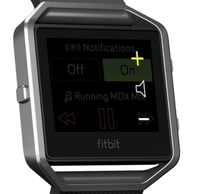
Notes:
- Android and Windows phones will still use BT Classic for using Music Control.
- While in exercise mode, press/hold Blaze's top-right button for 2 seconds to bring Music Control up.
- You'll use both buttons on the right to control volume on Blaze. See image to the right.
- As with most other Bluetooth devices, if you connect another Bluetooth device and disconnect your Blaze, you will have to connect it again the next time you want to use it to control music.
No matter what you're rocking out to, we're sure you'll love using Music Control on Blaze!

Answered! Go to the Best Answer.
Community Moderator Alumni are previous members of the Moderation Team, which ensures conversations are friendly, factual, and on-topic. Moderators are here to answer questions, escalate bugs, and make sure your voice is heard by the larger Fitbit team. Learn more
Bluetooth inerference is real; that'll explain your situation @bstngirl. It's related to the inability to bond (with confidence) with more than one BT source at a time.
 Best Answer
Classic. I am not using headphones its just playing through my phone
speaker. Sometimes i can leave it on the table and go into another room and
it still works..others not. It even does it if im in the same room. I
paired them according to the instructions.
Best Answer
get hwy i have to keep unpairing and repairing on something thatbisnt even
a day old..
Best Answer
Sent from my iPhone
Best Answer
when trying to connect to blaze classic it fails due to incorrect passcode. it never ask for the code nor does one appear on the blaze. how can this be resolved?
Best Answer
it anymore via the Blaze. I have no idea what other free music apps there
are that would work. Sorry your in the same boat it sucks!
Best Answer
a brand new $200 device
Best Answer
1 day. Its frustrating especially since i never spend this type of money on
stuff 😕
Best Answer
Sent from my iPhone
Best Answer
Hello there!
So I have a concern. You have to hold the top right button for 2 seconds to bring up music control. After that, you can change the volume and song. I would like to see this simplified. 2 seconds doesn't seem long, but when you are running it can seem so. Maybe instead of two seconds on the top right button, have it work from a double-tap to the left "Back" button kinda like how it did on the Surge. If you did that, you could use the right buttons as the volume control without having to pull up the music control screen on the watch. I think this will help keep runner's eyes in front of them instead of on their watch to try and turn the volume down in a hurry or change their song without have to see if they held the button down long enough to get the song change.
Maybe you can even set it up for the following:
One left button tap while exercising/running: Brings up the Volume Control Feature
Two left button taps while exercising/running: Pauses the current song
Two left button taps while exercising/running and song is pause: Plays the current song
Hold left button for 2 seconds while exercising/running: Changes the song
Right Buttons while exercising/running: Music Volume Control
You guys are way smarter than I am, so you might be able to come up with a better way than what I laid out. Am I the only person that feels the music/volume control should be easier to get to while running? To me at least the volume should be very quick to get to for safety purposes.
Let me know what you guys think!
Thanks,
Dathan
Best Answer
Hey Amanda!
I had a few problems setting up the music at first too, but if you follow the instructions for music that's been listed it should work. Also, Pandora has been working great for me.
Thanks!
Dathan
Best Answer
I did follow the instructions to set it up. Once setnup it works
however it will stop working. It still shows connected on both the blaze
and my phone but i can not control it via the blaze without unpairing and
repairing.
Best Answer
I have wireless earbuds. I connected the music first, then the earbuds, started my exercise (treadmill) then lost control of the music again.
Best Answer
Ive been olaying around worth the music control, while this may not, probably not gelp most. I have both the Surge and the Blaze. I noticed that using the Surge to control the music causes problems with the Blaze music control.
Having the Surge connected as an input control device, will prevent the Blaze from controlling the music even tho it is still paired.
Best Answer Best Answer