
Join us on the Community Forums!
-
Community Guidelines
The Fitbit Community is a gathering place for real people who wish to exchange ideas, solutions, tips, techniques, and insight about the Fitbit products and services they love. By joining our Community, you agree to uphold these guidelines, so please take a moment to look them over. -
Learn the Basics
Check out our Frequently Asked Questions page for information on Community features, and tips to make the most of your time here. -
Join the Community!
Join an existing conversation, or start a new thread to ask your question. Creating your account is completely free, and takes about a minute.
Not finding your answer on the Community Forums?
- Community
- Product Help Forums
- Blaze
- Re: Connected GPS Information Post
- Mark Topic as New
- Mark Topic as Read
- Float this Topic for Current User
- Bookmark
- Subscribe
- Mute
- Printer Friendly Page
- Community
- Product Help Forums
- Blaze
- Re: Connected GPS Information Post
Connected GPS Information Post
- Mark Topic as New
- Mark Topic as Read
- Float this Topic for Current User
- Bookmark
- Subscribe
- Mute
- Printer Friendly Page


 Community Moderator Alumni are previous members of the Moderation Team, which ensures conversations are friendly, factual, and on-topic. Moderators are here to answer questions, escalate bugs, and make sure your voice is heard by the larger Fitbit team. Learn more
Hey all!
I've been seeing a ton of great conversation about Connected GPS- the technology that will 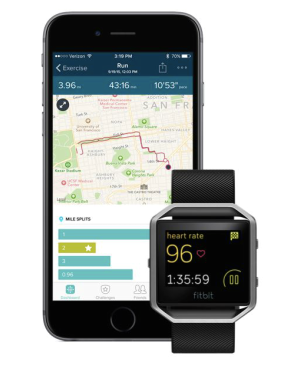
- What is Connected GPS?
Connected GPS is a new part of the Fitbit ecosystem! Using Connected GPS, Blaze connects with your phone's native GPS capabilities to plot routes and activity stats screen as the pace and duration.
- How do I use Connected GPS?
The necessary components for initiating a Connected GPS exercise are:
- Your charged tracker
- Your compatible Mobile device with GPS capabilities
- The Fitbit App
To initiate a Connected GPS exercise, open the appropriate exercise (exercises that offer GPS connectivity on the Blaze will have a gear icon on the tile). Once you select the exercise type, you'll see that your Blaze will begin to look for your phone's GPS services. Once the device establishes a connection, you'll be notified that you're ready to go. You can always bypass the connection if you'd like, much like on Surge.
- How is this different than Surge? MobileRun?
GPS is built-in on the Fitbit Surge, meaning that you could initiate a GPS activity without your phone in proximity. The MobileRun process works a bit differently; you'll have to open the Fitbit app and select Track Exercise > Stopwatch Icon > Start.
- What errors might I run into?
Phone Not Found: Users may see the following error state if their tracker is unable to connect to their phone. If this happens, please ensure the following: phone is within range, your app is open, phone is charged up, Bluetooth enabled and bonded, and Internet connection is present.
Check Fitbit App: If you come across this error, there may be a bit of action required. Please ensure that your app is open, you are logged into your account, and that location services are enabled.
- Location Services and Permissions:
Location services are required for Connected GPS to function properly. Please ensure that location services are enables, and set to "Always" if applicable.
Permissions are requested upon setup of the tracker. Users who intend to use the Connected GPS feature should accept the permission requests. If you switch phones during the life of your Blaze, you'll be prompted to run through all of these permission requests again before being able to successfully use Connected GPS.


High accuracy - GPS + Cellular + WiFi (Blaze connects, full green bars. Very inaccurate distance recorded)
Power saving - Cellular + WiFi (Blaze will not connect, message states to change to high accuracy mode)
Device only - GPS (Blaze connects with single red bar only. Only uses steps/stride for distance. No map)
Initiating exercise through the Fitbit app will connect using high accuracy or device only and is very accurate on distance using either mode.
 Best Answer
@Rich_Laue On Android 6 we have
1) Off
2) GPS & Wifi & mobile networks - works but is inaccurate
3) Wifi & mobile networks - gets 'check fitbit app' message
4) GPS only - will not connect to the phone (single red bar and no map)
Best Answer
Sense, Charge 5, Inspire 2; iOS and Android
Best Answer Best Answer
"the intensity of your stride may have been taken into affect and should be considered when walking the same course or route you normally would. This may sometimes result in either a slight change in distance or pace. Although you've walked the same route, based on the intensity of your stride your results may differ. You could be walking faster or slower than you typically would. If you accumulate more steps in a short period of time or less steps in a longer period time, this will also affect the outcome of your distance and pace results."
Best Answer

Sent from my iPhone
Best Answer
Samsung Galaxy Tab Pro 8.4 GPS connect - works accurately.
Motorola Moto E 2nd Gen GPS connect while in airplane mode with Bluetooth enabled - forcing it to use GPS only, full green signal bars, still not accurate and plotted route on map very jagged. My conclusion is my phone is not yet 100% compatible with the Blaze regarding connection using GPS connect.
I hope the developer keeps improving the product so one day everything works correctly. Customer support was no help and is clueless unfortunately. I'm having a touch of buyer's remorse currently.
Sense, Charge 5, Inspire 2; iOS and Android
Best Answer
I'm often biking in areas with no signal, and can't always know when to get signal...
________________________________
This message is for the designated recipient only and may contain privileged, proprietary, or otherwise confidential information. If you have received it in error, please notify the sender immediately and delete the original. Any other use of the e-mail by you is prohibited. Where allowed by local law, electronic communications with Accenture and its affiliates, including e-mail and instant messaging (including content), may be scanned by our systems for the purposes of information security and assessment of internal compliance with Accenture policy.
______________________________________________________________________________________
www.accenture.com
Best Answer
I can't answer that, except to say I guess it just needs to shake hands with the server before it gets started. Sounds like the Surge might work better for you, as it has a built in GPS chip.
Sense, Charge 5, Inspire 2; iOS and Android
Best Answer
My guess would be that fitbit is doing some type of initialization process with the server.
Best Answer
@jwebb72 I tested turning the phone to GPS only mid walk today and on the Samsung S7 Android 6 it doesn't work. As soon as you select GPS only the using location symbol turns off and all tracking and mapping the route stops.
Best Answer
________________________________
This message is for the designated recipient only and may contain privileged, proprietary, or otherwise confidential information. If you have received it in error, please notify the sender immediately and delete the original. Any other use of the e-mail by you is prohibited. Where allowed by local law, electronic communications with Accenture and its affiliates, including e-mail and instant messaging (including content), may be scanned by our systems for the purposes of information security and assessment of internal compliance with Accenture policy.
______________________________________________________________________________________
www.accenture.com
Best Answer
@Rich_Laue whenever you connect (sync) to any Fitbit using the app the app connects to Fitbit.com to upload the results. You can immediately see the changes on your fitbit web page or another device using the app. Afaik that is the only time the internet is required.
Best Answer
@Julia_G's experiance seems to be dofferent , but she still does not me a network whole spoof the actual walk.
@MuzDownUnder I'm very aware that all stubble is done between the tracker and the Firbit server. The phone/computer is just the doorway. This thread is not about syncing.
Best Answer
@Rich_Laue , but was your Blaze already connected to that phone? In my case, not.
Sense, Charge 5, Inspire 2; iOS and Android
Best Answer
________________________________
This message is for the designated recipient only and may contain privileged, proprietary, or otherwise confidential information. If you have received it in error, please notify the sender immediately and delete the original. Any other use of the e-mail by you is prohibited. Where allowed by local law, electronic communications with Accenture and its affiliates, including e-mail and instant messaging (including content), may be scanned by our systems for the purposes of information security and assessment of internal compliance with Accenture policy.
______________________________________________________________________________________
www.accenture.com
Best Answer