
Join us on the Community Forums!
-
Community Guidelines
The Fitbit Community is a gathering place for real people who wish to exchange ideas, solutions, tips, techniques, and insight about the Fitbit products and services they love. By joining our Community, you agree to uphold these guidelines, so please take a moment to look them over. -
Learn the Basics
Check out our Frequently Asked Questions page for information on Community features, and tips to make the most of your time here. -
Join the Community!
Join an existing conversation, or start a new thread to ask your question. Creating your account is completely free, and takes about a minute.
Not finding your answer on the Community Forums?
- Community
- Product Help Forums
- Blaze
- Re: Connected GPS Information Post
- Mark Topic as New
- Mark Topic as Read
- Float this Topic for Current User
- Bookmark
- Subscribe
- Mute
- Printer Friendly Page
- Community
- Product Help Forums
- Blaze
- Re: Connected GPS Information Post
Connected GPS Information Post
- Mark Topic as New
- Mark Topic as Read
- Float this Topic for Current User
- Bookmark
- Subscribe
- Mute
- Printer Friendly Page


 Community Moderator Alumni are previous members of the Moderation Team, which ensures conversations are friendly, factual, and on-topic. Moderators are here to answer questions, escalate bugs, and make sure your voice is heard by the larger Fitbit team. Learn more
Hey all!
I've been seeing a ton of great conversation about Connected GPS- the technology that will 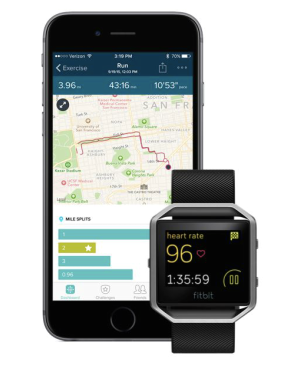
- What is Connected GPS?
Connected GPS is a new part of the Fitbit ecosystem! Using Connected GPS, Blaze connects with your phone's native GPS capabilities to plot routes and activity stats screen as the pace and duration.
- How do I use Connected GPS?
The necessary components for initiating a Connected GPS exercise are:
- Your charged tracker
- Your compatible Mobile device with GPS capabilities
- The Fitbit App
To initiate a Connected GPS exercise, open the appropriate exercise (exercises that offer GPS connectivity on the Blaze will have a gear icon on the tile). Once you select the exercise type, you'll see that your Blaze will begin to look for your phone's GPS services. Once the device establishes a connection, you'll be notified that you're ready to go. You can always bypass the connection if you'd like, much like on Surge.
- How is this different than Surge? MobileRun?
GPS is built-in on the Fitbit Surge, meaning that you could initiate a GPS activity without your phone in proximity. The MobileRun process works a bit differently; you'll have to open the Fitbit app and select Track Exercise > Stopwatch Icon > Start.
- What errors might I run into?
Phone Not Found: Users may see the following error state if their tracker is unable to connect to their phone. If this happens, please ensure the following: phone is within range, your app is open, phone is charged up, Bluetooth enabled and bonded, and Internet connection is present.
Check Fitbit App: If you come across this error, there may be a bit of action required. Please ensure that your app is open, you are logged into your account, and that location services are enabled.
- Location Services and Permissions:
Location services are required for Connected GPS to function properly. Please ensure that location services are enables, and set to "Always" if applicable.
Permissions are requested upon setup of the tracker. Users who intend to use the Connected GPS feature should accept the permission requests. If you switch phones during the life of your Blaze, you'll be prompted to run through all of these permission requests again before being able to successfully use Connected GPS.


 Platinum Fitbit Product Experts share support knowledge on the forums and advocate for the betterment of Fitbit products and services. Learn more
For the app to sync it requires BT, a network connection to Fitbit, and on Marshmallow Location needs to be on. Limitation st by Androod, not Fitbit.
Connected GPD needs the App to be running in, at least background, location, and Bluetooth
 Best Answer
Platinum Fitbit Product Experts share support knowledge on the forums and advocate for the betterment of Fitbit products and services. Learn more
Best Answer
Platinum Fitbit Product Experts share support knowledge on the forums and advocate for the betterment of Fitbit products and services. Learn more
 Best Answer
Platinum Fitbit Product Experts share support knowledge on the forums and advocate for the betterment of Fitbit products and services. Learn more
Best Answer
Platinum Fitbit Product Experts share support knowledge on the forums and advocate for the betterment of Fitbit products and services. Learn more
I've tried to connect the blaze at home before leaving with the GPS and the distance was correct but the route on the map stopped halfway and didn't show all of the route I walked.
Best Answer
That's my experience any way
________________________________
This message is for the designated recipient only and may contain privileged, proprietary, or otherwise confidential information. If you have received it in error, please notify the sender immediately and delete the original. Any other use of the e-mail by you is prohibited. Where allowed by local law, electronic communications with Accenture and its affiliates, including e-mail and instant messaging (including content), may be scanned by our systems for the purposes of information security and assessment of internal compliance with Accenture policy.
______________________________________________________________________________________
www.accenture.com
Best Answer
Platinum Fitbit Product Experts share support knowledge on the forums and advocate for the betterment of Fitbit products and services. Learn more
Pull the stairs bar down, hold the finger on the location icon, tap the Mode and chose.
 Best Answer
Since launch I've had a problem with my Blaze not showing a map of my route on the app when I've used the connected GPS. Any idea when this is going to get fixed? Starting to feel like buying it was a waste of money if you're not going to fix this issue. I have a Samsung Galaxy S4.
Platinum Fitbit Product Experts share support knowledge on the forums and advocate for the betterment of Fitbit products and services. Learn more
Does the map show on the web? I'll assume it shows, since there is no mention of it not showing, and suggest logging out and back in on app.
Best Answer
No, it doesn't log a map at all. I've heard of other people with the same issue. This is the only info it shows when I use the connected GPS:
 Best Answer
 Best Answer
Thanks but I've done all that already. My phone GPS works fine in the fitbit app and makes the map fine. It's just when I try to do it from the Blaze that it doesn't work.
Best Answer Best Answer
 Platinum Fitbit Product Experts share support knowledge on the forums and advocate for the betterment of Fitbit products and services. Learn more

SunsetRunner
Best Answer
Platinum Fitbit Product Experts share support knowledge on the forums and advocate for the betterment of Fitbit products and services. Learn more
On Android, even with the WiFi turned off, in hough accuracy the phone is so listening door known wifi SSIDs, or known locations of home routers.
Best Answer
The music controls work for you while you have it in run mode? I must not be swiping correctly!
Best Answer