
Join us on the Community Forums!
-
Community Guidelines
The Fitbit Community is a gathering place for real people who wish to exchange ideas, solutions, tips, techniques, and insight about the Fitbit products and services they love. By joining our Community, you agree to uphold these guidelines, so please take a moment to look them over. -
Learn the Basics
Check out our Frequently Asked Questions page for information on Community features, and tips to make the most of your time here. -
Join the Community!
Join an existing conversation, or start a new thread to ask your question. Creating your account is completely free, and takes about a minute.
Not finding your answer on the Community Forums?
- Community
- Product Help Forums
- Blaze
- Deleting Notifications
- Mark Topic as New
- Mark Topic as Read
- Float this Topic for Current User
- Bookmark
- Subscribe
- Mute
- Printer Friendly Page
- Community
- Product Help Forums
- Blaze
- Deleting Notifications
Deleting Notifications
ANSWERED- Mark Topic as New
- Mark Topic as Read
- Float this Topic for Current User
- Bookmark
- Subscribe
- Mute
- Printer Friendly Page

Answered! Go to the Best Answer.
Accepted Solutions

http://help.fitbit.com/articles/en_US/Help_article/How-do-I-restart-my-tracker/

 Fitbit Product Experts Alumni are retired members of the Fitbit Product Expert Program. Learn more
@Dawnds2008. You can also scroll to the bottom and hit "Clear All" - perhaps that will make it easier for you.
Kelly | Oklahoma
Alta HR, Blaze, Flex 2, Charge 2, Charge, and Aria * IPhone 7+

I can not delete my notifications. There is no delete all at the end of the list and none of them will swipe left or right. Can I just cancel all notifications?
04-02-2017
04:48
- last edited on
06-06-2025
07:23
by
MarreFitbit


 Community Moderator Alumni are previous members of the Moderation Team, which ensures conversations are friendly, factual, and on-topic. Moderators are here to answer questions, escalate bugs, and make sure your voice is heard by the larger Fitbit team. Learn more
04-02-2017
04:48
- last edited on
06-06-2025
07:23
by
MarreFitbit
A warm welcome to the Community @Mariothecat. If you are not seeing the "Clear All" option on your Blaze, I recommend restarting your tracker. After the restart process, please test it.
Let me know the outcome. 
 Best Answer
Sent from my iPad
Best Answer
@mario easy mistake, your posting in the Blaze area not the Zip area.
Since the Zip does not have notifications, please be kind enough to let us know what notifications your referring to? I assume they might be on the app or web
Sent from my iPad
Best Answer
When you get a notification, are you able to read it on your Zip?
If so then to turn them off you go into you device settings - Zip -, Notifications, and simply turn them off.
If your receiving notifacations on your phone or web page then please let us know what device it is.
The app and the Dashboard or not your Zip.
 Fitbit Product Experts Alumni are retired members of the Fitbit Product Expert Program. Learn more
Hi @Mariothecat
The zip it self is not capable to give reminders to move if that's what you are talking about.
See compare here:
https://www.fitbit.com/compare
I suspect you are talking about the app on you Ipad? Please let us know i that's the case so we can help you better. Also let us know which reminders you are talking about as they can come from challenges as well
Please give more info so we can help you better. Looking forward to hearing from you

Wendy | CA | Moto G6 Android
Want to discuss ways to increase your activity? Visit the Lifestyle Forum
Sent from my iPad
Best Answer
Fitbit Product Experts Alumni are retired members of the Fitbit Product Expert Program. Learn more
On your dashboard go to settings
Then on the left hand side select Notifications. Uncheck anything you do not want to see.
It will need to sync before it takes place.
This will not get rid of them on the Ipad but it should stop them from Coming. I know of no way to remove them completely.
Wendy | CA | Moto G6 Android
Want to discuss ways to increase your activity? Visit the Lifestyle Forum
Best Answer
Yes @Dawnds2008 I realize that the Zip does not have the notifications that this thread is referring to. My confusion is that your asking about notifications that are found on the app but seem to be insisting they are found on the Zip.
This causes a common misconception when a post hijacks a thread. Neither this forum or the subject of the thread has anything to do with your question.
You would have gotten a better answer by asking in the forum for the type of phone you have.
Unfortunately as @Wendy states these notifications are not delectable by the user, and get removed after 30 days we are told.
Sent from my iPad
Best Answer
Hi Rich. My issue is as resolved long ago. I think your reply was meant for Mario?
Best Answer
Which dashboard are you refferring to @Mariothecat
The red mark points to the settings, left the app, right the dashboard.
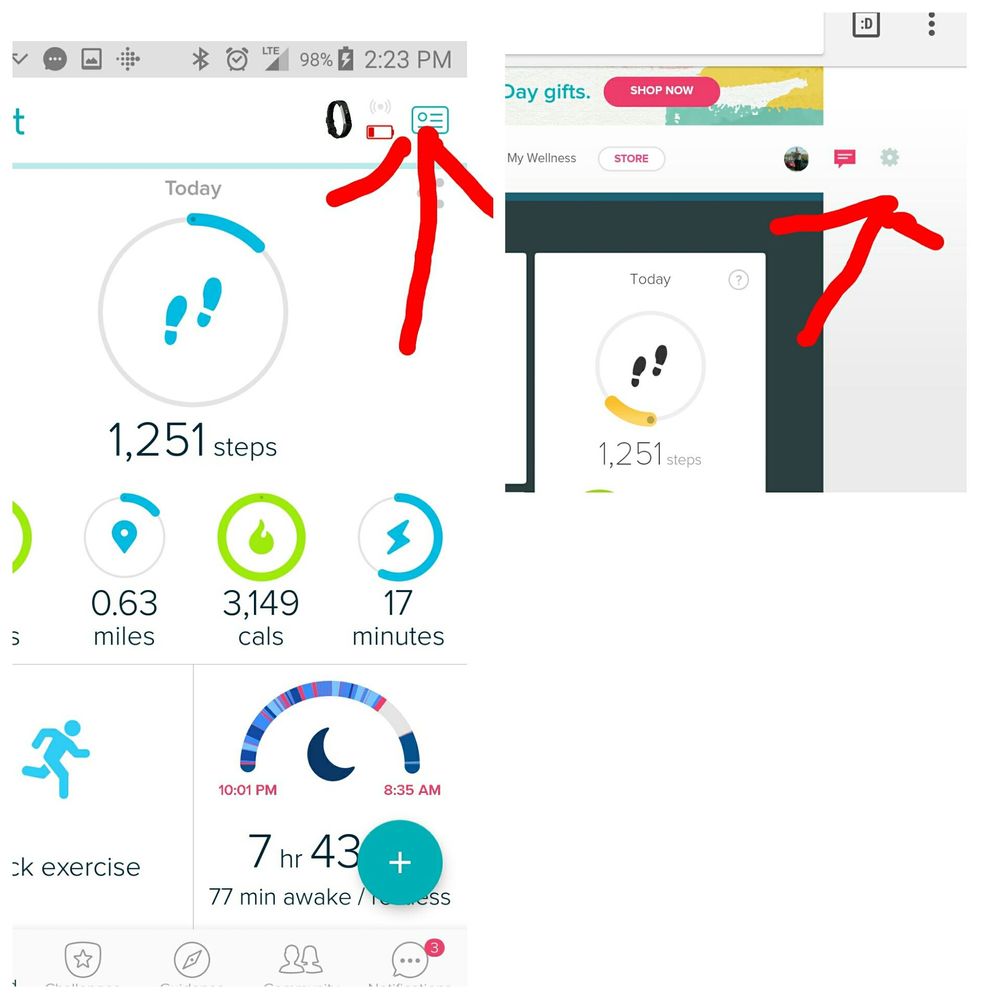
@Mariothecat wrote:
Again you don't seem to know your own product. If you go to dashboard you cannot get to settings. Sorry I am just so frustrated. Time to get rid of my zip and go with someone else.
Sent from my iPad
Best Answer
Fitbit Product Experts Alumni are retired members of the Fitbit Product Expert Program. Learn more
@Rich_LaueThey are using an iPad which they never stated. You need to look where the Signature is to see they posted from an iPad
I looked in my iPad and there is no way to delete notifications. @Mariothecat I also so found no way to update notification on the iPad. It must be done on a computer like we were telling you above
Wendy | CA | Moto G6 Android
Want to discuss ways to increase your activity? Visit the Lifestyle Forum
Best Answer
I cant delete notifications on my dashboard that is on my computer! There is no "clear all" and there is no settings icon. I have right at 100 notifications and cant delete them.
Best Answer