Join us on the Community Forums!
-
Community Guidelines
The Fitbit Community is a gathering place for real people who wish to exchange ideas, solutions, tips, techniques, and insight about the Fitbit products and services they love. By joining our Community, you agree to uphold these guidelines, so please take a moment to look them over. -
Learn the Basics
Check out our Frequently Asked Questions page for information on Community features, and tips to make the most of your time here. -
Join the Community!
Join an existing conversation, or start a new thread to ask your question. Creating your account is completely free, and takes about a minute.
Not finding your answer on the Community Forums?
- Community
- Product Help Forums
- Blaze
- Re: How do I delete custom activity lists?
- Mark Topic as New
- Mark Topic as Read
- Float this Topic for Current User
- Bookmark
- Subscribe
- Mute
- Printer Friendly Page
- Community
- Product Help Forums
- Blaze
- Re: How do I delete custom activity lists?
How do I delete custom activity lists?
- Mark Topic as New
- Mark Topic as Read
- Float this Topic for Current User
- Bookmark
- Subscribe
- Mute
- Printer Friendly Page
06-28-2019
23:55
- last edited on
07-23-2019
16:32
by
MarreFitbit


06-28-2019
23:55
- last edited on
07-23-2019
16:32
by
MarreFitbit
I no longer do some of the activities I created to manually enter into activity log, but I cant figure out how to delete them off these lists.Is there a way to do this?
Moderator edit: updated subject for clarity
 Best Answer

 Community Moderators ensure that conversations are friendly, factual, and on-topic. We're here to answer questions, escalate bugs, and make sure your voice is heard by the larger Fitbit team. Learn more
Hello there @smickle! I'm sorry for the late response.
To delete a custom activity, do the following:
- Go to your Dashboard > click on log
- Click on activities > scroll down and you'll see at the right corner the custom activities
- Finally, hover the mouse over the custom activity that you want to delete
- Click on the trash can
Keep in mind that just the ones that have the trash can on the right side are the ones that you created.
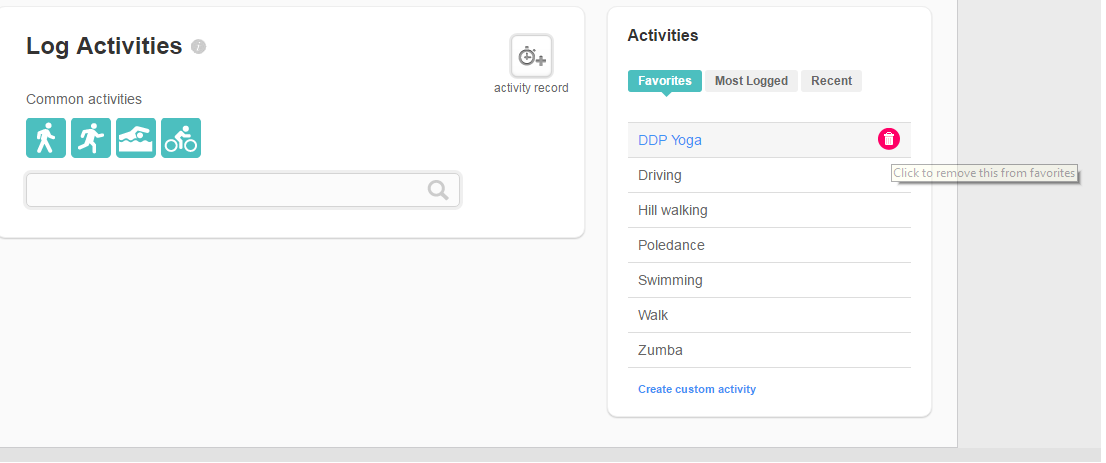
Let me know if you need further assistance.
Was my post helpful? Give it a thumbs up to show your appreciation! Of course, if this was the answer you were looking for, don't forget to make it the Best Answer! Als...
Best Answer
SunsetRunner
Even when deleted, they still appear as a proposal when editing an exercise. How do I make them disappear?

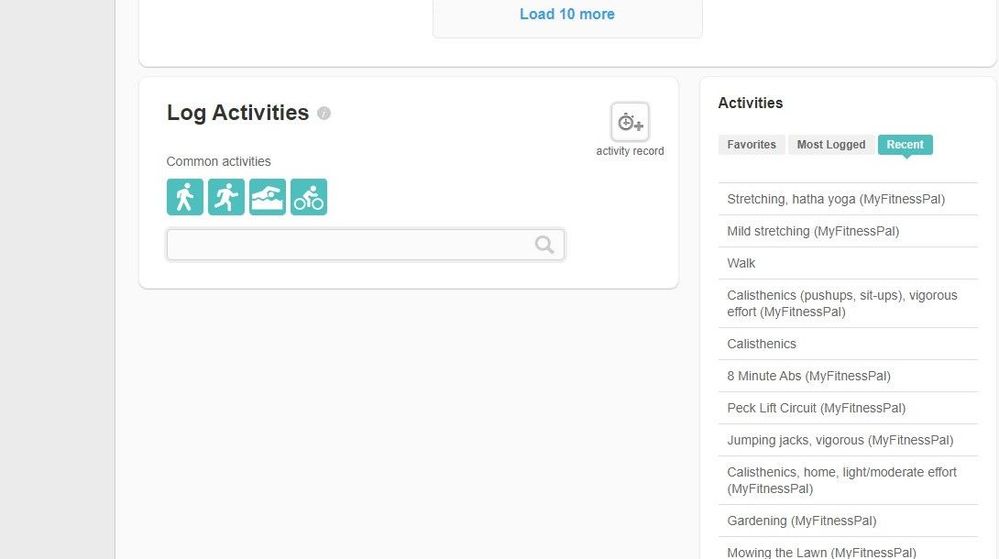
Hi @MarreFitbit I am having the same issue as well except I didn't create the exercises I am trying to delete. It looks like they are from myfitnesspal, a program I haven't used in years. Any advice?
 Community Moderators ensure that conversations are friendly, factual, and on-topic. We're here to answer questions, escalate bugs, and make sure your voice is heard by the larger Fitbit team. Learn more
Hi there @AmberM., welcome to the Community Forums. Thanks for attaching the image in your post.
Since those activity logs are coming from MyFitnessPal, please revoke the access to this third-party app so those activities won't show again. To revoke this access, click here.
Let me know if you have any questions present.
Was my post helpful? Give it a thumbs up to show your appreciation! Of course, if this was the answer you were looking for, don't forget to make it the Best Answer! Als...
Best Answer
@MarreFitbit Thank you. I revoked access but they are still showing up. I even went back through my activities and deleted all logs they were associated with. Any other suggestions?

I have the same problem: Custom Activities I no longer require do not show in the Activities Log on my iMac. But I cannot prevent them from coming up on my iPhone.

I don't see a garbage can, so I can't delete.
Best Answer