
Join us on the Community Forums!
-
Community Guidelines
The Fitbit Community is a gathering place for real people who wish to exchange ideas, solutions, tips, techniques, and insight about the Fitbit products and services they love. By joining our Community, you agree to uphold these guidelines, so please take a moment to look them over. -
Learn the Basics
Check out our Frequently Asked Questions page for information on Community features, and tips to make the most of your time here. -
Join the Community!
Join an existing conversation, or start a new thread to ask your question. Creating your account is completely free, and takes about a minute.
Not finding your answer on the Community Forums?
- Community
- Product Help Forums
- Blaze
- Re: Trouble connecting to fitbit.com
- Mark Topic as New
- Mark Topic as Read
- Float this Topic for Current User
- Bookmark
- Subscribe
- Mute
- Printer Friendly Page
- Community
- Product Help Forums
- Blaze
- Re: Trouble connecting to fitbit.com
Trouble connecting to fitbit.com
- Mark Topic as New
- Mark Topic as Read
- Float this Topic for Current User
- Bookmark
- Subscribe
- Mute
- Printer Friendly Page

Got my fitbit connected to bluetooth
but i cant set it up.
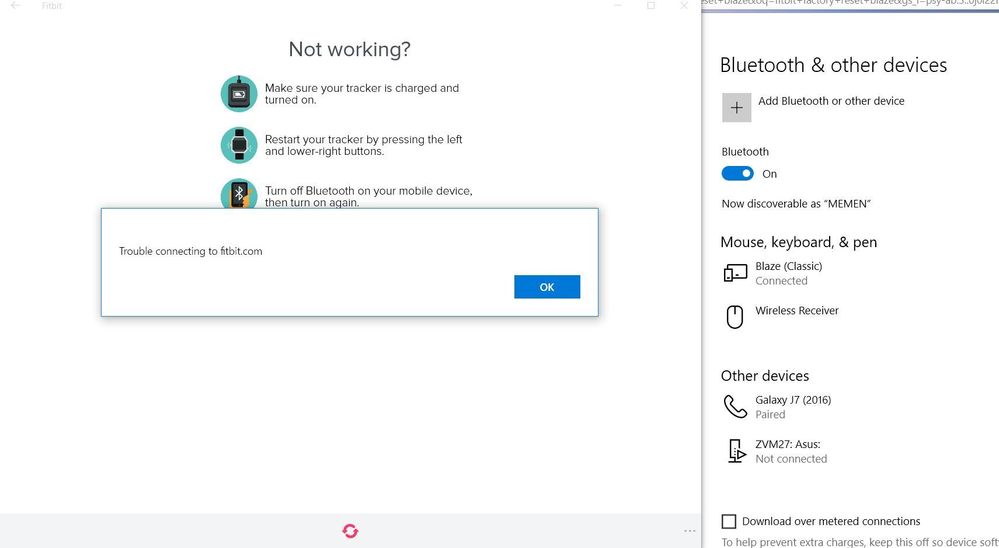
after i entered the 4 digit code this error pops out:
Trouble connecting to fitbit.com
I got good wifi so its not a connection problem. tried so many times already.
Any Idea?
 Best Answer
@Linmuel may I ask what device your using to setup the tracker?
For most devices you should not connect to Bluetooth but let the app do the pairing.
So if you did connect directly to Bluetooth, you want to tell the Bluetooth to forget it.
Best Answer
Im using my laptop Acer Aspire F5-573G - Windows 10
Fitbit App ver. 2.28.1350 (50496) Installed
 Best Answer
I also tried turning off my laptop's bluetooth and connected the fitbit Charger. Same thing happens after i entered the 4 digit code.
Best Answer

Exactly same issue connected via USB or BT to either Samsung Note 8 or Windows 10 PC - will not update and cannot find Blaze 50% time
Best Answer
did it over bt on samsung note 8 - and then managed to do the update - could not do it over USB via PC however many times i tried but now wont sync at all over either method - think i will take it back tbh....just pointless for 'latest' technology
Best Answer
I am having the same problem right now. I have tried every solution I could find in the forums and nothing is working. I enter the 4-digit code and I get the same error.
I also tried setting up a new device using my LG V20. It finds my fitbit, but once I enter the 4-digit code, it just keeps loading and nothing happens.
Hope you found a solution.
Best Answer